Salesforce Territory Management Best Practices: 12 Checks Before Your Next Realignment
Picture the weeks after a realignment. The new territory map looked sensible in the planning meeting. Then a regional manager asks three questions nobody can answer quickly: why the account list for the new West patch doesn't match the plan, why a handful of key accounts still show last year's owner, and why the pipeline report for the region has a different total from the territory view. Nobody was careless. The plan, the records, their owners and the reports were simply never checked against each other.
That gap, between a territory plan that looks right and a rollout that actually puts the right accounts and opportunities in front of the right people, is what this guide is about. It gives sales leaders and RevOps owners 12 checks for the next realignment, each tied to a publicly reported problem, with a question to ask and evidence to request.
What are Salesforce territory management best practices?
Good Salesforce territory management comes down to six habits:
- Define coverage and responsibility before anyone draws the map.
- Keep the management hierarchy, territory coverage, record ownership and record access as separate decisions.
- Drive assignment rules from data that someone owns and maintains.
- Test assignment and publishing against expected results, record by record.
- Reconcile reports to known accounts and opportunities before leaders rely on them.
- Name an owner for every exception and every future change.
A quick note on names, because they cause real confusion. Salesforce's native feature is Sales Territories, long known as Enterprise Territory Management. Salesforce documents it for Enterprise and Unlimited Editions with Sales, plus Performance and Developer Editions. Territory Planning is a separately licensed add-on for designing alignments and publishing them. Salesforce Maps and Field Service service territories are different products again. Confirm which of these your org actually has before anyone promises a feature.
Before you change a territory, agree what should change
Territory discussions go wrong quickly when one word means several different things. Before approving a realignment, make sure everyone means the same thing by each of these:
| Term | The question it answers | Evidence that it's right |
|---|---|---|
| Role hierarchy | Who manages whom, and how record visibility rolls up to managers | Roles match the current org chart for a sample of managers |
| Territory model and hierarchy | Which part of the market each team covers | The approved model and hierarchy, reviewed by sales leadership |
| Account–territory association | Which territories an account sits in (one or several) | Expected and actual associations compared by Account ID |
| User territory membership | Which people work each territory | Membership list matches the coverage plan |
| Account Owner | Who is personally accountable for the account record | Owner field matches the agreed handoff list |
| Opportunity territory | Which territory a deal counts in for territory reporting and forecasting | Open opportunities with a blank or unexpected territory, listed and explained |
| Planning alignment | The proposed carve-up in a planning tool | Alignment compared with what was actually published |
| Report scope | What a filter such as My Territories includes | Report rows reconciled to known record IDs |
Two rows deserve special attention. Associating an account with a territory and changing its Account Owner are separate changes in Salesforce, so plan, approve and verify them as two deliverables. And an account can legitimately sit in more than one territory, which matters later when reports start counting it.
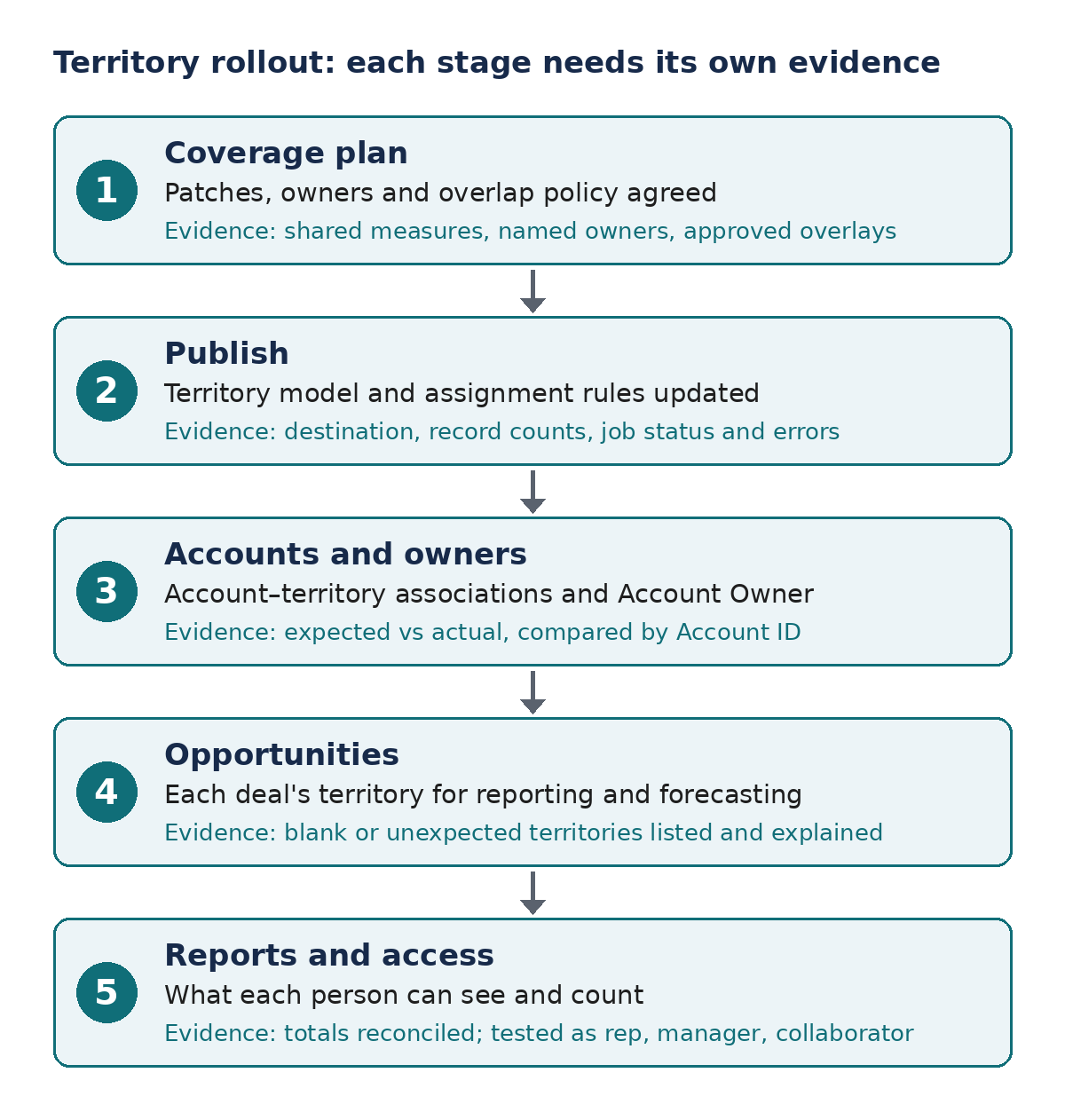
Each stage of a territory rollout needs its own evidence before the realignment is called done.
The 12 checks below are grouped by stage: designing coverage, building the plan and rolling it out. Each starts from a problem someone reported in a public Salesforce community since January 2025, paired with what current Salesforce documentation says.
Design checks: get coverage right before drawing the map
1. Compare patches on potential and workload, not account count
In a June 2025 r/SalesOperations thread, the person redesigning territories for Q3 described one large spreadsheet of zip codes, account lists and personal knowledge. New reps were added by splitting patches largely on judgment. Some reps said their patches were thin; others were overloaded. The author wanted to weigh addressable market, lead flow and realistic opportunity counts rather than geography alone, and wondered whether Salesforce Maps made sense at their stage.
If two patches were never measured the same way, the performance gap between the reps working them may say more about the map than about the people. That flows straight into coaching, quota conversations and hiring decisions.
Agree a small set of measures before the map is drawn: potential (for example, accounts that fit your ideal customer profile), workload (active accounts, open opportunities, travel) and capacity (who is ramping, who is fully productive). Label every estimate with its source and how fresh it is. The goal isn't mathematically equal patches; it's differences you can explain.
Ask your team: "What makes these two patches comparable?"
Check: Compare two patches on the agreed measures. If account count is the only answer, the plan isn't ready.
2. Keep the role hierarchy, coverage and access as separate problems
The author of an October 2025 Trailblazer Community thread described more than 200 roles and cross-country collaboration across roughly 180 countries, with country values stored on accounts and several related and custom objects. Keeping access working involved hundreds of sharing rules, a role hierarchy simplified until it no longer reflected the organization, and reports with hard-coded users instead of a team filter. A follow-up asked whether territory management would be a better fit; the replies didn't confirm a finished solution.
When one structure has to carry management reporting, geographic coverage and record access at once, every reorganization becomes a sharing-rule project, and managers lose the ability to filter reports to their own team.
Separate four questions: who manages whom (role hierarchy), who covers which market (territories), who owns each record, and who needs to see which objects. Sales Territories can control access to accounts and their related opportunities, contacts and cases, but don't assume a territory model replaces the sharing design for every object, particularly custom objects.
Ask your team: "Which of our sharing rules exist only because the role hierarchy doesn't match how we cover the market?"
Check: Before choosing a design, list what a country rep, a regional manager and a cross-country collaborator each need to see, object by object, including custom objects.
3. Settle the opportunity model before choosing automation
A 2026 r/salesforce question came from an implementer whose client wanted branch-based territory forecasting at the opportunity level, without applying the same territory model to accounts, because users work across branches. They planned to map each opportunity's custom Branch field to a territory and asked whether a Flow could set the opportunity's territory or whether the documented Apex filter was required. The post had no replies when reviewed for this article.
Choosing the mechanism first can produce custom code that solves the wrong problem, or a territory forecast that doesn't mean what leadership thinks it means.
Write down, separately, how accounts get their territories, how opportunities get theirs, who owns each record, which users belong to which territories and what the forecast should roll up. Salesforce's filter-based opportunity territory assignment runs an Apex class that decides each opportunity's territory; Salesforce provides a default class, or you can write your own. Confirm your requirements fit that model, or another supported approach, before anyone writes code. Avoid logic that matches on territory names someone can edit later.
Ask your team: "Which territory should this opportunity count in, and why?"
Check: Walk one customer with deals in two branches through the design and write down the expected territory and visibility for each deal before building anything.
4. Decide how regional managers will read the numbers
An older example, from a May 2025 Trailblazer Community thread: a hierarchy had a Midlands parent territory with postcode-based child territories. Opportunities sat in the children, but the manager wanted pipeline grouped at the Midlands level. The parent had no records of its own, and bucketing more than twenty postcode values in a report wasn't practical. Replies suggested a formula approach or a report type that exposes the parent territory; neither was marked as the answer.
Assignments can be exactly right while a regional manager still can't answer "what's in my region?" That gap is an open invitation for spreadsheet copies of the pipeline. A realignment also changes how pipeline compares with last quarter, which is worth planning for alongside forecast accuracy in Salesforce.
Agree the reporting levels (rep, territory, region, segment) and rollups before the hierarchy is approved. For a manager who is assigned to the parent territory, Salesforce's My Territory Team's report filter includes descendant territories; that helps the manager's own view, but it isn't the same as comparing every region side by side. Confirm the report type and relationship you'll use in your own org rather than publishing a guessed formula as a fix.
Ask your team: "Can a regional manager see the whole region's pipeline without exporting it?"
Check: Reconcile one region's report to a known list of opportunity IDs from its child territories. Never duplicate live opportunities to make a rollup appear.
Build checks: make sure the plan is working from complete data
5. Trace the data relationships behind each planning view
In a December 2025 Trailblazer Community thread, a team's hierarchy ran country, region, district. Regional managers owned regions and salespeople were assigned to districts, but accounts were tied to salespeople rather than mapped to districts. The author wanted selecting a district in Territory Planning to show its accounts, then clarified that they meant alignment, not assignment, a distinction one reply about assignment methods didn't fully address.
A planning view can look complete while quietly leaving accounts out, because the relationship everyone assumes exists, account to district, isn't in the data the tool reads. Decisions made from that view inherit the gap.
Document which fields and relationships feed each planning view, and check them against the question planners are actually asking.
Ask your team: "How does an account get into this district's list?"
Check: Pick one district, build its expected account list independently and reconcile it with the planning view before anyone makes decisions from it.
6. Confirm rules and associations came across, not just the hierarchy
A July 2025 Trailblazer Community post described building an account, territory and user report plus a dataset, selecting the active territory model and choosing to include assignment rules. The hierarchy appeared, but the interface said no rules were available, and accounts didn't show as assigned in Territory Planning as expected. The one visible reply didn't diagnose the cause.
A familiar-looking tree can hide a plan working from incomplete rules or memberships. Salesforce documents that a territory with no inherited or local assignment rules contains only accounts associated manually, and that an account matching the rules of several territories on the same branch lands in the lowest matching territory. If rules didn't come across, the plan's picture of coverage won't match how the live model behaves.
Validate the contents of imported rules and associations, not just the presence of the hierarchy.
Ask your team: "Which accounts are in this territory because of a rule, and which were added by hand?"
Check: Choose a few known accounts: one that matches a rule, one associated manually, one that matches nothing and one deliberate exception. Compare the source model, the imported data and the expected alignment, and log each difference with an owner.
7. Rehearse at a realistic data volume
A separate December 2025 Trailblazer Community thread reported that a high-volume territory model failed to load in Territory Planning. The later reply from Salesforce pointed them to Support.
A smooth demonstration in a small sandbox can hide a bottleneck that appears only with the full account base loaded.
Before sign-off, agree what representative volume means for your org and what "loaded and usable" looks like, then keep the timings and errors from that rehearsal. Don't borrow someone else's threshold; measure your own.
Ask your team: "Have we run this plan against our real volume, or only a sample?"
Check: File the rehearsal's record counts, timings and error messages with the approval.
8. Make sure any workaround still lets planners do the job
The same author then switched to a dataset built from Salesforce reports. The data appeared, but the selection checkbox they needed was read-only, and they asked whether a permission was missing. No reply diagnosed it.
A workaround that restores visibility but removes the planner's ability to act only moves the bottleneck.
Confirm the import method, intended editability, licensing and permissions against current Salesforce documentation before changing access, and resist granting broad permissions just to make a control clickable.
Ask your team: "Can the actual planner, not an admin, complete every step?"
Check: Run the workaround as the planner and list each action they must perform, with the result.
Rollout checks: confirm the records, people and reports agree
9. Verify what publishing actually changed
In a December 2025 Trailblazer Community question, the author had carved, optimized and published a territory model. Territories existed and people were assigned, but they weren't sure how to get the right accounts into each territory while also lining up account owners, and asked whether publishing to Salesforce fields was the missing step. No accepted answer was visible.
A project can be signed off from the planning view while the CRM records and owners still disagree, so sellers work from the old picture while leadership believes the new one is live.
Territory Planning can publish to several destinations: Sales Territories (updating territory models and their assignment rules), Salesforce Maps, Field Service, specific Salesforce fields, CSV files and PDFs for review. Each changes something different. Write a publish checklist that names the target model, the assignment rules to run, the expected account associations, the owner updates and the reconciliation step.
Ask your team: "After we publish, what will have changed in Salesforce, and what won't?"
Check: Compare expected and actual associations and owners for a sample of accounts. A successful job status on its own isn't acceptance evidence.
10. Test every route that changes a rule-driving field
An older example, from a March 2025 Trailblazer Community thread: an org used territory assignment rules to give partner users visibility. A Flow updated a field the rules depended on, but territory membership didn't change. The author tried before-save, after-save and screen flows and confirmed the rules otherwise worked. A reply suggested API-based approaches; no accepted answer was visible.
The data can be correct while coverage and access stay stale, until someone can't see an account they should.
Decide when rules should be reevaluated, then test each route that changes rule-driving data. Salesforce's Sales Territories performance guidance describes an option on the account edit page to evaluate an account against territory rules on save, and an equivalent header for SOAP and REST API update calls. It also cautions that these options run assignment rules for all accounts even when only one was updated, so use them deliberately. Rule-driving fields also need an accountable source; our guide to Salesforce data quality covers how to assign one.
Ask your team: "Which routes can change the fields our rules use, and does each one trigger reevaluation when it should?"
Check: Change a rule-driving value through the user interface, an approved import and the real automation or integration path, then compare the resulting associations and access. Avoid triggering broad recalculation for updates that can't affect territory.
11. Follow new leads to the person who has to act
A September 2025 r/salesforce post described a Flow that routed leads by zip code into sales-manager queues, followed by an email asking each manager to assign a salesperson. The author said adoption of that last step had been poor for three years and wanted an email-first way to set the owner. In replies, they explained that product interest, segment, seniority and dealership-specific judgment all shaped who should get each lead.
Geographic routing can look finished while individual accountability is still open. Strong campaign reporting doesn't prove the field handoff happened either; our article on Salesforce campaigns best practices covers the marketing side, and this check covers where leads stop after they reach a territory.
Name the final accountable person, the exception owner and the escalation rule, and support the device and workflow managers really use. Treat lead routing as its own design, since Sales Territories assignment rules are written for accounts; our guide to Salesforce lead routing covers that side.
Ask your team: "How long do leads sit in a manager's queue, and who notices?"
Check: Sample recent leads entering a territory and review queue time, owner changes and evidence of follow-up. Be cautious with any design that lets an email reply change record ownership without proper authentication.
12. Check overlaps and "My Territory" reports as each user
An older example, from January 2025 on r/salesforce: a new implementation assigned accounts to territories for two business lines. A rep's Territory-with-Accounts report filtered to My Territory appeared to show the other rep's territory associations too, and a shared account appeared in two places. Replies debated hierarchy and assignment settings without settling a cause.
Association rows are easy to mistake for unique accounts or exclusive ownership, which leads to double-counted coverage or disputes over accounts meant to be shared.
Document what each territory report filter includes. Salesforce's My Territories filter shows accounts and opportunities in the territories you're assigned to, while My Territory Team's adds their descendant territories. Also document what one report row represents and your overlap policy, and count distinct Account IDs separately from association rows. An account shared by two territories isn't a duplicate record; true duplicate records are a separate problem, covered more broadly in our guide to Salesforce duplicate management.
Ask your team: "Is this overlap intentional, and does our report count it once or twice?"
Check: Set up three test accounts: one in territory A only, one in B only and one in both. Review report rows, access and unique counts while logged in as each rep.
A realignment acceptance checklist for sales leaders
Use this before the realignment is called done. A printable version adds tick boxes and sign-off lines for the approval meeting.
| Management question | Evidence to request | Accountable owner | Failure condition | Next action |
|---|---|---|---|---|
| Are the right accounts in each territory? | Before-and-after association list by Account ID for sample territories | RevOps or Salesforce admin | Additions or removals nobody can explain | Correct rules or manual associations, then recheck |
| Do owners match the handoff plan? | Owner changes compared with the approved handoff list | Sales leader | Owner unchanged, or changed without approval | Correct owners and confirm the handoff with each rep |
| What is still unassigned? | Accounts with no territory or matching no rule | RevOps | Unassigned accounts with no named owner | Assign, or record as an exception with an owner |
| Which overlaps are intended? | Accounts in more than one territory, labeled overlay or accident | Sales leadership | Overlap not on the approved overlay list | Remove it or approve it explicitly |
| Can each role see what it needs, and no more? | Results from testing as a rep, a manager and a collaborator | Salesforce admin | Missing or excess access to accounts, opportunities or related records | Adjust access, then retest as that user |
| Do open opportunities carry the expected territory? | Opportunities with a blank or unexpected territory | RevOps | Open deals in the wrong territory or none | Reassign and review the opportunity assignment logic |
| Do totals reconcile? | Unique-account and opportunity counts by territory and region | RevOps with finance | Report totals differ from reconciled record IDs | Fix report types or filters before sharing reports |
| Did the jobs finish cleanly? | Job status, error messages and record counts | Salesforce admin | Errors or partial runs not explained | Investigate and rerun |
| Can we undo it? | Saved prior associations and owners, plus the approval record | Project owner | No way to restore the previous state | Export the before state before go-live |
What to fix first
When several checks fail at once, a sensible default order is:
- Access and accountability. Accounts the responsible people can't see, or accounts and leads nobody is accountable for.
- Working assignments. Wrong owners, associations or opportunity territories that sellers act on every day.
- Decision-critical reports. Regional and pipeline reports leadership is about to use for quota, coverage or hiring decisions.
- Planning convenience and performance. Slow or awkward planning tools, unless a fixed deadline depends on them.
Adjust the order to your own evidence. A reporting problem two days before a board meeting can outrank a minor ownership cleanup.
When a focused territory review is useful
Not every realignment needs outside help. Native Sales Territories may be all you need, and no add-on can rescue a coverage policy nobody has defined. More automation isn't always the answer; sometimes a manual step with a named owner is the right design. Documented named-account exceptions are often worth keeping. And your own team can run many of the checks above, which is why the checklist names evidence rather than tools.
A focused review earns its place when the evidence doesn't line up and nobody can explain why: associations and access differ depending on how a record was updated, reports don't reconcile to known records, integrations or automation change rule-driving data, or the realignment date is fixed and the acceptance evidence isn't there yet.
Bring one territory where the account list, working owner or pipeline report doesn't agree. Logic Conduit can review the assignment path, access and reporting assumptions with you, then identify which changes are worth making before the next realignment.