Salesforce Campaigns Best Practices: 5 Mistakes That Make Marketing ROI Unreliable
Imagine the monthly performance meeting. Marketing says the webinar produced 300 leads. Sales says it received 80 it could use. Finance says the event cost more than planned. Everyone brought a real number, and nobody can explain the gap.
Salesforce campaigns best practices exist to prevent exactly that meeting. A campaign can be set up well enough to run and still badly enough to mislead the people deciding where the next budget goes. Small gaps in naming, membership, statuses, integrations and attribution add up quietly, then surface as an argument about whose report is right.
Here are the five that matter most to a manager, each with a documented example, a question for your team and a check you can run this week.
Five Salesforce Campaigns Best Practices That Protect Your Marketing Investment
1. Use campaign naming conventions that survive reporting and integration
What goes wrong. Most teams agree on a naming convention once, then the names drift. Reports that group or filter by name start splitting one initiative into several, or merging two that should stay apart.
Salesforce's Trailhead guidance describes campaign hierarchies of up to five levels, noting that three levels work well for many companies, with results such as responses and converted leads rolling up to parent campaigns. Fields such as Type, Start Date and Parent Campaign are more reliable than a free-text name.
A documented example. In a February 2025 Adobe community thread about Salesforce campaigns missing from Marketo's campaign list, one practitioner reported that child campaigns can be hidden when their parent campaign in Salesforce is inactive. It is a community observation, not vendor documentation, but hierarchy choices clearly reach beyond reports.

Date and channel lead each name because the hierarchy view truncates long names.
Why management should care. If names are the only way to tell initiatives apart, every comparison depends on someone typing consistently for a year.
Best practice. Keep a short naming pattern, put the distinguishing parts first, and move anything you report on (channel, period, region, product) into controlled fields. Give one person ownership of the convention and review new campaigns monthly.
Ask your team: "If I group last quarter's campaigns by channel, does that come from a field or from the name?"
Check: Pull the last 30 campaigns created. Count how many break the convention or have a blank Type or parent.
2. Prevent duplicate or missing campaign interactions from distorting results
What goes wrong. Campaign results are only as complete as the membership behind them. People can be counted twice when the same person exists as two lead records, or as both a lead and a contact. Others go missing when a list upload, form or integration skips them unnoticed.
A documented example. In a September 2025 Adobe Experience League thread, a user described a Salesforce campaign of about 16,000 records in which "around 180 records didn't flow through" to the matching Marketo campaign, even though those people existed in Marketo. They noted that the missing records included invalid emails, inactive contacts and duplicates, but that records with the same traits had synced. A community leader suggested checking the sharing rules for the Salesforce user that Marketo connects as. The thread does not record a confirmed cause.
Why management should care. About 1% sounds small until those people miss a follow-up.
Best practice. Reconcile counts between systems for every important campaign, give exceptions an owner, and deal with the duplicate records behind unreliable counts. Our guide to Salesforce duplicate management covers how to reduce duplicates without blocking sales.
Ask your team: "For our last major campaign, do the member counts in Salesforce and the marketing platform match? If not, who knows why?"
Check: Compare member counts for three recent campaigns across both systems, then spot-check ten people who appear in only one.
3. Test marketing-platform synchronization before relying on campaign data
What goes wrong. An integration can look connected while campaign sync is not working. Adobe's documentation for Salesforce Campaign Sync explains that program members and statuses sync in both directions, while cost and channel flow from Marketo to Salesforce. The Marketo sync user must be a Marketing User in Salesforce or campaigns may not appear, and incompatible statuses between a campaign and its program can cause errors.
A documented example. In the same February 2025 thread, a new administrator's settings showed the integration working, yet selecting a campaign returned a message that sync was still initializing. "This same message has been appearing for days now," they wrote, and the campaign list showed only some of the active Salesforce campaigns. Replies suggested reconnecting, checking the sync user's access and visibility, and confirming that campaigns were active with member statuses defined. The thread does not confirm which fix worked.
Why management should care. Launches and board reports can depend on an integration nobody has tested with real campaign records.
Best practice. Before an important campaign, sync a small representative one and confirm members, statuses and visibility in both systems. Match statuses before linking a program to an existing campaign, as Adobe's program sync instructions recommend. If several systems are involved, it helps to be clear about what you are paying for in integration work.
Ask your team: "When did we last prove campaign sync works end to end, and where is the evidence?"
Check: Create one small campaign, sync it, change two member statuses on one side and confirm they appear on the other.
4. Define campaign member statuses that distinguish activity from outcomes
What goes wrong. Every Salesforce campaign starts with two member statuses, Sent and Responded. Teams add others, such as Registered, Attended and No Show, but don't always update them after the event. Salesforce's Trailhead guidance recommends one set of member statuses per campaign type and explains that any status marked Responded counts towards the campaign's responses.
A documented example. In July 2026, a user on the Zoom developer forum described approved webinar registrants who synced into Salesforce while the matching campaign members stayed at their previous status, such as Invited. In another webinar, Zoom reported several hundred approved registrants while Salesforce showed significantly fewer. A March 2025 Marketo community post described attendees whose statuses had not moved from Registered to Attended or No-Show when the follow-up emails were due.
To show how this looks, we set up a 14-contact webinar campaign in a Salesforce Developer Edition org.
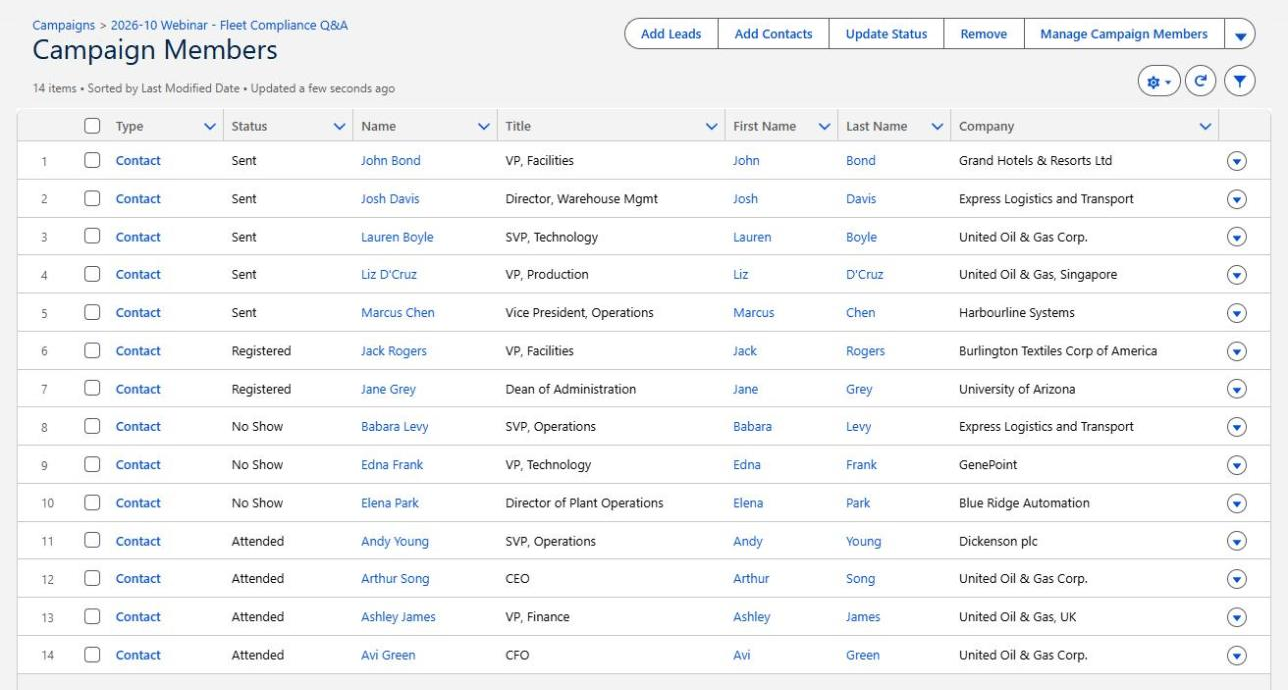
Fourteen members, four attended. Two are still marked Registered after the event, the same gap the community threads describe.
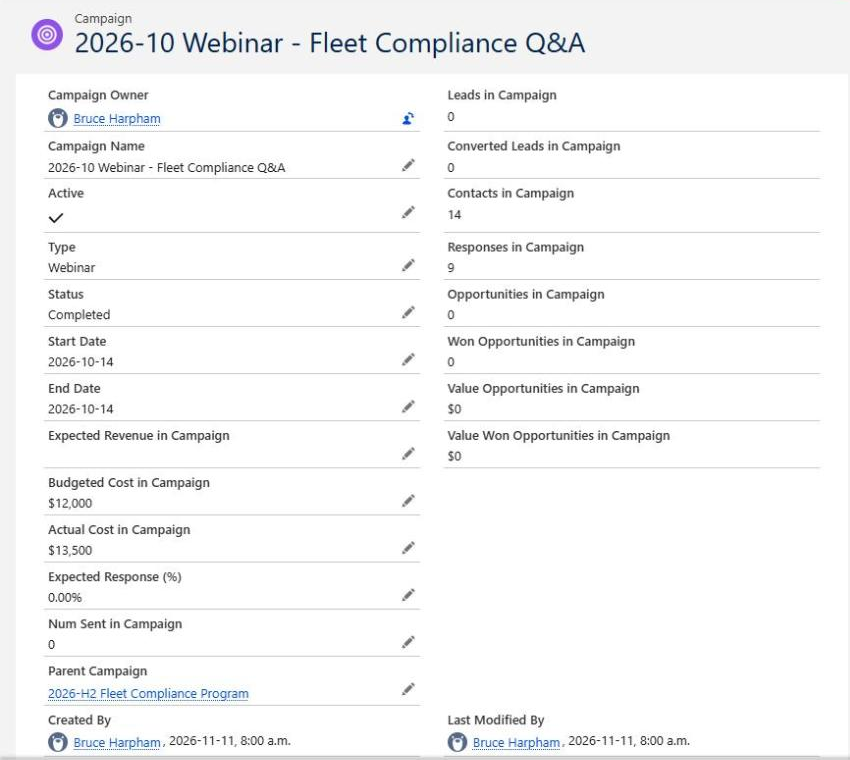
Salesforce counts 14 contacts and 9 responses, because Registered, Attended and No Show all count as responses. Num Sent is an editable field and stayed at 0.
Why management should care. "Nine responses" can easily be read as nine attendees. The member list says four. Membership, responses and attendance each answer a different question.
Best practice. Agree on a small status set for each campaign type, decide which statuses count as responses, and name an owner who updates statuses by a set date after every event.
Ask your team: "For our last webinar, how many attended, and does that number come from Salesforce or from a spreadsheet?"
Check: Open the last three event campaigns and count members still at Registered or Sent after the event date.
5. Validate campaign attribution and reporting before allocating budget
What goes wrong. Different reports connect campaigns to opportunities in different ways. Salesforce's overview of the Campaigns with Influenced Opportunities report explains that it shows campaigns linked through several methods, including contact roles whose contacts are campaign members and the Primary Campaign Source field. It notes that a campaign saved in Primary Campaign Source is still reported even after it is removed or replaced, and that a campaign added with the New button under Customizable Campaign Influence does not appear in that report.
The Campaign ROI Analysis report calculates ROI from the value of won opportunities and the campaign's Actual Cost. If Actual Cost is incomplete or opportunities are not linked, the percentage looks precise and is still wrong.
Why management should care. Two honest reports can disagree about the same campaign. No attribution model is objectively correct; what matters is that everyone knows which one they are looking at.
Best practice. Write down which report and attribution method you use for budget decisions, how Primary Campaign Source is set, and who enters campaign costs. Our article on the marketing to sales handoff shows how missing Primary Campaign Source values change which campaigns appear to produce pipeline, and lead source tracking explains why channel reports and sales often disagree.
Ask your team: "Which report produced the ROI figure in this deck, and what does it count?"
Check: Take one closed opportunity and trace every campaign connected to it. Compare that with what each campaign report credits.
Five Questions to Ask Before Trusting Your Campaign ROI Report
| Management question | Warning sign | Evidence to request | Next action |
|---|---|---|---|
| Is every relevant campaign in the report? | Initiatives missing or split across several names | Campaign list with Type, parent and dates for the period | Agree on a naming pattern and required fields |
| Are people missing or counted twice? | Member counts differ between Salesforce and the marketing platform | Count comparison for recent campaigns, plus ten sample records | Assign an exception owner; address duplicates |
| What does "response" mean here? | Response totals higher than attendance or engagement figures | Member status values per campaign type and which count as responses | Standardize statuses and set an update deadline |
| How are campaigns credited for pipeline? | Marketing and sales present different campaign totals | The report name, attribution method and Primary Campaign Source rules | Document the method used for budget decisions |
| Do Salesforce, the platform and spending records agree? | Actual Cost blank or different from finance figures | Campaign cost entries alongside finance's spend for the same campaigns | Reconcile one campaign end to end before the next review |
What Should You Fix First?
Start with what is costing you now, not with everything that looks untidy:
- Problems affecting live spending or campaigns about to launch.
- Gaps that stop sales from following up on the right people.
- Numbers that go into executive or board reporting.
- Integrations that a major upcoming campaign depends on.
Large historical clean-ups are expensive and rarely change the next decision. Fix the process for new campaigns first, then repair history only where an important report depends on it. Our guide to Salesforce data quality has practical ways to make that progress this month.
When to Bring in a Salesforce Consultant
Your own team can run most of these checks. Outside help earns its place when the problem crosses systems and nobody owns the whole path: Salesforce, a marketing platform, a webinar tool and a finance spreadsheet, each managed by someone different. It also helps when you have found the symptoms but need dependable controls, or when automation needs repair and breaking something live is a real risk.
A focused review reconciles a sample of campaign data across systems, checks naming, statuses and attribution assumptions, and sets out the highest-risk defects in priority order.
Not sure your Salesforce campaign reports reflect what's actually happening?
Logic Conduit can review campaign data, reporting assumptions and marketing-system integrations to find the problems affecting management decisions. Bring one campaign where the numbers disagree: the Salesforce member count, the marketing platform's count and finance's spend figure. We will help you find where the gap starts and what is worth fixing.