Salesforce Duplicate Management: Stop Duplicate Leads and Contacts Without Blocking Sales
Duplicate Leads and Contacts can leave a sales manager paying for the same work twice. Two reps research and contact the same buyer, neither sees the full conversation, and someone has to untangle who owns the follow-up. Meanwhile, repeated records can distort lead counts and conversion reporting. For a manager, the expensive problem is lost selling time and a customer history the team cannot rely on. Duplicates are one visible symptom of the wider cost of poor data quality.
Salesforce duplicate management uses matching rules to identify potential duplicate records and duplicate rules to warn users or block a save. To reduce the rework, you also need a way to resolve existing duplicates and fix the process that keeps creating them.
A useful starting policy is to warn on uncertain matches and consider blocking dependable matches only when the rep has a clear next step. Preventing another record should not prevent the business from responding to the enquiry.
When duplicate records become an expensive sales problem
An occasional repeated record may be manageable. The case for fixing the process becomes stronger when the same problems recur:
- Repeated outreach: reps spend time on the same buyer, or send messages that ignore an earlier conversation.
- Ownership disputes: managers spend time deciding who should follow up rather than helping the deal move forward.
- Unreliable reporting: the team has to reconcile repeat Leads before trusting lead-volume or conversion figures.
- Recurring cleanup: an import or connected application creates another batch shortly after the previous batch was repaired.
Put a cost against the rework before choosing a solution. For one representative month, estimate the hours spent investigating duplicates, merging records, correcting reports and coordinating follow-up. Multiply those hours by an agreed internal hourly cost. Keep possible missed sales separate: duplicate records alone do not establish lost revenue.
If the same source keeps recreating the problem, a one-off cleanup leaves the ongoing cost in place.
How Salesforce duplicate management works
A matching rule defines how Salesforce identifies potential duplicates. A duplicate rule uses that matching logic to determine how to handle records being created or edited. Salesforce provides standard rules and supports custom ones. See Salesforce's duplicate management overview.
Keep those decisions separate. A poor match needs better matching criteria. A useful match that stops legitimate work needs a better response policy.
Duplicate Contacts: warn before creating another customer record
Consider Northbridge Process Supply, a fictional industrial supplier. Elena Marquez, its procurement manager, is already a Contact. She submits another enquiry about replacement filtration assemblies.
The rep should inspect the existing Elena record before creating another. The new enquiry may belong in the existing customer's sales history rather than in a second Contact.
To illustrate this decision, we used fictional records in a disposable Salesforce Developer Org. Custom rules compared exact, nonblank email values within the same object. They applied only to records carrying a demonstration marker in Description. These were deliberately simple rules for showing the workflow, not a recommended universal matching policy.
With Allow and an alert, Salesforce can warn about a potential duplicate while allowing the save. Block prevents the duplicate save. An alert alone is not a hard stop. Salesforce documents both behaviors.
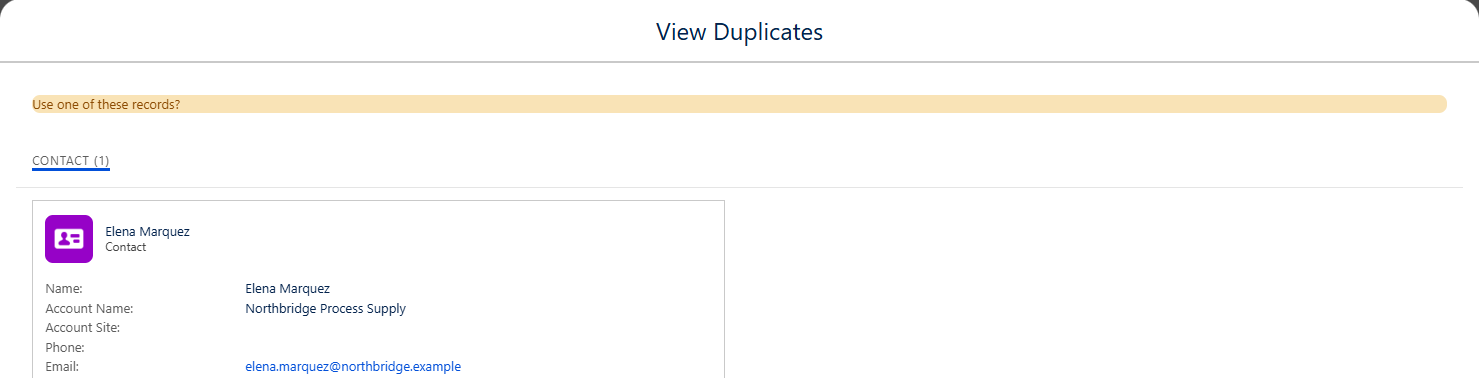
A repeated Contact email surfaced the existing Elena Marquez record. In the accompanying test, a second Save created another Contact: the rule warned, but did not block.
David Chen is another buyer at the same company. Sharing an employer does not make David and Elena duplicates. A shared mailbox or switchboard number may be useful evidence without establishing that two records describe the same person.
Tell reps what to do with a warning: inspect the match, use the existing record when appropriate, and ask the data owner to resolve ambiguity. “Ignore it if you're busy” turns a warning into background noise.
Salesforce duplicate rules: when to allow, alert or block
A block makes sense when your team has tested the matching criteria and knows how to continue without a new record. Even an exact email match needs a business interpretation: two people may use a shared purchasing address.
| Situation | Suggested starting response |
|---|---|
| Likely match, uncertain identity | Warn and inspect the existing record. |
| Confirmed repeat record, accessible to the rep | Consider blocking creation and directing the rep to that record. |
| Match the rep cannot access | Provide a named resolution route before enforcing a block. |
| Distinct people sharing company details | Refine matching criteria rather than forcing a merge. |
| An import or application submits a duplicate | Define how its operator resolves or maps the incoming record. |
Review create and edit actions separately. A sensible policy for new records can disrupt someone correcting an old one. Review visibility too: when configured to bypass sharing, a rule can check records the user cannot access, but Salesforce does not display those inaccessible matches. A warning needs a practical escalation path. See Salesforce's visibility guidance.
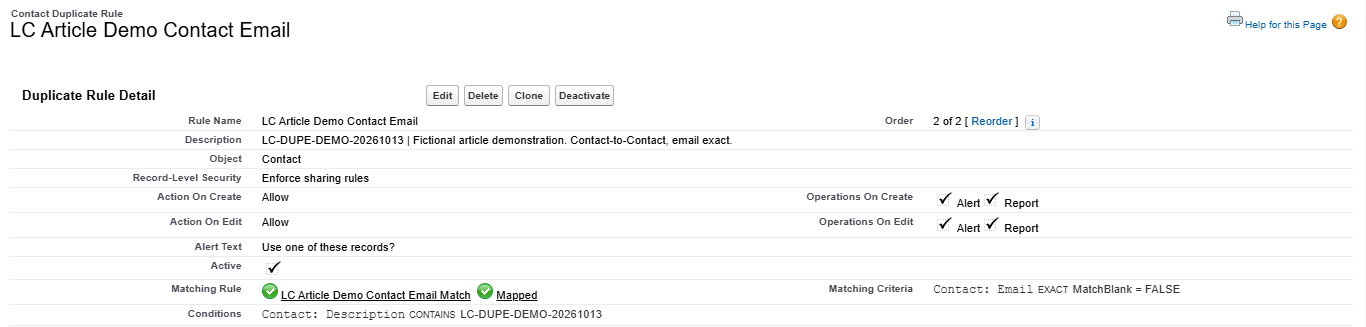
Open the image at full size to read the settings. The custom Contact rule was active, used Email EXACT with blank matching disabled, and enforced sharing rules. Create and edit were configured as Allow with Alert and Report. The Description condition restricted the demonstration to marked records.
Duplicate Leads: preserve the enquiry and check the existing record
Our second example used Marcus Bennett, a fictional plant operations director at Calder Packaging Systems, asking about conveyor components before a maintenance shutdown. Creating another Lead with his email surfaced the existing Lead. The attempt was cancelled after the match was inspected.
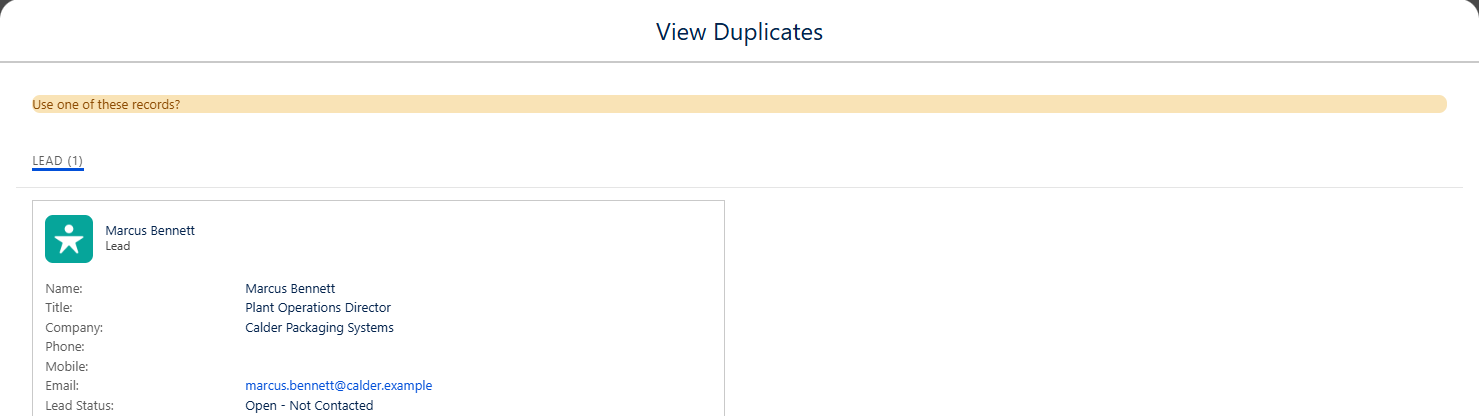
The Lead-to-Lead rule surfaced Marcus Bennett at Calder Packaging Systems. The new Lead was cancelled after inspection, so no second Lead was saved.
The screenshots show two same-object checks: Contact-to-Contact and Lead-to-Lead. They do not demonstrate a Lead being matched to a Contact.
Check the Lead-to-Contact handoff separately
A repeat enquiry can arrive as a Lead even when the person already exists as a Contact. Include that scenario in your review. Do not assume a Contact-to-Contact rule covers it: inspect the objects and matching rules configured in your org.
Check the existing relationship, owner and open work before deciding where the enquiry belongs. Duplicate handling should support that decision, rather than encourage reps to alter names or emails to get past a warning.
How to handle existing duplicate Leads and Contacts
Turning on prevention does not replace reviewing duplicates already in your database. Before merging, compare record ownership, activity history, customer identifiers and the fields your team relies on.
Agree which record survives and which values to keep. Start with a small reviewed group, rather than assuming every match is safe to merge. Native functionality may suit a manageable queue. Larger volumes or complicated matching and merge requirements may justify evaluating additional tools.
If you allow duplicates, assign someone to review them. Salesforce's duplicate management walkthrough shows how reporting can expose records created after users bypass warnings. A report is useful only if someone acts on it.
Are native duplicate rules enough, or do you need a tool?
Start with the requirement. If the main issue is repeated manual entry and a small queue of records to review, native matching and duplicate rules are a sensible first option to assess. If you need to process large backlogs, compare more complex identity signals, or control repeatable merge decisions, evaluate specialist duplicate-management tools against those tasks.
Ask a supplier or consultant to demonstrate the difficult cases using representative data: shared emails, different people at the same company, and customer histories that must be retained. Agree which fields and relationships must survive a merge before approving bulk cleanup.
When a connected application creates the duplicates, include its record-matching and update logic in the scope. A cleanup tool cannot substitute for a clear identity policy between systems. See our Salesforce data sync planning guide for the wider handoff problem.
Test duplicate rules against your sales workflows
Before changing production rules, write down the expected result and test these paths in a suitable non-production environment:
- Manually create a repeated Lead or Contact.
- Create a different person at the same company.
- Edit an existing record to correct useful information.
- Convert a Lead when a relevant Contact exists.
- Submit a repeated person through an import or connected application.
- Have a Flow create or update a record that meets the criteria.
- Encounter a match the rep cannot access.
Record what happened, whether anything was saved, and how the user or process recovered. Our demonstration covered Lightning creation only. Edit, import, API, Flow, lead conversion and cross-object behavior were not tested. A manual-entry test does not establish how those paths behave.
A practical acceptance test: the team can identify a repeat person, preserve the enquiry, and explain who owns the next action. If the workaround is changing the email address, the policy needs another pass.
Stop paying to resolve the same duplicate problem
Choose the source causing the most rework: website enquiries, event imports, manual entry or a connected application. Review its matching criteria, save behavior and resolution route together. Then track whether it produces fewer new duplicates and whether users can still complete legitimate work. A lower record count is not a useful result if sales enquiries get stuck.
Get a focused review of the process creating duplicates
If reps keep hitting warnings, imports need repeated cleanup, or managers cannot trust the customer history, contact Logic Conduit about your Salesforce duplicate problem.
Tell us where records enter Salesforce, what your team does to resolve them, and which part is costing the most time. We can use that information to scope a review of the matching rules, duplicate rules and related automation.
A useful review should leave you with a clear decision on what to warn or block, how to handle existing records, which source needs fixing, and how to verify that legitimate sales work can continue.