Salesforce Report Types: 7 Reporting Traps and How to Fix Them
A Salesforce report can run without a single error and still send your team down the wrong path. Ask for "accounts we haven't contacted," and a report built from activity records can only list accounts that have at least one activity. The accounts nobody has touched never appear, so they never reach the rep dividing up the territory. Closed-case counts that hide repeat work, targets counted once per deal and a pipeline total that grows without real progress cause the same kind of trouble. Managers can end up checking records by hand, rebuilding numbers in spreadsheets or arguing about figures instead of acting on them.
Some of these traps start with the report type. Others start with how the population, measure or date window is defined. This guide is for sales, RevOps and service leaders who work with a Salesforce administrator or developer. It covers seven traps, each drawn from a problem described in a 2025 post by a Salesforce user or sales leader. Each section names the trap, the question to put to your administrator, a fix and a quick test with a few known records. We demonstrated the first fix with fictional records in a Salesforce Developer Edition org.
What are Salesforce report types?
A Salesforce report type decides which records a report can return and which fields you can add to it. It does this through a primary object, such as Accounts or Cases, and any related objects linked to it, such as Activities or Contacts. Salesforce ships many standard report types, and an administrator can create custom report types when the standard ones do not expose the right relationship or fields (Salesforce Help: report types). A custom report is not the same as a custom report type: most reports your team builds are custom reports created from standard types.
Report formats are a separate choice. They control how results are laid out, not which records are available (Trailhead: report formats).
| Choice | What it controls | Examples | Question it answers |
|---|---|---|---|
| Report type | The records and fields available | Accounts; Cases; Opportunities with Products; a custom type | "What are we counting, and what related data can we see?" |
| Report format | How results are arranged | Tabular, summary, matrix, joined | "How should the results be grouped and compared?" |
So tabular, summary, matrix and joined are not "the four Salesforce report types." A joined report can place blocks built from different report types side by side, but it cannot create a relationship your data does not already have.
The seven traps at a glance
Filters, date definitions, required relationships, field access, record sharing and the unit being counted can all change a report's answer, whatever type it uses. Prefer an existing standard report type when it meets the need. Most of the questions below do not need a new custom type.
| Business question | Starting population | Format or feature | Main trap | Decision it supports |
|---|---|---|---|---|
| Which accounts still need outreach? | Accounts | Cross filter on related activity | Starting from activities hides untouched accounts | Allocating accounts and avoiding overlap |
| Are we measuring service effort? | Cases, plus case emails or history | Summary report with separate measures | Closed-case counts miss repeat work | Staffing and coaching |
| Who is behind target? | Opportunities, splits or target records | Summary or matrix; dashboard | Targets counted once per deal | Coaching and coverage |
| Where is new product business coming from? | Opportunities with Products | Matrix, possibly a stored classification | Repeat business looks like expansion | Cross-sell focus |
| Does the report include the exceptions? | The unit under review (for example, Activities) | Tabular plus an exception report | Required relationships drop rows | Remediation and review |
| Which open deals need review? | Opportunities | Exception report | Flags mistaken for verdicts | Pipeline review agenda |
| What changed in the pipeline? | Historical trending or reporting snapshots | Trend report or snapshot | Current data can't explain last week | Interpreting pipeline growth |
1. Which accounts still need outreach?
In a January 2025 r/salesforce thread, a salesperson whose territories had grown fivefold said checking accounts one at a time no longer worked. They wanted an account-level view so they would not resend or overlap cadences. Replies suggested activity reporting and asked where emails and campaign membership were actually recorded.
The trap: Starting from activity records, which hides the accounts nobody has touched.
Ask your administrator: "Which accounts in this territory have no qualifying outreach in the last N days?" Agree first what qualifies: a completed call or email rather than a planned step, logged by whom, and dated by which field.
How to fix it: Start from Accounts, because the account is what you allocate. Add a cross filter that keeps accounts without related activity meeting your definition. Cross filters work from the report's parent object, so untouched accounts stay in view (Salesforce Help: cross filters). If your cadence tool records its work elsewhere, an Activities report or campaign-member reporting may be the better source. Then allocate the untouched accounts and pause overlapping outreach, after checking consent and your team's contact policy.
Test it: We created four fictional accounts in a Salesforce Developer Edition org on 31 October 2026, using Tasks only:
| Fictional account | Related Tasks | Should it need outreach? |
|---|---|---|
| Kestrel Packaging Ltd | None | Yes: untouched |
| Ironbark Fabrication Inc. | One completed call dated 3 June 2026 | Yes: activity is older than 90 days |
| Millbrook Cold Storage | Two completed Tasks dated 19 and 26 October 2026 | No: recent qualifying outreach |
| Pinegate Tooling Co. | One open email Task due 5 November 2026 | Yes: planned, not yet done |
The Accounts report used the cross filter "Accounts without Activities", with subfilters Status equals Completed and Date equals LAST 90 DAYS.
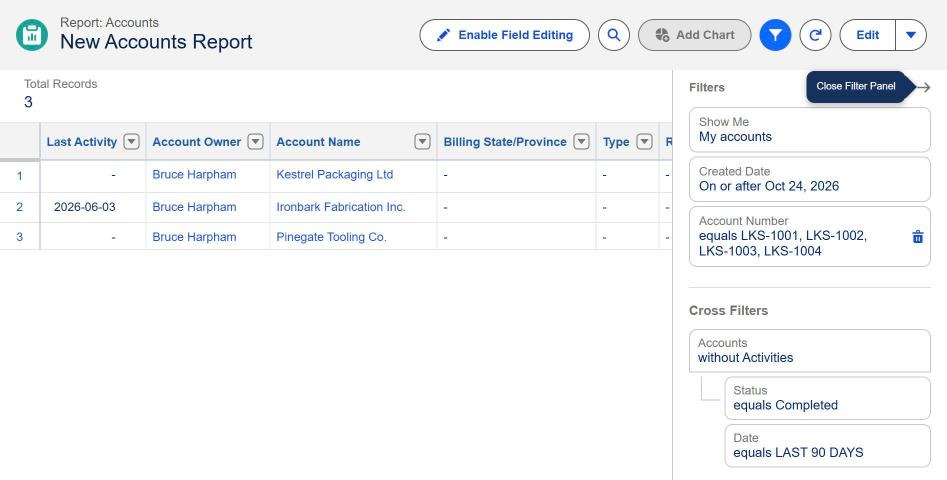
Synthetic Tasks-only demonstration, run 31 October 2026. The report returns the three accounts expected to need outreach and excludes Millbrook Cold Storage. The other filters restrict the view to the four demonstration accounts.
The report returned the three accounts we expected, one row each. Millbrook's two recent Tasks kept it off the list without creating duplicate rows. Ironbark has a Last Activity date but still needs outreach under a 90-day rule, which is why "has any activity" is a weak test. Pinegate's planned email did not count.
This test covered Tasks only, not Einstein Activity Capture, a cadence product or other channels. A missing activity may mean the contact was never captured, not that it never happened. Salesforce has been moving Einstein Activity Capture orgs toward syncing email as Salesforce activity, on timing that varies by org (Salesforce Help: Sync Email as Salesforce Activity). Check what your org stores before trusting a "no activity" list.
2. Are we measuring service effort, or just closed cases?
A contact-centre manager asked in June 2025 how to show their team's real workload. A customer reply reopened the existing case, so "cases closed" missed repeat exchanges and work done while a case was pending elsewhere. Counting modified cases was no better, because a reassignment looked like work.
The trap: Counting closed cases, which misses repeat replies and work on cases that are still open.
Ask your administrator: "Which measures of service effort will we use, and how does each one count?"
How to fix it: Keep distinct cases, qualifying customer responses, reopened cases and pending backlog as separate measures. Compare a Cases report with the "Cases and Emails" or Case History report types where available. Case History depends on field history tracking, and the email-based types need Email-to-Case (Salesforce Help: support report types). Look into workload and bottlenecks before using the figures for staffing or individual coaching.
Test it: A case with three qualifying replies should count as one case and three responses. A pending case with completed work should show effort. A reassignment with no reply should add nothing. If the report treats all three the same way, it is not measuring effort.
History tracking switched on today does not recreate past status changes, and the current case owner may not be the person who did the earlier work.
3. Who is behind target, and does the regional total agree?
In a February 2025 thread, a poster wanted to compare each rep's closed-won revenue with their target, rolled up to regional attainment, using standard reports rather than Salesforce Forecasting. Replies disagreed about what native reporting could do. The thread shows a clear need; it does not prove Salesforce cannot report attainment.
The trap: Adding the same target once per opportunity, or averaging percentages when targets differ.
Ask your administrator: "What is the target grain: person, region, period, currency and credit rule?"
How to fix it: Agree the grain first. Check whether your org's Forecasting and quota features already hold the targets before anyone designs custom target records. Then pick the report type that matches the measure: opportunities, opportunity splits or target records. Shared credit needs its own reconciliation; see opportunity splits. A dashboard or joined report can display the comparison but cannot supply a missing link between targets and results. Review gaps on the same period and credit basis before deciding where to coach.
Test it: Two sellers each have a target of 100 and are credited with 80 and 120. Regional attainment should be 200 out of 200, or 100%. Add a third seller with no sales and make sure they show at zero rather than disappearing.
This is target attainment, not forecast accuracy. Avoid placeholder "quota opportunities" in the live pipeline, because they distort every other pipeline report.
4. Where are we winning new product business?
A user described three years of sales by account, product and region and wanted 2025 sales for combinations with no sales in 2023 or 2024. They could do it in Excel but wanted it in Salesforce. Suggested summary formulas compared neighbouring columns, not the same region across years.
The trap: Counting repeat business as expansion because nobody defined "new."
Ask your administrator: "Within this lookback period, which account, product and region combinations are new?"
How to fix it: Start with Opportunities with Products if your org records sales as opportunity line items. Define "new" as new within the lookback, which is not necessarily a first-ever purchase. A matrix report can show the pattern, but matching prior-year combinations reliably may need a stored "first sale" classification or a separate analytical dataset. Use the result to pick cross-sell conversations.
Test it: A combination sold this year and last year is repeat business. One sold only this year is new within the lookback. One last sold four years ago will look new unless the definition says otherwise, so agree its label before the report is built.
A row-level formula cannot query other records, and a missing row does not prove there was never a purchase. Check currency and closed-won definitions as well.
5. Does the report include the exceptions we need?
An administrator needed activity reporting with account and contact fields for a compliance review. Their account-based custom report left out activity on contacts with no account. A standard activities report showed those records but lacked some related fields.
The trap: A required relationship drops the rows a reviewer most needs, such as activity on contacts with no account.
Ask your administrator: "What population must this review include, and where do the exceptions appear?"
How to fix it: Start from the unit the review covers, here the activity, and add related fields where the relationship allows. Compare that population with the account-based version to see which rows drop out. Keep a separate exception report for activity with no account link, give each exception an owner, and use your data quality work to fix the cause.
Test it: One activity is linked to a contact and account; another to a contact with no account. Both must appear, or the second must appear on the exception report. Check the result while logged in as the person who will use it.
A new report type does not override field-level access or record sharing, and a report design alone does not certify compliance.
6. Which open deals need review before we trust the pipeline?
A semiconductor sales leader managing 150 sellers described opportunities with wrong values, dates and outdated details, and estimated pipeline inflation at about 60%. That is their own estimate, not a benchmark. They wanted better data without burying sellers in busywork.
The trap: Trusting the pipeline total before anyone reviews the deals that fail basic checks, or treating every flagged deal as dead.
Ask your administrator: "Which open deals fail our agreed evidence checks today?"
How to fix it: Build an Opportunities exception report for past close dates, missing next steps and any other gaps your managers agree on. Where stage history is captured, compare ageing within similar segments. With twelve-month sales cycles, set thresholds with management rather than borrowing a generic rule. Review the list with deal owners, who can update or requalify each deal. For measuring forecast accuracy over time, see Salesforce forecasting accuracy.
Test it: An open deal with last month's close date should be flagged. A long-cycle deal moving as expected should not. Report the number and value of flagged deals, not a "recovered revenue" figure.
A report cannot make sellers enter accurate data. It can give managers a shorter, fairer list to review.
7. What changed in the pipeline since last week?
An administrator asked in March 2025 how to give leadership week-over-week visibility into stage movement. They believed their population exceeded the 2,000-record limit for reporting snapshots and were considering exporting the data to a separate BI tool.
The trap: Reading a bigger pipeline total as progress, when a current report cannot show what changed since last week.
Ask your administrator: "Did the pipeline grow through new deals, stage progress or edits to existing records?"
How to fix it: Start with the smallest historical grain that answers leadership's question. Historical trend reporting compares a few snapshot dates over a recent window: at the time of writing, up to five dates within the previous three months plus the current month (Salesforce Help: historical trend reporting). Reporting snapshots store scheduled results in a target object. Their documented 2,000 limit applies to new target records written per run, not to how many records an ordinary report can summarise (Salesforce Help: reporting snapshots). Consider extra analytics infrastructure only after trying those.
Test it: Define last week's and this week's populations, then split the difference into deals added, removed, won, lost and changed. If those parts do not add back to the change in total, the report cannot explain the movement yet.
A snapshot switched on today records from today onward. It cannot show what the pipeline looked like last week.
Standard report, custom report type, or a data problem?
Use a standard report type when it exposes the right population and fields. A custom report type helps when you need a relationship or field combination the standard types lack, or "with or without" related records in one structure. Creating one requires the Manage Custom Report Types permission, and its primary object cannot be changed after saving (Salesforce Help: custom report types).
Sometimes the blocker is missing data: activity that is not captured, targets that do not exist as records, or stage changes nobody stored. No report type fixes that. The work is in data capture, process or a small data model change.
Before you accept a report
- Does the population include records with zero activity, zero sales or a missing link?
- What does one row represent, and can one parent record appear on several rows?
- Which date field and window does it use?
- Did you test it with a few records whose correct answer you worked out separately?
- Did you check it as the person who will use it, with their sharing and field access?
- What decision will someone make from it, and how often?
The companion worksheet turns these questions into a one-page request your administrator can build from.
Do we need help if we already have an admin or developer?
Often, no. An internal administrator can build many of these reports, especially from a request that states the decision, the population and a few test records. Outside help is most useful when the answer depends on cross-object design, data that is not captured yet, integrations, history storage, or careful testing of numbers leadership will act on.
Have one report your team doesn't trust? Bring the business question, the current report and a few records that should appear. Logic Conduit can help review the report type, fields, filters and data capture, then scope the changes needed. Start a conversation.