Salesforce Sandbox Management: Reduce Release Risk Without Slowing Delivery
Salesforce sandbox management is the ongoing work of choosing, preparing, maintaining and retiring non-production environments so your team can test changes with appropriate data, access and ownership. It is not a one-time setup task and it is not the same thing as having sandboxes. The practical question a platform owner has to answer, release after release, is narrower than any tooling discussion: what must be true before this environment can be trusted for the next change?
That question matters because a sandbox can be finished and still not be ready. The copy can complete and the people who need to test can still be unable to log in, unable to reach the integration under test, or looking at data that cannot produce the business scenario under review. Copy completion is a platform event. Readiness is a decision someone has to make and own.
Here is the situation this article is written for — a deliberately fictional small team, not a real client engagement. One administrator, two developers and one business tester share a single UAT environment. A refresh is requested because the data has drifted too far from production to test a pricing change, while unmerged work from one developer still sits in that environment. The new copy arrives before anyone has confirmed the tester can log in, that outbound email settings are where they should be, or that the integration the change depends on has been reconnected. Nothing has gone wrong yet. But nobody can say whether the environment is fit for the release, and that uncertainty is the expensive part.
What sandbox management actually includes
Four responsibilities sit underneath the term, usually owned by different people or by nobody:
- Environment choice. Matching the type to the decision being tested, not to what happens to be available.
- Lifecycle. Requesting, timing and activating refreshes without destroying work in progress.
- Preparation. Data, access, integration configuration and metadata baseline — the work that turns a copy into a usable test environment.
- Retirement and ownership. Knowing which environments still have a job, and who answers for each one.
The production boundary runs through all four. A non-production environment exists so a change can be wrong somewhere that does not matter. Every decision that erodes that separation — real customer data copied without controls, outbound messages reaching real recipients — gives back the protection the environment was supposed to provide.
Choose the environment for the decision you need to test
Salesforce documents four sandbox types with different copy behaviour, refresh eligibility and storage. The following reflects Salesforce's current documentation (SF01, SF02), checked 16 November 2026. Entitlements vary by edition and licence, so confirm your own before planning around any row.
| Type | What it copies | Minimum refresh interval | Base data storage |
|---|---|---|---|
| Developer | Configuration and metadata only | 1 day | 200 MB |
| Developer Pro | Configuration and metadata only | 1 day | 1 GB |
| Partial Copy | Configuration plus a sampled subset of production records, defined by a required template | 5 days | 5 GB |
| Full | Configuration plus broader production data, supporting the widest testing | 29 days | Production-equivalent |
Two things in that table are commonly misread. The refresh intervals are minimum eligibility periods — the earliest you may request another refresh — not promises about how long a copy will take. And the Developer-type storage figures are base allocations with optional upgrades, not universal ceilings.
A bigger copy is not automatically a better fit. A Full sandbox gives you breadth, and also a 29-day refresh floor and production-scale data you may now be obliged to protect. If the question is whether a validation rule fires correctly on a particular Opportunity shape, a Developer sandbox with four purpose-built records answers it sooner than a production-scale copy where the relevant record is hard to find. Choose the smallest environment that can actually produce the scenario you need to assert.
One clarification, because it causes real confusion: a free Developer Edition org is not a sandbox and does not provide sandbox-management capability (SF01). It can run Apex and hold configuration; it cannot demonstrate a refresh.
Give every environment an owner and a job
Most environment contention is not a technical problem. It is an unassigned-ownership problem that only becomes visible under deadline. The cheapest fix for a small team is a written register — one row per environment, kept current, owned by one named person. Each row should answer:
- Purpose. What class of decision is this environment for?
- Owner. One name, not a team.
- Active work. What is in flight here that a refresh would destroy?
- Intended roles. Who must log in and complete a scenario, not just who has admin access?
- Data classification. What is in here, and what obligations follow?
- Integration targets. Which external systems may it reach, and which must it never reach?
- Next refresh decision. When is it eligible, who decides, and who activates?
A small team does not need many environments; it needs each one to have a job. One Developer sandbox per developer for isolated build work, one shared UAT environment with a named owner and a protected test window, and a documented decision about whether a Partial or Full environment is justified at all, is a defensible arrangement. No fixed number is universally required, and adding environments without adding ownership multiplies the problem. If drift and dependency surprises are the recurring theme, the underlying issue may be Salesforce technical debt rather than environment count.
The register is a worksheet, not a guarantee: a completed row records a decision and who made it. It does not make the environment safe.
Refresh without discarding unfinished work
Refreshing is where the lifecycle gets unforgiving, so it is worth separating the distinct events teams routinely collapse into one word:
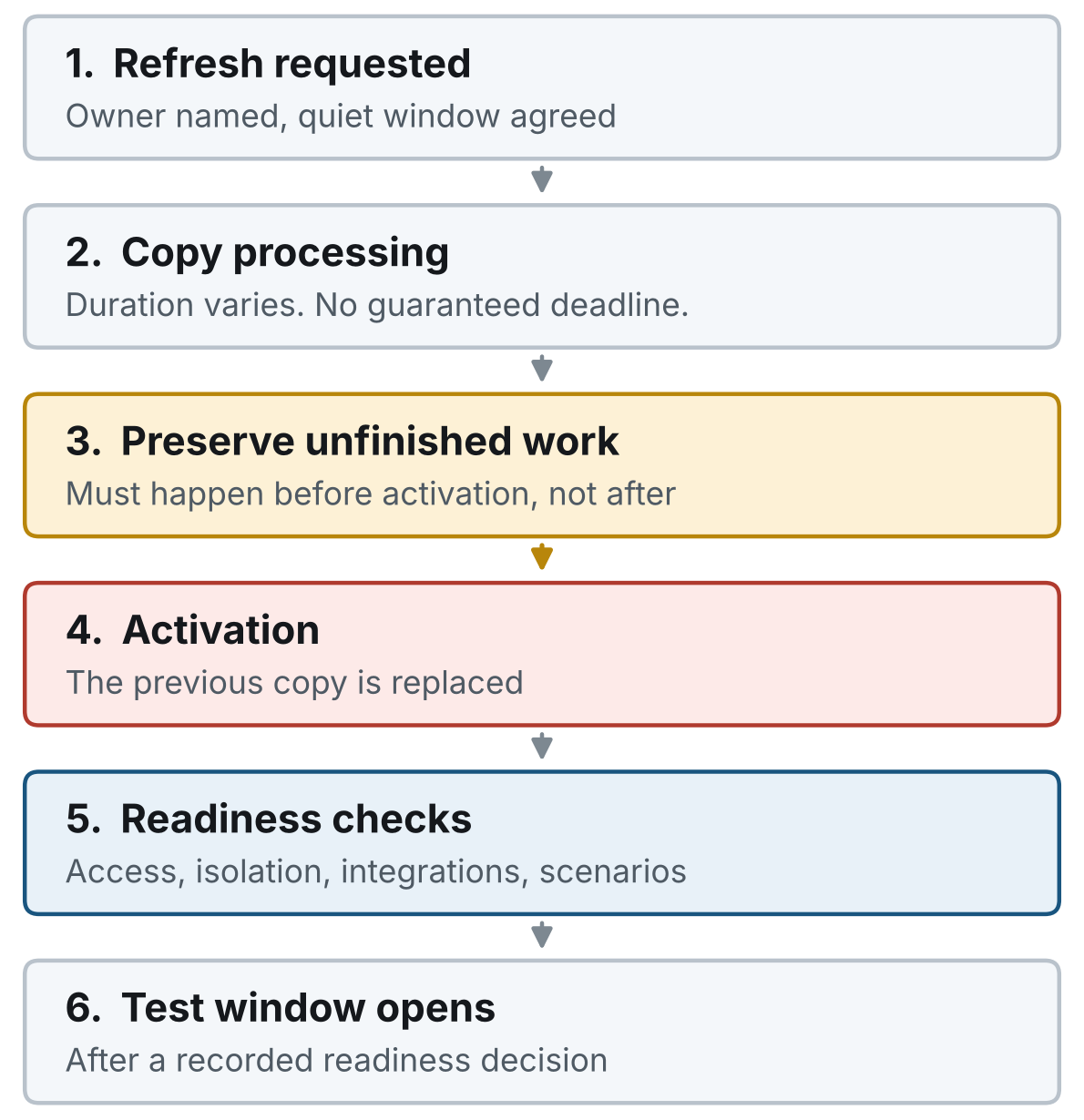
The refresh sequence, and why the order matters: anything not preserved before activation is gone once the previous copy is replaced. Conceptual diagram, not a record of an observed refresh.
The constraints that matter for planning:
Copy time is variable and uncommitted. Salesforce documents that copy duration depends on queueing, shared capacity, demand, data size and complexity, that same-type requests can queue behind each other, and that there is no guaranteed completion deadline (SF03). Stagger requests and plan lead time — and note that Support cannot force normal copy processing to go faster. One administrator described a Full refresh that reached a point and halted: Since then it is stuck at 94% and is not progressing further. (r/salesforce, 21 January 2026). That is one self-report with no confirmed cause or documented resolution, and it says nothing about how often this happens. It is enough to show that a test plan anchored to a promised finish time is fragile.
Activation destroys what it replaces. Without Auto Activate, a refreshed copy requires manual activation, and activating it deletes the sandbox being replaced, including its current configuration and data changes (SF05). Copies not activated within 30 days are subject to deletion. Auto Activate removes the manual step and also removes the prior copy during activation (SF12) — an operational decision about your team's dependencies, not a universal best practice. Preserving unmerged metadata and required fixtures has to happen before activation, and the activation needs a named owner and a sign-off, not a calendar slot.
Discarding a refresh does not reset the clock. If you discard a pending copy, you keep using the existing sandbox, but the next-refresh eligibility still follows the original request (SF06). Treat that as a scheduling constraint, not an escape hatch.
A refresh is not an exact snapshot. Copying is not a point-in-time capture, and concurrent production changes during the copy can produce inconsistencies (SF04). Salesforce's guidance is to maintain a refresh strategy, preserve undeployed work, and use a fresh comparison environment when isolating whether a problem is sandbox-specific. Not every anomaly in a stale environment is a production defect.
Where targeted metadata or data updates would answer the question, they may sometimes avoid a full refresh entirely (SF03). That is often the better move for a small team under time pressure.
Make test data representative and safe
Representative does not mean real. The requirement is that the data can produce the scenarios you need to assert — the right relationships, variations and edge cases the change actually touches. A relationship-rich set of synthetic records built for a specific scenario usually tests a change better than a production sample where the relevant combination may not appear at all.
For the fictional team's pricing change, that means a small deliberate fixture set: two Accounts on different pricing tiers, Contacts holding the roles the approval path requires, and Opportunities spanning the boundary conditions the change affects — not a broad copy and a hope that something suitable is in there.
Where a production sample genuinely is needed and authorized, Partial Copy templates and Full sandbox data bring obligations with them. Salesforce documents Data Mask & Seed for replacing sensitive sandbox values with synthetic ones through reusable policies that can be associated with refresh workflows, and it requires the Data Mask add-on and supported editions (SF08). Availability and coverage need checking against your own org rather than assuming them, and enabling a masking tool is not the same as demonstrating your privacy obligations are met — masking and seeding are separate decisions, and both are separate from compliance.
Two more items belong here rather than in the readiness gate, because they concern the data itself: fixture versioning (so you know which scenario set a result came from) and metadata currency (so you are not testing against configuration production has moved past). If the change involves volume or migration behaviour, automation readiness before a data migration is the adjacent question.
Use a post-refresh readiness gate
This is the step most often skipped, because the copy finishing feels like the finish line. A readiness gate is the short, owned set of checks that convert "the environment exists" into "this environment can be trusted for this change." Six areas are worth checking, deliberately separated by evidence type:
-
Access for the intended tester. Not admin access — the specific person or role who has to complete the business scenario. An administrator logging in successfully proves nothing about whether the business tester can. Access failures after a refresh are a recurring public complaint: one administrator described being locked out of a newly refreshed Partial sandbox under SSO enforcement, writing I have an urgent package update to deploy tomorrow and I am completely stuck. (r/salesforce, late October 2026 per search result; the page's own relative date was inconsistent, so treat the exact day as provisional). They attributed it to an identity-provider mismatch, but that is their explanation rather than a verified diagnosis, and no accepted resolution is visible. The lesson is that access verification belongs before the test window, with a named escalation owner — not that production SSO or MFA should be weakened for convenience. Any security exception needs its own review and authorization.
-
Outbound isolation. New and refreshed sandboxes default to System email only, permitting automatically generated administrative mail such as password resets; All email enables other outbound messages (SF07). Inspect the actual setting rather than assuming it, and note its limit: it does not establish that API integrations or other outbound channels are isolated, and it should not be switched to All email for convenience.
-
Integration configuration. Local external client apps are not copied when a sandbox is cloned or refreshed; packaged ones are (SF09). One practitioner described exactly that friction: Every time i refresh uat or other sandbox, the external client apps are gone. (r/salesforce, 24 April 2026). Record distribution type per app and assign a secure reconfiguration owner in the runbook. Credential-handling suggestions in that thread are speculation, by their own authors' admission — do not adopt advice to share or redistribute secrets. When reconnected integrations start returning errors mid-test, Salesforce integration error handling covers what to retry versus escalate.
-
Jobs and configuration. Scheduled jobs, required settings and anything that needs to be deliberately re-enabled or deliberately left off.
-
Fixture integrity. The scenario data is present, related correctly, and is the version you think it is.
-
Business-scenario assertions. Someone in the intended role completes the actual scenario and the result matches a written expectation.
The distinction between items 1–5 and item 6 matters most. Inspecting configuration tells you a setting is correct; only item 6 tells you the business scenario works end to end. A worksheet that marks the first five green and leaves the sixth unchecked has not established readiness — only that the environment is plausibly configured.
If you automate preparation, keep the evidence levels honest. Salesforce's SandboxPostCopy interface supports post-copy preparation through runApexClass(context), executed under Automated Process, where permission limitations can cause failures (SF10). The testSandboxPostCopyScript overload that runs under Automated Process permissions gets closer to real post-copy conditions than the default — but a passing unit test does not prove an actual refresh invoked the script, and proves nothing about external receivers (SF11). Compilation, unit test results and observed post-copy execution are three different receipts. Keeping those scripts maintainable is the same discipline as maintainable Salesforce automation anywhere else on the platform.
Let change risk decide the size of the gate
A uniform checklist either slows small work down or gives large work false confidence. Scale the gate to what the change can break.
Lower-impact change — a field label, a report, a narrow validation rule on one object. A focused check is proportionate: fixture integrity, the intended tester completing the one affected scenario, and a recorded decision.
Higher-impact change — permissions, sharing, integrations, data model, anything touching the approval or pricing path. The gate widens: representative data across the affected relationships, the intended role completing the scenario rather than an admin, integration configuration confirmed per app, and a recovery owner named before the test window opens.
Then let the owner record one of three outcomes, and say which:
- Ready. The checks that matter for this change passed, with evidence.
- Hold. Something required is missing. Name it and name who clears it.
- Ready with declared limits. Testing can proceed, and these specific things were not verified. Write them down.
That third state earns its keep. It is honest, it is actionable, and it stops a team from either blocking indefinitely or quietly treating an unchecked integration as passed. A checklist is useful when it supports a decision; it stops being useful when it only accumulates signatures.
Measure whether the process is actually helping
If you introduce a register and a gate, measure whether they help. Suggested local measures, each needing a stated denominator and a note when scope changes:
- Request-to-test-ready elapsed time — refresh request to recorded readiness decision.
- Hands-on preparation time — person-hours preparing an environment, separated from waiting.
- Time waiting for an environment — delivery work blocked on availability.
- Escaped defects by severity — post-release issues the gate could plausibly have caught.
- Rework after refresh — work redone because something was not preserved.
- First-pass readiness — share of refreshes reaching Ready without a Hold cycle.
Use these measures to inform your own judgement about whether your use of Salesforce sandboxes is helping you meet your goals.
Common objections
Do we need a Full sandbox for everything?
No. Full gives you breadth and production-scale data, with a 29-day refresh floor and the obligations that follow production-scale records (SF02, SF08). Reserve it for decisions that genuinely need volume or breadth; use smaller environments with purpose-built data for everything else.
Can we refresh more often?
Only within your type's minimum eligibility interval — one day for Developer and Developer Pro, five for Partial Copy, 29 for Full (SF02). More frequent refreshing also means more preparation work and more destruction of in-progress work at activation (SF05). Frequency is not free.
Why not just refresh before every release?
Because the refresh is the risky step, not the safe one. Activation replaces the existing environment and its unpreserved contents (SF05), copy timing is uncommitted (SF03), and a copy is not an exact snapshot (SF04). Sometimes a targeted update answers the question without a refresh (SF03). Refresh when the drift actually blocks the decision you need to test.
Can automation remove the checklist?
It can remove repeated manual preparation, which is worth doing. It cannot remove the decision. SandboxPostCopy can prepare fixtures and configuration, subject to permission limits under Automated Process (SF10), and can be unit tested — but a passing test is not evidence a real post-copy ran, nor that external receivers are ready (SF11). Automate the preparation; keep the readiness decision owned by a person.
Can we do this with a small team?
Yes, and the small-team version is deliberately thin: a one-page register with an owner per environment, a short readiness checklist scaled to change risk, and a named activation owner. The cost is minutes per release; the cost of not having it shows up as a release nobody can confidently approve. If the ongoing load genuinely exceeds internal capacity, ongoing Salesforce support is a separate buying decision from the lifecycle discipline described here.
When outside help is worth it
Three patterns suggest a scoped review is worth the time: environment conflicts that recur every release regardless of planning; preparation that is manual, fragile and only one person can do; or a critical release approaching with real uncertainty about whether any environment is fit to test it.
A review of this kind looks at environment ownership, change and dependency paths, what representative test data would need to contain, and where the refresh and readiness gaps sit. It produces decisions — who owns what, which checks belong at which risk level, what to fix first — not a tool purchase.
If refreshes keep interrupting UAT, or your team can't agree when an environment is ready, get in touch. Bring one recent release, your environment list and the preparation steps your team repeats. We can scope a review of the ownership, data and readiness gaps worth fixing first.
Scope and evidence
The technical behaviour described here comes from current Salesforce documentation reviewed on 16 November 2026, listed below. Documentation establishes documented platform behaviour; it does not establish your org's settings, entitlements or licences, which need checking directly.
The small-team scenario is fictional, and the lifecycle sequence above is an illustration rather than a record of an observed refresh. No sandbox refresh, activation or post-copy execution was performed for this article, and no readiness exercise was run in a licensed sandbox — the register and checklist are worksheets, not completed test results. The practitioner reports cited are public firsthand self-reports: they show these problems occur and are worth planning for, but they are not prevalence data, verified diagnoses or confirmed root causes, and none documents a financial loss.
Salesforce documentation (checked 16 November 2026):
- Sandbox Types and Templates (SF01)
- Sandbox Licenses and Storage Limits by Type (SF02)
- Best Practices for Salesforce Sandbox Creation and Refresh Times (SF03)
- Troubleshooting Issues That Occur Only in a Salesforce Sandbox Environment (SF04)
- Activate Your Refreshed Sandbox (SF05)
- Unable to refresh sandbox after you discard a previous refresh (SF06)
- Email Deliverability (SF07)
- Protect Sensitive Data with Data Mask & Seed (SF08)
- Comparison of Connected Apps and External Client Apps Features (SF09)
- SandboxPostCopy Interface (SF10)
- System.Test testSandboxPostCopyScript (SF11)
- How to Configure Salesforce Sandbox to Auto-Activate After Refresh (SF12)
- Salesforce Sandbox Types and Management Best Practices (SF13)