Can Your Salesforce Automation Handle Your Next Data Migration?
Your Salesforce data migration is scheduled for the weekend. The file has been cleaned, the field mappings are approved, and sales expects to use the new accounts on Monday. Then someone asks: have we tested what happens when those records activate our existing automation?
That question deserves an answer before you approve the cutover. Salesforce warns that record-triggered flows can hit CPU limits during bulk operations even when they work for individual records. Flow and Apex triggers can also draw from the same transaction CPU budget. Salesforce’s troubleshooting guidance.
For the manager, the immediate concern is the handover: can staff use the right records at the agreed time? If a rehearsal uncovers a bottleneck, leave room to repair it and repeat the relevant checks. Finding it during the migration window leaves you choosing between a delay and proceeding with unresolved errors.
The business problem starts when nobody can explain what completed
Consider a hypothetical acquisition. You are bringing the acquired company’s accounts and contacts into Salesforce. The agreed handover includes assigned account owners and a completed transfer to a connected system.
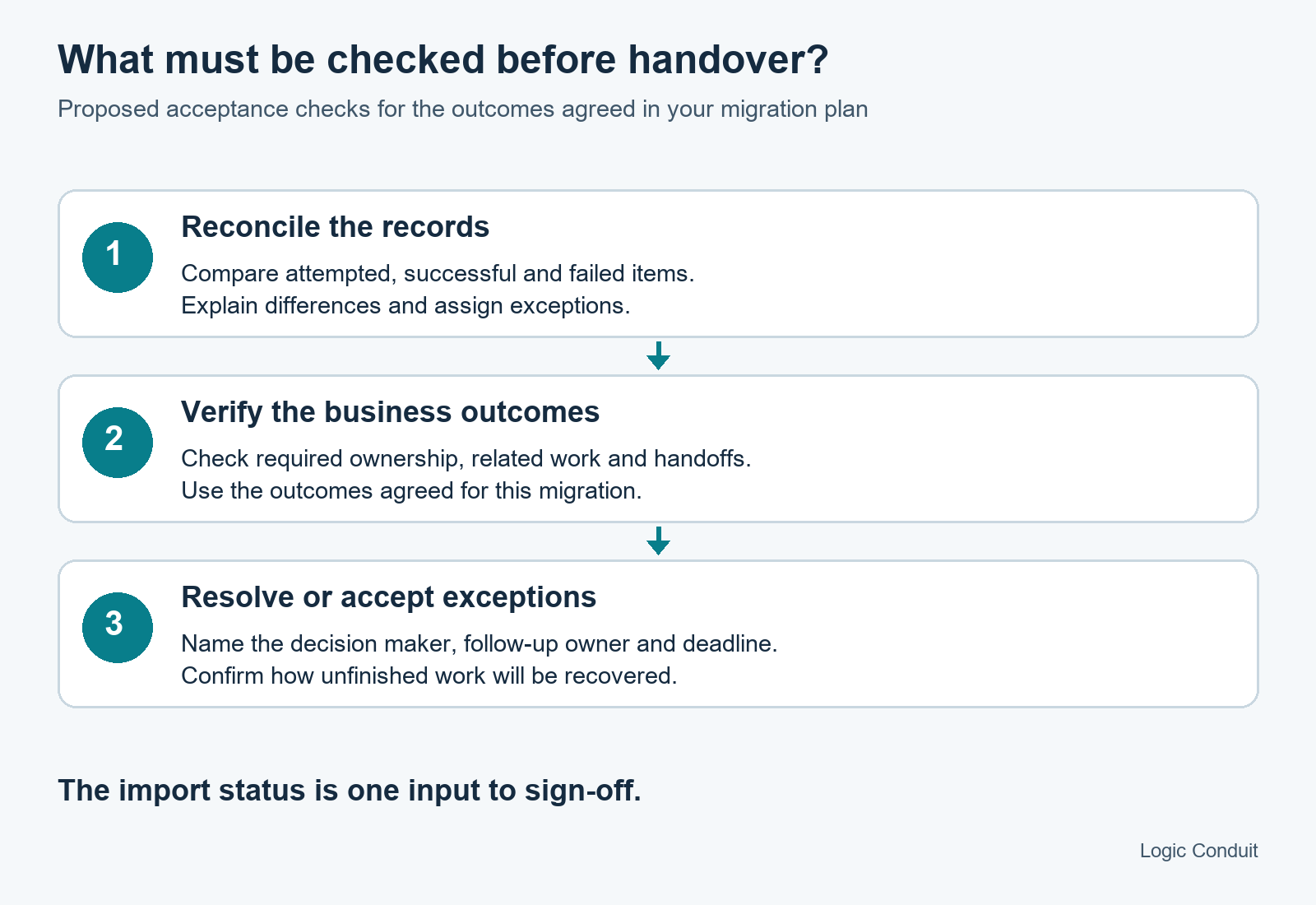
Now suppose the import reports errors. Before letting sales use the data, someone must establish which records loaded, which need another attempt, and whether the expected follow-up actions happened. An import status alone cannot answer every question in that handover.
The cost to assess is the work your team would have to do: investigate exceptions, correct records, reconcile the connected system, and support staff waiting for access. Ask the relevant owners to estimate that exposure using your own workload and staffing assumptions. A generic percentage saving would tell you little about this migration.
You can own this decision without becoming a Flow developer. Ask for a named person who can explain the result, identify unfinished work, and make the call to resume or stop.
Review the automation your load will activate
A clean import file establishes something about the input. It leaves a separate question about the work Salesforce performs when those records change.
Salesforce’s guidance describes how record changes can trigger chains of automation and how their cumulative CPU use counts toward the transaction limit. It recommends reviewing the full chain and testing with realistic data volumes. Salesforce Flow troubleshooting.
Ask your technical owner to map the relevant chain for this load. Depending on your org, it could include ownership changes, related-record updates, task creation, notifications, or integration handoffs. The useful deliverable is a short map of what this migration activates, who owns each part, and which outcomes the business requires.
Record the import tool and settings alongside that map. Salesforce documents specific CPU accounting for Bulk API and Bulk API 2.0. Your team should assess the actual execution path rather than approve a load using a limit quoted for a different context. Salesforce Bulk API limits.
Use two questions to locate the approval gap
First: has the team demonstrated the planned workload in a representative rehearsal? Second: can it reconcile the outcomes and explain how interrupted work will be recovered?
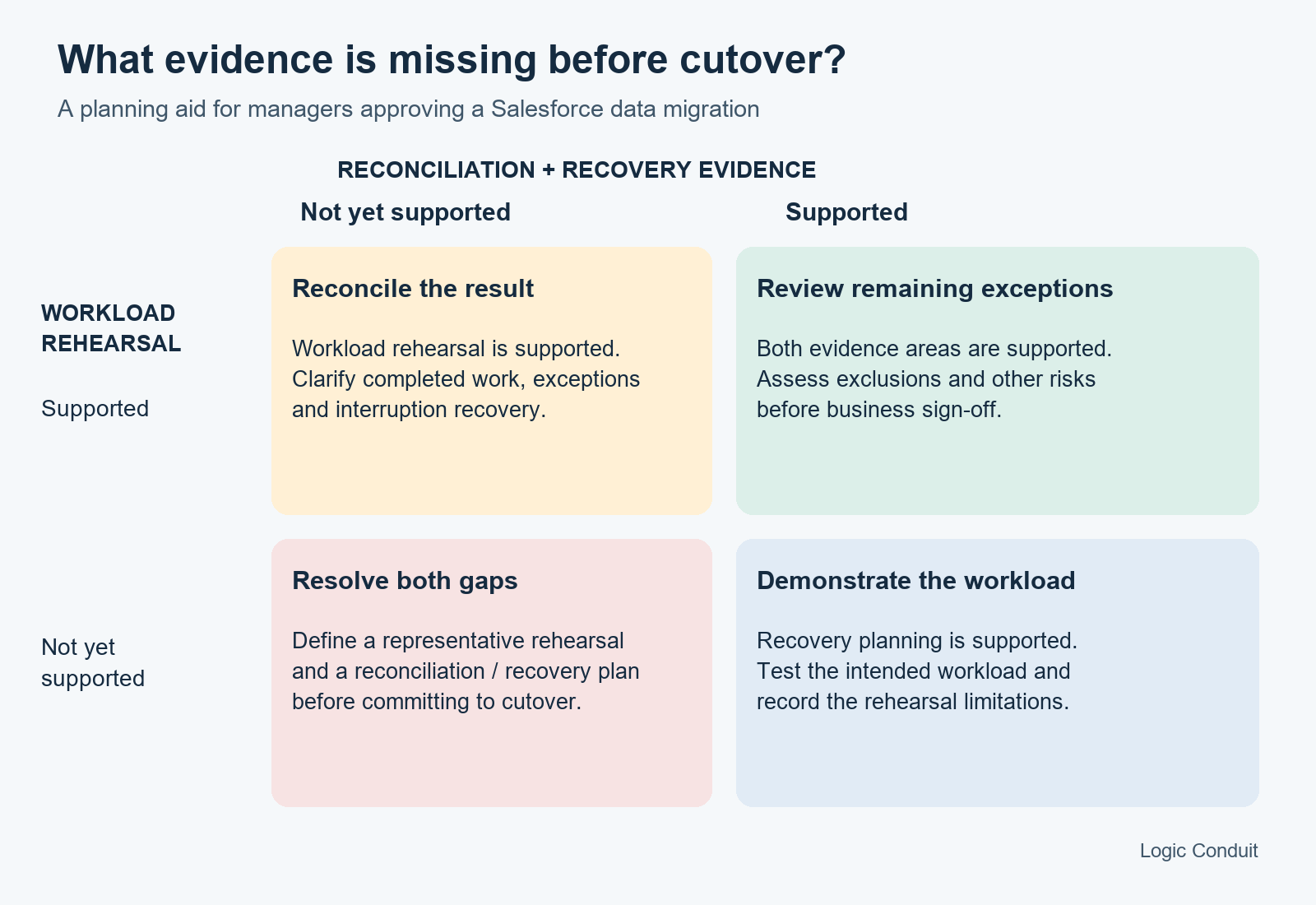
A clean rehearsal with no recovery plan still leaves an interruption unanswered. A detailed recovery document with no representative rehearsal leaves the load assumptions untested. Where both are supported, review the remaining exceptions and other project risks before signing off.
Specify what a useful rehearsal must show
“We tested a sample” is the start of a conversation. Ask what was in the sample, how it was processed, and what the team checked afterward.
For the hypothetical acquisition, a useful acceptance note might read:
The rehearsal will include accounts with simple and complex contact relationships, use the planned import tool and settings, and check ownership and the agreed connected-system handoff. The report will list successful and failed records, explain exclusions, and identify unresolved exceptions before sign-off.
This is a suggested test requirement, not a report of a test we performed. Your technical owner must choose a suitable approved non-production environment and explain where it differs from production.
Ask for three retained outputs: the workload and configuration used, a reconciliation of attempted records, and the results of the selected business checks. Make the exceptions visible. A smaller rehearsal may be appropriate, but document what it cannot establish about the full load.
Require a diagnosis before approving a workaround
If the rehearsal fails, ask which part of the automation chain is implicated and what supports that conclusion. The name of the Flow that reports an error is a starting point for investigation.
On narrow screens, scroll the table sideways. Keyboard users can focus the table and use the arrow keys.
| Proposed change | The question that determines whether to approve it |
|---|---|
| Optimize existing automation | What repeated or unnecessary work was found, and how will the team verify that required behavior remains intact? |
| Process smaller batches | Does the intended tool support the proposed setting, and did a representative test show that the load can still finish within the window? |
| Move selected work asynchronously | Which outcomes can arrive later, and who will monitor and recover the deferred work? |
| Bypass selected automation | Which business actions would be skipped, who approves that exception, and how will they be completed or reconciled? |
| Redesign part of the automation | What evidence rules out a smaller repair, and what maintenance and regression testing will the new design require? |
Be particularly careful with a bypass proposed to protect the date. In the acquisition example, skipping an ownership rule would need a separate way to establish the correct owners before sales begins using the records. The approval should include that follow-up work and its owner.
Likewise, deferring work changes its timing. If an outcome is required at handover, a proposal to produce it later needs explicit business agreement. Ask the team to compare the smallest viable repairs against your completion window and required outcomes.
Write the stop conditions before the weekend
Decide in advance which unresolved issues would defer the cutover. For this hypothetical migration, those might include an unexplained difference in the record reconciliation, an unverified connected-system handoff, or a recovery procedure that does not distinguish completed work from work needing another attempt.
Name who can accept an exception. A technical owner can explain what happened; the relevant business owner should approve the operational consequence of proceeding. Record the exception, the follow-up action, and its deadline.
This gives the cutover team a decision they can apply under pressure. It also gives you a better basis for funding a repair: an identified gap, the options for closing it, and evidence that the chosen change addresses it.
Bring the gaps to an automation risk assessment
Use the Salesforce Migration Automation Readiness Checklist with your project and technical owners. It reviews existing plans and records without changing your org. Start with the largest unanswered question, rather than commissioning a broad redesign by default. If you are still choosing a provider, the questions to ask a migration provider cover the same ground from the buying side.
If your team cannot explain a bottleneck or reconcile the handover, bring the load plan, automation map, and available rehearsal results to Logic Conduit to discuss an assessment. Those materials help define what needs verification and whether a targeted repair is sufficient before you commit to the cutover.