Salesforce Validation Rule Examples: When Your CRM Stops People From Doing Their Jobs
Your salesperson has a deal to move forward. The customer is on the phone. Salesforce won't let them save the opportunity, because a field they've never heard of is blank and marked required.
They don't know the answer. They type "TBD" and carry on with their day.
Your company now has two problems instead of one. Salesforce has interrupted legitimate sales work, and your management reports have quietly inherited a value nobody has verified. That second problem is a data quality problem, and it outlasts the sale.
The salesperson is not the problem here. They did the sensible thing under pressure. The problem is more likely to be a design decision — how your required fields and Salesforce validation rules were set up, and at which point in the sales process they demand an answer.
When Salesforce becomes an obstacle to sales
Most teams install validation rules for good reasons. A sales leader wants to know who the decision-maker is; finance wants clean close dates; operations is tired of chasing shipping details. Each request is reasonable on its own, and the quickest way to satisfy it is to make a field required.
The trouble is that these decisions accumulate. Rules get added by one administrator, inherited by the next, and rarely revisited, and nobody owns the total burden they place on the person trying to save a record. Over time, a system bought to help people sell starts interrupting them instead.
The business question worth asking is not "is our data clean?" It is this: is our Salesforce configuration costing us money by preventing people and systems from completing legitimate work?
That is a different question, and it has a different answer.
It also has a consequence that tends to surprise the people who asked for the fields in the first place. Make opportunity creation expensive enough — a dozen or twenty fields before a record can exist — and reps respond rationally: they wait. They keep the deal in their head, or in a spreadsheet, until it is real enough to justify the paperwork. The pipeline then fills up late, deals appear to move from nowhere to nearly-won, and the leadership team that asked for better opportunity data ends up with less visibility than before. The requirement was added to improve reporting and quietly degraded it.
Three ways bad validation rules cost your business
Employee productivity and sales execution
The direct cost is interruption. A rule written for one scenario will fire in every scenario that resembles it. A rep updating a phone number can be blocked by a requirement about next steps. A manager correcting a close date can be stopped by a field owned by a different team.
One Salesforce administrator described this pattern on the Trailblazer Community after building separate validation rules for each milestone in a process. Their account of the result is blunt: as a colleague further down the process went to save their own update, an earlier milestone's rule fired, "preventing them from saving the record." Their rules, as they put it, cancelled each other out and caused errors for users downstream.
Each of these events is small; the pattern is not. People re-enter data, ask an administrator for help, or wait on someone else before they can record their own work.
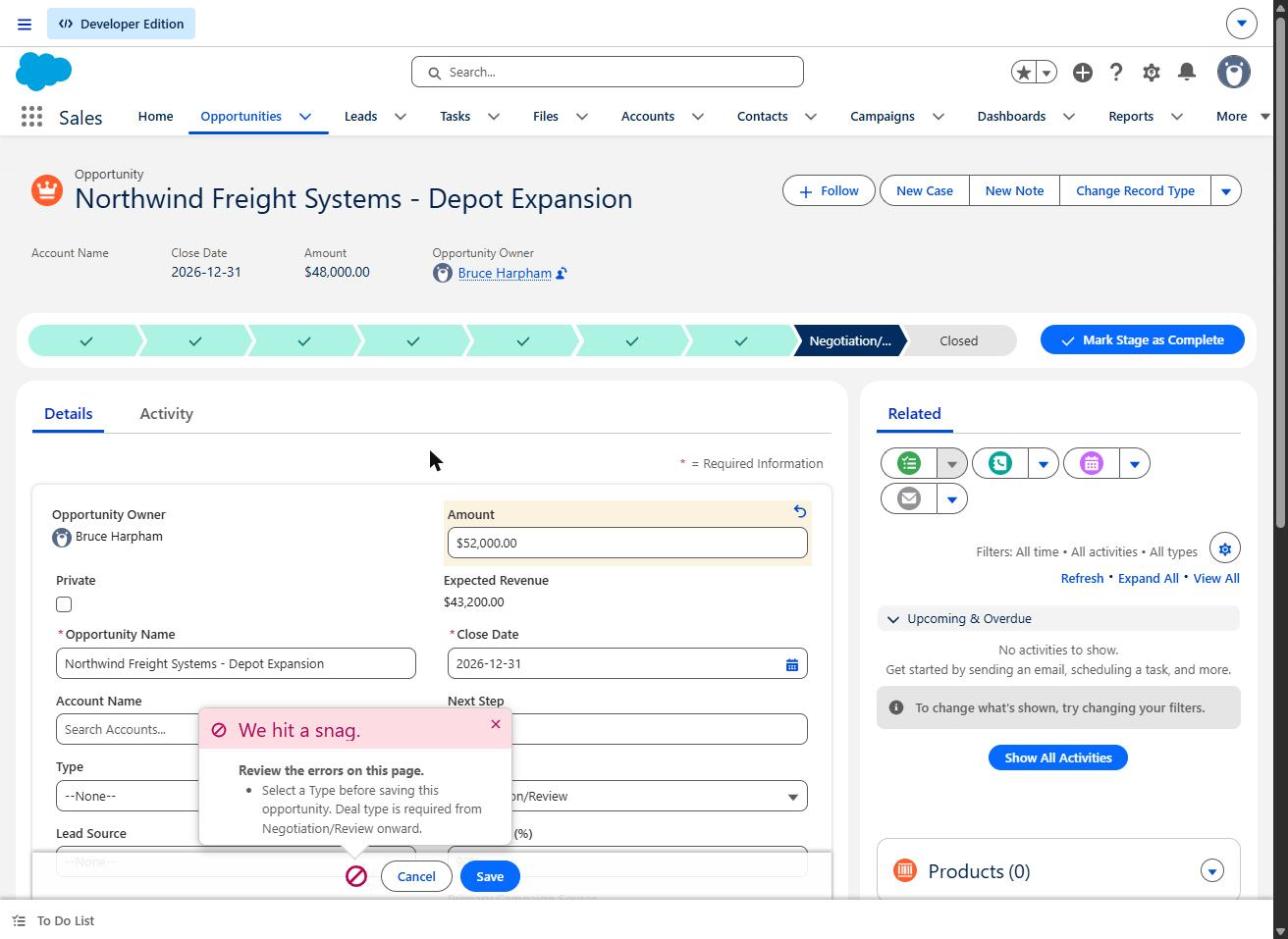 An edit to Amount — a field the rule never mentions — blocked because the opportunity happens to sit in Negotiation/Review with Type blank.
The screenshots here use invented records. The rule under test is deliberately simple — it requires a deal Type once an opportunity reaches Negotiation/Review — and the point is not the formula but where it bites. Because the rule is written against the stage the record is in rather than the move into that stage, it applies to every save while the deal sits there, including saves that have nothing to do with the field it names.
Interrupted business processes
This is the consequence managers tend to discover last, and it is usually the most expensive.
A validation rule applies to records regardless of how they are saved. Salesforce is explicit that, unlike a page-layout requirement, a validation rule applies "all the time, regardless of where the record is created or updated." That includes your integrations, your imports and your automation.
There is a subtlety here that catches experienced teams. Salesforce notes that validation rules execute after your automation runs triggers and flows, which means you can build automation that updates records with values that conflict with your validation rules — and that this "prevents your users from saving even when they aren't making direct changes that violate your validation rules." A rule and a flow, each sensible alone, can combine into a record nobody can save.
This has a specific and expensive shape worth naming, because it crosses object boundaries. Suppose a flow updates Account fields when an opportunity reaches Closed Won. A validation rule on the Account — written years ago, for manual data entry, by someone else — rejects that update. Because the rule runs after the flow, and applies to existing records as well as new ones, the rejection propagates back and the Opportunity save fails. The rep sees an error about a field they did not touch, on an object they were not editing. Legacy accounts with missing values are the usual trigger, which is why the failure looks intermittent: it depends entirely on which account the deal happens to be attached to.
The failure then lands wherever your error handling puts it. A marketing automation user hit exactly this in a public community thread: leads submitted through a website form stopped syncing to Salesforce, returning "FIELD_CUSTOM_VALIDATION_EXCEPTION: Website values cannot be assigned to phone ups" — and the poster did not know what the rule was asking for. The accepted answer identified a Salesforce validation rule and pointed them to the validation rules list to read the error message and work out the requirement.
These errors are not inherently silent. They become effectively invisible when nobody owns the error queue, nobody is alerted, and the records simply don't arrive. If you want handoffs that hold, someone has to own what happens when a write is rejected — the subject of our guide to Salesforce integration error handling.
Management reporting you can't rely on
Require information before anyone could reasonably know it, and people supply something rather than nothing. That is not dishonesty. It is a rational response to a system that will not let them continue.
The business consequence is worse than missing data. A blank field is visibly incomplete; you know not to trust it. A field containing "TBD", "N/A" or a guessed name looks complete in every report, dashboard and forecast you run.
Three states lead to three different decisions, and only one of them is safe: blank (not known, and visibly so), placeholder (supplied to satisfy a rule, with nothing behind it), and verified (known and confirmed). A non-blank field is not evidence of accuracy. Field completion rates can rise while the quality of your decisions falls.
The way out is usually not a better-worded error message. It is asking for less, later, and in context — a short guided prompt at the moment a stage changes, asking for the three or four things that actually matter at that point and inheriting the rest from the account, tends to produce better information than a dozen fields enforced at creation. Fewer required fields can mean more reliable data, which is counterintuitive only until you have watched someone type "TBD". We cover the broader version of this problem in Salesforce data quality.
Required fields versus validation rules: where to enforce the rules
Consider two policies for the same business goal — a leadership team that wants visibility into who actually signs off on deals.
Policy 1: always required. The Economic Buyer field is made universally required. When an opportunity is created, the rep often genuinely doesn't know. Some delay creating opportunities at all, which hides pipeline; others enter a guess, which pollutes it.
Policy 2: enforced in context. The opportunity can be created during discovery without it. Before advancing to a later stage, Salesforce requires the decision-maker details, with an error that explains what is needed and why.
The lesson is about placement, not strictness: require information at the point where its benefit justifies its operational cost.
One qualification matters a great deal in practice, and it's where well-intentioned conditional rules still cause damage. A rule written as "if stage is Negotiation and this field is blank, block the save" applies to every save while the record sits in Negotiation — not just the move into it. The rep who edits a phone number three weeks later is blocked too. A transition-only check (using ISCHANGED with PRIORVALUE to look at the stage movement itself) behaves differently from an ongoing field requirement. Decide which one you actually want — and be careful here, because the fix is easy to overshoot. Narrowing a rule to fire only on change will stop it blocking unrelated edits, but it also stops it enforcing anything on the records already sitting in that stage. If the requirement was genuinely meant to hold for as long as the deal is open, narrowing it quietly removes the control you thought you had. Which behaviour is correct is a business policy question, not a formula question.
Conditional rules have one further rough edge: the experience they produce differs by entry path, so a rule that reads clearly on a record page can surface as an opaque error in a flow, an import or an API write. Our article on Salesforce opportunity stage requirements works through the stage-gate version of this in detail.
Some fields genuinely must be required from the first save. Anything your billing, provisioning or compliance obligations depend on belongs in that category. The point is that this should be a short, deliberate list rather than an accumulation.
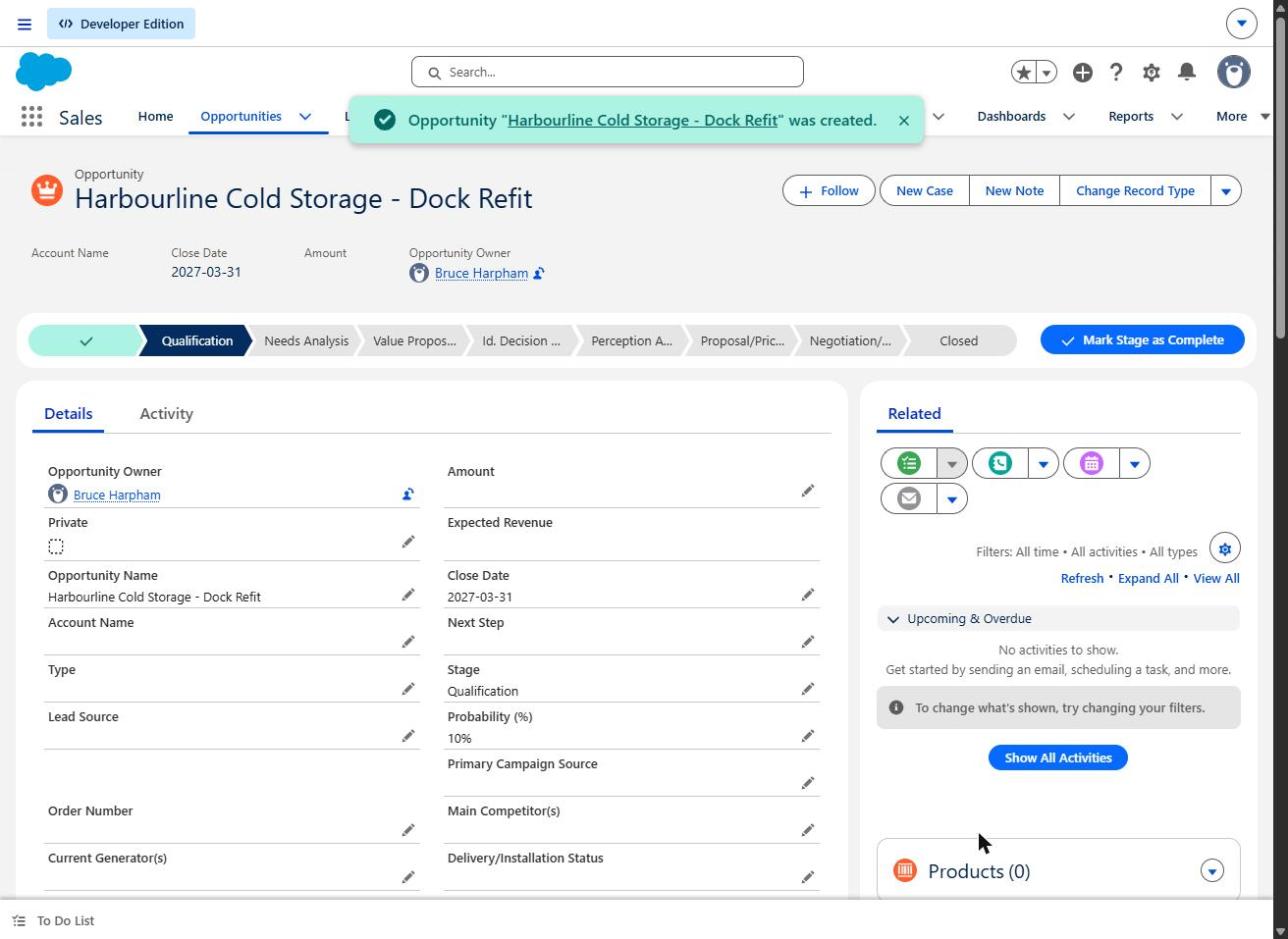 The same requirement, earlier in the process: a new opportunity saves at Qualification with Type still blank. The rule only bites once the deal reaches Negotiation/Review.
Where each method is enforced
| Method | Enforced in Lightning UI | Enforced via API, integrations and imports | Typical use |
|---|---|---|---|
| Universally required custom field | Yes | Yes — Salesforce states it applies regardless of how the record is saved, including integration, API and mass upload | A genuinely non-negotiable field |
| Page-layout required field | Yes | No — Salesforce states this applies only when edited in the UI, and not to API updates | Guiding data entry on a specific layout |
| Dynamic Forms required field | Yes, on that Lightning page only | Not addressed in the documentation | Page-specific entry guidance |
| Validation rule | Yes | Yes — applies regardless of where the record is created or updated | Conditional and transition-based logic |
| Guided screen flow | Yes, within the flow | No | Improving the experience, not enforcing the rule |
Two further details are worth knowing before you rely on any of this. Salesforce states that import files must include every universally required field or the import will fail, and that universally required fields "are only enforced during lead conversion if validation and triggers for lead conversion are enabled." That setting explains a lot of otherwise baffling behaviour.
Five Salesforce validation rule examples worth reviewing
1. Reps cannot advance an opportunity
A rep moving a deal from Discovery to Proposal is blocked by a decision-maker field they can't yet complete. The rep feels it; the sales leader looking at a thin pipeline pays for it. The likely cause is a universally required field, or a conditional rule firing on every save while the record sits in a stage. Consider instead a transition-only check at the point the information becomes necessary — and verify it by having a rep attempt both an unrelated edit and the stage change itself.
2. Lead conversion is unexpectedly blocked
Conversion is the step most likely to surprise you, because it runs through a different path from a normal save. A marketing automation user reported being stopped mid-conversion by "Validation error on Lead: Please select appropriate LDR who qualified the lead." The accepted answer attributed it to a Salesforce validation rule and offered two options: populate the field before converting, or exclude the integration user from the rule — a pattern that still appears in orgs today, typically now implemented with a bypass permission rather than a hard-coded profile name.
The commercial risk is that a lead arrives, qualifies, and then cannot become an opportunity. Test the actual conversion path, not just record editing, and check whether validation for converted leads is enabled in your org. We cover the downstream cost of a messy conversion step in Salesforce lead conversion.
3. Closed-won deals don't become completed handoffs
A deal closes. Onboarding needs a billing contact, a go-live date and a shipping address nobody captured. Operations chases the rep, the rep chases the customer, the customer waits. Requiring those three fields at the won stage is defensible; requiring them at creation months earlier is not, since it moves the friction to the point where the answers don't exist.
4. Automation and integration transactions fail
Your order system writes back to Salesforce and the write is rejected by a rule written for manual entry. Or a flow sets a field in a way a validation rule forbids. Salesforce's own guidance is a useful warning here: because validation rules apply to existing data as well as new data, an administrator may need to populate the required data on existing records to ensure future integrations aren't blocked. A rule activated today can break a sync that touches records created years ago. Before activating a rule, test it against the integration user and a realistic bulk update, not just a single record in the UI.
5. Management receives complete-looking, unreliable information
Every opportunity has a Next Step; half of them say "follow up". Every account has an Economic Buyer; some are the rep's own manager. The requirement is satisfied and nothing has been learned. This is the hardest case to detect, because no error is ever thrown — the only symptom is a forecast that doesn't behave like the business.
Sidebar: a rough sense of scale (illustrative only)
40 employees × 10 minutes lost per day × 220 working days ≈ 1,467 hours of employee time per year. At an illustrative fully loaded cost of $65 per hour, that is roughly $95,000 of labour capacity.
These are assumptions, not measurements, and not recoverable cash — lost minutes do not convert automatically into savings or revenue. The figure is only useful for deciding whether the problem deserves an hour of your administrator's attention. At this scale, it usually does.
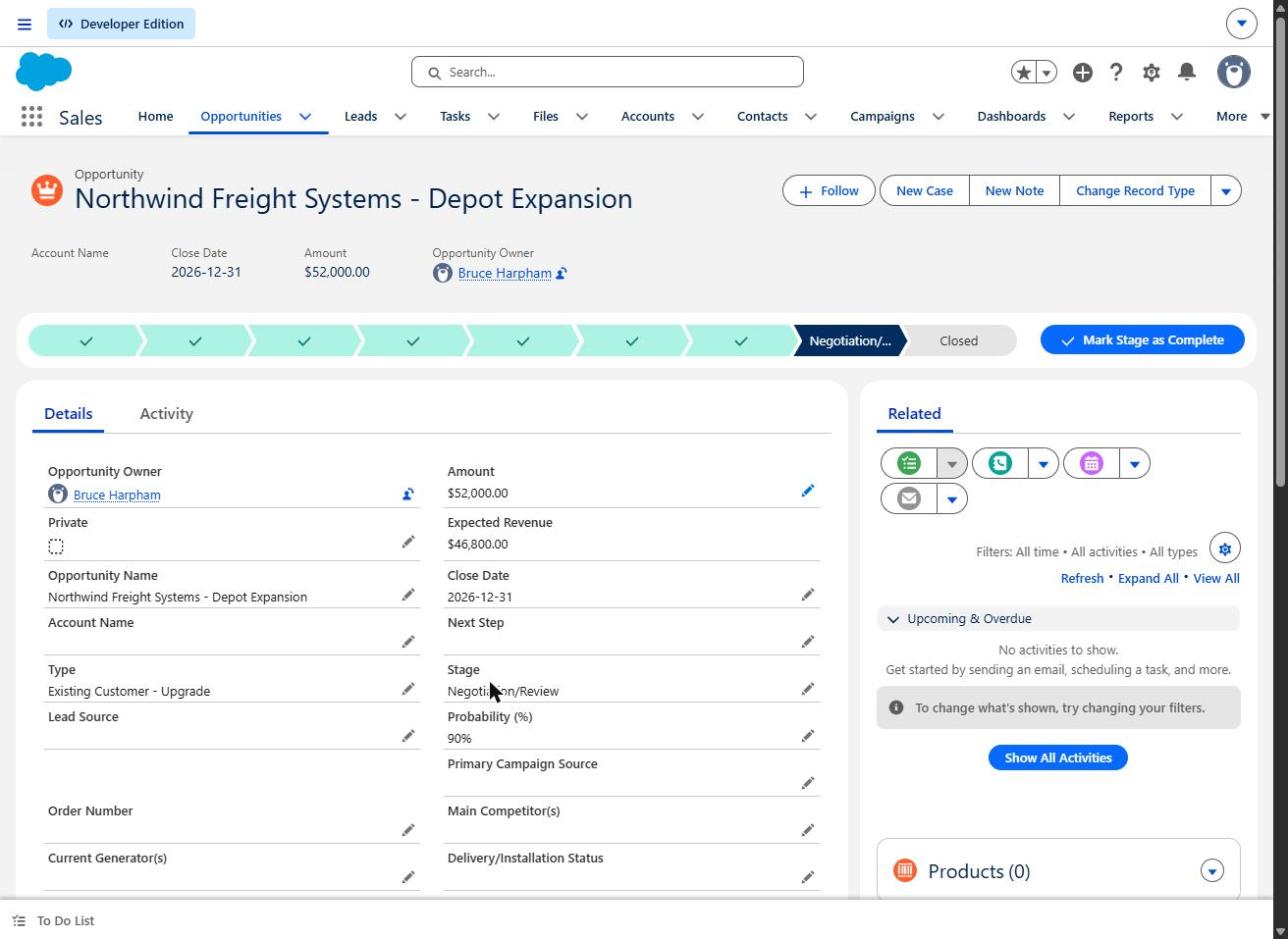 The same Amount change saves once Type is supplied. The block was never about the amount.
Five questions managers should ask their Salesforce administrator
- Which requirements block our people most often, and do we have any record of it?
- Which rules can interfere with customer-facing or revenue-generating activity — conversion, quoting, closing?
- What happens when an integration or automation hits a validation error? Who sees it, and how quickly?
- Are people entering placeholder values to get their work done? What would we look for to find out?
- When we test a new rule, do we test it as an ordinary employee? Administrators often hold bypass permissions, so the person signing off on a change may be structurally incapable of experiencing the error it causes.
None of these require a rebuild to answer. They require someone to look.
Fix the Salesforce problems that interrupt work
The right first step is rarely a platform-wide overhaul. It is a bounded review: list the active rules on your revenue-critical objects, identify which ones fire on every save rather than at a transition, test the paths that actually matter — conversion, bulk update, integration write, and a normal user's record edit — and fix the handful that are costing you the most. Most of what you find will fall into three buckets: requirements that could be delayed to a later stage, requirements that could be narrowed to fewer record types, and requirements that should be guidance rather than a block. That is usually a short engagement with a visible result, and it tells you whether anything larger is warranted.
Small configuration decisions compound into real operational cost — and are usually straightforward to unwind once someone looks at them deliberately.
If deals, handoffs or integrations are stalling in your org and you'd like someone to work out why, get in touch with Logic Conduit.
Sources
- Salesforce Help, Four methods of making a field required (published 9 November 2026) — https://help.salesforce.com/s/articleView?id=000003107&language=en_US&type=1
- Salesforce Help, Considerations for Universally Required Fields — https://help.salesforce.com/s/articleView?id=sf.fields_universally_required_field_considerations.htm&language=en_US&type=5
- Trailhead, Get Started with Validation Rules (order of execution with flows and triggers) — https://trailhead.salesforce.com/content/learn/modules/validation-rules/get-started-with-validation-rules
- Trailhead, Create Validation Rules (rules apply to existing as well as future data) — https://trailhead.salesforce.com/content/learn/projects/customize-a-salesforce-object/create-validation-rules-1
- Trailhead, Bypass Your Validation Rules (bypass switches and permission sets) — https://trailhead.salesforce.com/content/learn/modules/validation-rules/bypass-your-validation-rules
- Trailblazer Community, Validation Rule Help (milestone rules blocking downstream users) — https://success.salesforce.com/answers?id=90630000000hJQtAAM
- Adobe Experience League Community, lead sync blocked by FIELD_CUSTOM_VALIDATION_EXCEPTION, 29 April 2014 — https://experienceleaguecommunities-beta.adobe.com/marketo-27/trying-to-have-leads-fill-out-a-marketo-form-and-then-be-synced-to-salesforce-181117
- Adobe Experience League Community, lead conversion blocked by validation rule, 16 May 2013 — https://experienceleaguecommunities-beta.adobe.com/marketo-27/how-to-convert-a-lead-into-opportunity-194846