Salesforce Opportunity Stage Requirements for Better Handoffs
Your pipeline says a deal is ready to move. The colleague who needs to act next opens the opportunity and cannot tell what the customer has agreed to, what is still missing, or who is doing what next. Work waits while someone tracks down the rep.
Multiply that across the pipeline and the cost goes beyond untidy Salesforce records. Sellers spend time repeating the deal history. Managers use pipeline meetings to recover basic information. Teams pulled in to help lose time waiting for context, while leadership makes decisions from stages that may mean different things to different people.
Making more fields mandatory can leave you with the same problem and more frustrated sellers. The useful question is: what must the next person know to act, and when does that information become essential?
That is the starting point for useful Salesforce opportunity stage requirements. Define the business need, show what a useful entry looks like, and enforce it where the missing information justifies blocking a save. The example below applies that approach to one Next Step requirement, so a colleague can see the next customer action without first chasing the rep.
Define what the next person needs to act
An opportunity stage can prompt someone to allocate specialist time, prepare a submission or plan a customer conversation. Agree what evidence makes the deal ready for that attention before requiring another field.
Salesforce's stage-planning guidance starts with mapping the sales process, what is needed to advance, and the probability associated with each stage.
Pick a handoff that repeatedly generates follow-up questions. Use it to answer four questions before changing Salesforce:
- What does this stage promise? What has happened that makes the deal ready for the next person's attention?
- Whose work is held up? Name the person and the decision or task they cannot complete.
- What would unblock them? Write an example that lets them act without another conversation to recover the basics.
- When is that information essential? Require it at the point of need, allowing it to remain optional where it serves no immediate purpose.
A field added because “it would be useful to have” is harder to justify when every seller must complete it. Start with one requirement tied to work that is being delayed or repeated.
Choose Salesforce guidance or validation to fit the problem
A requirement has a cost too: time to complete it, interrupted updates and maintenance as the process changes. Choose the response that addresses why information is missing, rather than adding the same obstacle to every deal.
| Business problem | Approach to consider | What to watch |
|---|---|---|
| People miss information because the expectation is unclear | Path key fields and guidance for success | Highlighting a field does not itself make it mandatory at that stage. |
| Missing information makes a specific handoff premature | A validation rule with a clear message | Depending on its conditions, it can block ordinary edits as well as stage changes. |
| Collecting several related details creates repeated work | A guided screen flow | Plan how other editing routes and integrations will meet the same policy. |
Salesforce Path can highlight key fields and display guidance at each step. Use that space to explain what a good entry looks like. For enforcement, Salesforce provides sample validation rules that conditionally require a field based on opportunity stage.
Guidance, guided data collection and validation can work together. A screen flow helps users supply information through that route; it does not automatically enforce the policy through every other route. Choose the smallest change that makes the handoff usable.
Make the next customer action visible before a handoff
In a Salesforce Developer Edition demonstration, Northbeam Commercial Finance is a fictional equipment-finance broker. Its manager wants the next customer action visible before an application goes to a lender, so the manager and credit team know what still needs attention.
The requirement is deliberately narrow: an opportunity in Lender Submission must have a nonblank Next Step. Earlier stages can leave it blank. A useful entry is:
Confirm the supplier's revised equipment quote with Tamarack's controller on 2026-10-27.
This gives the colleague an action, a customer contact and an intended date. “Follow up” would pass a nonblank check while leaving much of the same uncertainty. Requiring an entry cannot guarantee useful or truthful information, qualification or buyer commitment.
The demonstration rule applies only to opportunities associated with three fictional accounts. It checks whether the opportunity is in Lender Submission and Next Step is blank after trimming spaces. It checks saves while the record is in that stage, including edits that do not change Stage. It does not require the field in later stages.
Renaming an account would change this demonstration's coverage. For a live process, define a stable scope and decide whether the requirement should continue into later stages.
Before the rule Next Step could be left blank
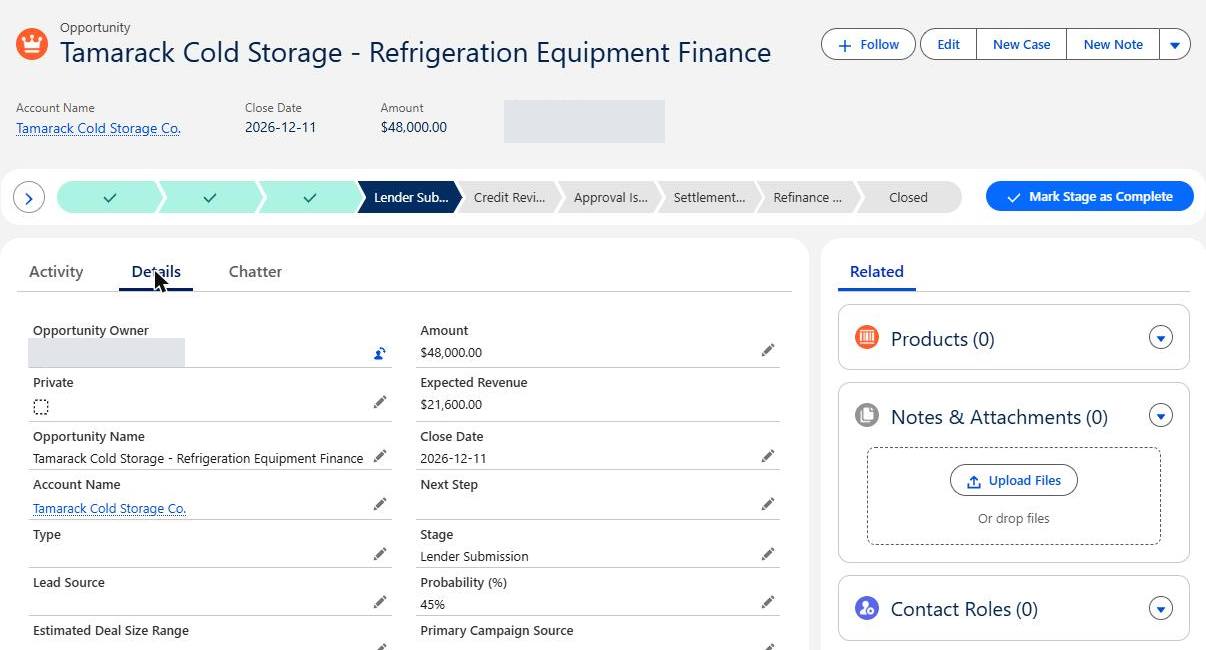
Before: the fictional Tamarack opportunity moved from Fact Find / Discovery to Lender Submission with Next Step blank. Owner details are masked.
With the rule the same incomplete move was blocked
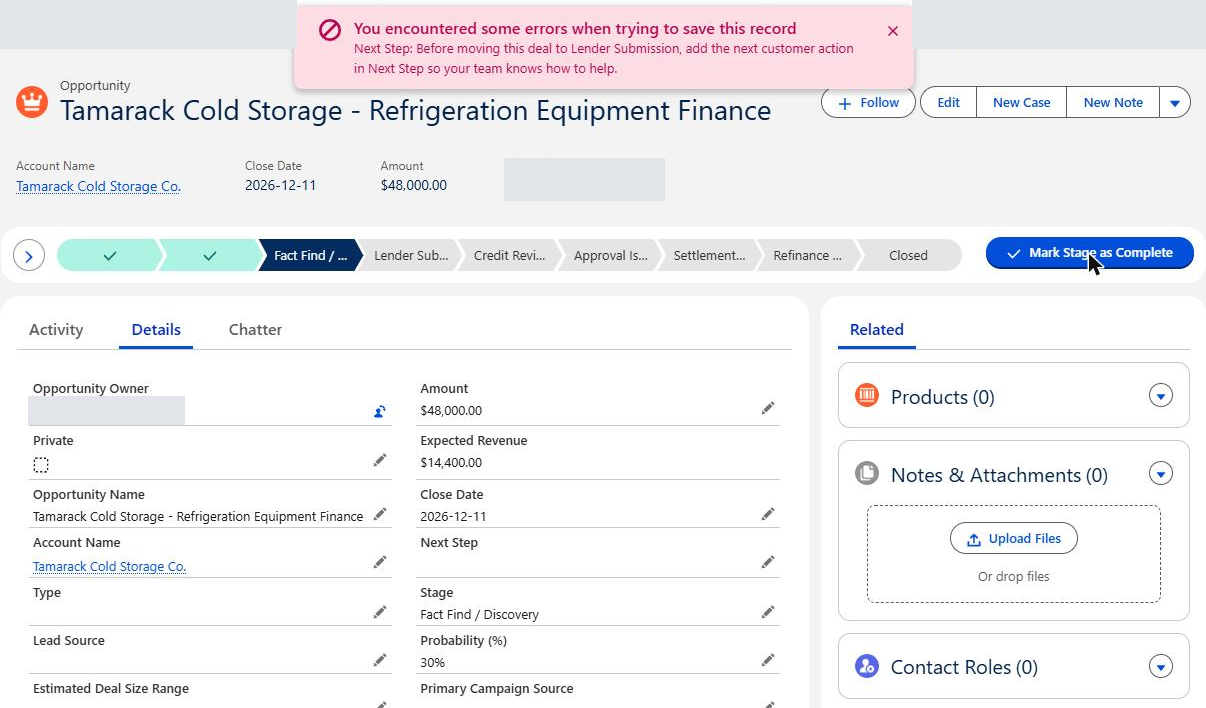
After resetting the record and activating the rule, the same action through Path's “Mark Stage as Complete” was blocked. The record remained at Fact Find / Discovery.
The message tells the seller what to add, where to add it and why it helps.
After Next Step was entered the move succeeded
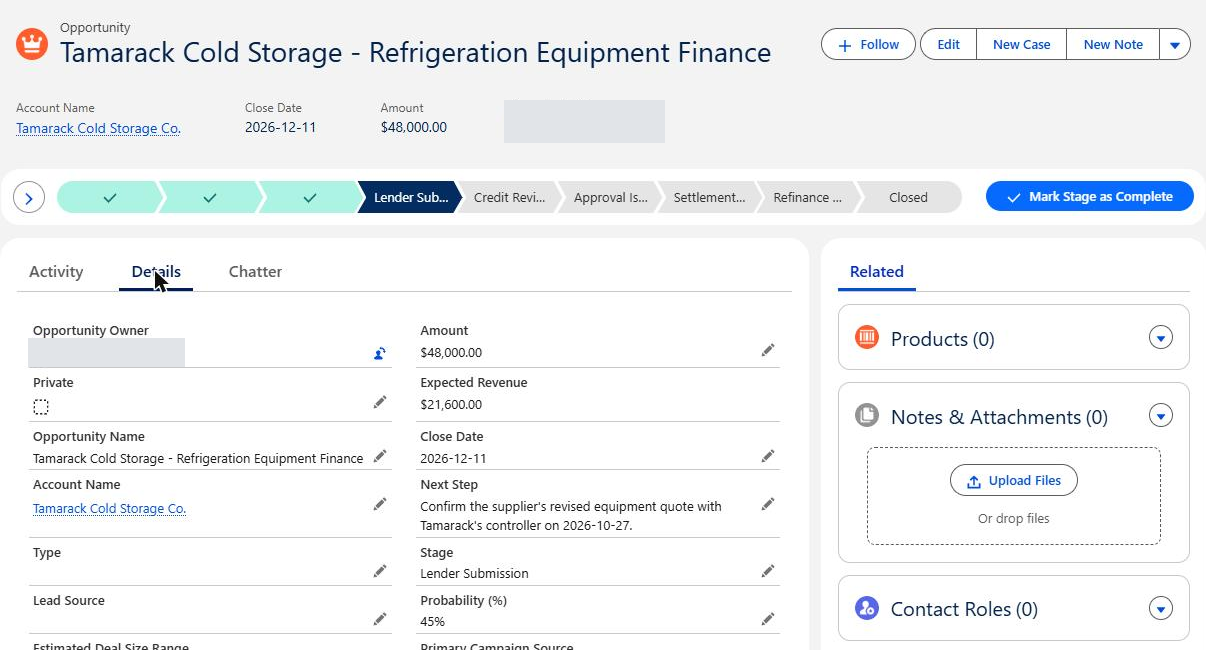
After: once the specific next action was entered and saved, the same Path action moved the opportunity to Lender Submission.
The test establishes that this move could no longer leave Next Step blank. Less chasing depends on the team entering useful information and colleagues using it; the demonstration does not measure time savings or sales results.
Protect useful work from the new requirement
A rule that catches missing information can also hold up legitimate work. A seller may need to correct an amount, move a deal backwards or close a lost opportunity. Preventing those updates can leave the pipeline less accurate while the team works around the restriction.
The demonstration therefore checked more than the successful transition:
- An earlier-stage opportunity could move from Qualified to Fact Find / Discovery with Next Step blank.
- Clearing Next Step while the Tamarack opportunity was in Lender Submission was blocked.
- A separate opportunity could move from Fact Find / Discovery to Closed Lost with Next Step blank.
- Editing Stage directly to Lender Submission with Next Step blank was blocked, with the message shown under Next Step instead of in Path's top-of-page notice.
Salesforce documents that Path validation messages appear at page level even when the rule specifies a field location. Check the controls people actually use so your instructions match what they see.
The wording matters too. “Before moving this deal…” fits a transition, but reads awkwardly when someone clears the field on a deal already in that stage. A clearer production message would be: “Deals in Lender Submission need the next customer action in Next Step so your team knows how to help.” The screenshots retain the message that was actually tested.
Before applying a similar requirement to live work, test ordinary edits, moving backwards, skipping stages, creating a record directly in the covered stage, and closing as lost from that stage. Include representative seller permissions and the imports or integrations that update opportunities. Salesforce notes that validation rules can affect new and updated records, including API calls. A change that looks helpful on screen can still disrupt updates arriving from another system.
Demonstration scope: tested on October 18, 2026, in a Developer Edition / Trailhead Playground org, using fictional records and an administrator account. The checks above covered Path and inline editing. They did not cover other profiles, mobile, direct creation in Lender Submission, imports, integrations, later-stage skips, or closing as lost from Lender Submission. Path guidance was not configured.
Measure whether the handoff needs less chasing
More completed fields is a weak measure of success if colleagues still ask the same questions. Before making the change, ask the person receiving the handoff what they usually have to chase. After rollout, review whether those questions are being answered in the record and whether they can start their work sooner.
Compare the effort saved by the receiving team with the effort added for sellers. Vague entries, continued requests for context and blocked legitimate updates are reasons to revisit the design. Assign an owner who can adjust the guidance, narrow the rule or remove a requirement that is not earning its place.
Use the companion Opportunity Stage Requirement Review Checklist, available below, to review one costly handoff with your sales manager and Salesforce administrator before making a change.
If the wider issue is confidence in the forecast, our article on three questions to ask before trusting a Salesforce forecast is a useful next read.
Find where your Salesforce handoffs are costing time
Which stage in your pipeline creates the most chasing or rework? Contact Logic Conduit with your current stage list and one recent example. We can talk through who was waiting, what information was missing, and whether clearer guidance, a simpler process or a targeted Salesforce change would help. You do not need a complete redesign brief to start that conversation.