Salesforce Opportunity Stages Best Practices: 7 Mistakes That Distort Your Pipeline
Salesforce opportunity stages best practices matter most in the meeting where someone asks how much of the pipeline is real. If your stage definitions can't support an answer, every report built on them inherits the doubt.
Picture this: it's the quarterly leadership meeting, and the VP of Sales presents $2 million of open opportunities, including $750,000 in advanced stages. The CEO asks a fair question: "How much of that is actually likely to close?" Nobody can give a defensible answer. One seller moves a deal to Negotiation as soon as a proposal is sent; another waits until the customer is discussing contract terms. Several "late-stage" deals have close dates that passed weeks ago.
The numbers add up. The stage definitions don't. That gap is expensive: managers assign people, discounts and executive time to deals that may have stopped moving, while finance builds plans on a pipeline nobody fully believes.
The seven practices below are for leaders who want the pipeline to describe sales reality, not just produce tidy totals.
What Salesforce opportunity stages are, and why managers should care
An opportunity stage is a picklist value that says where a deal sits in your sales process. In Salesforce, each stage is mapped to a default probability and a forecast category, and when the stage changes, the probability and forecast category change with it. That's why a stage choice ripples into pipeline reports, Expected Revenue and forecasts.
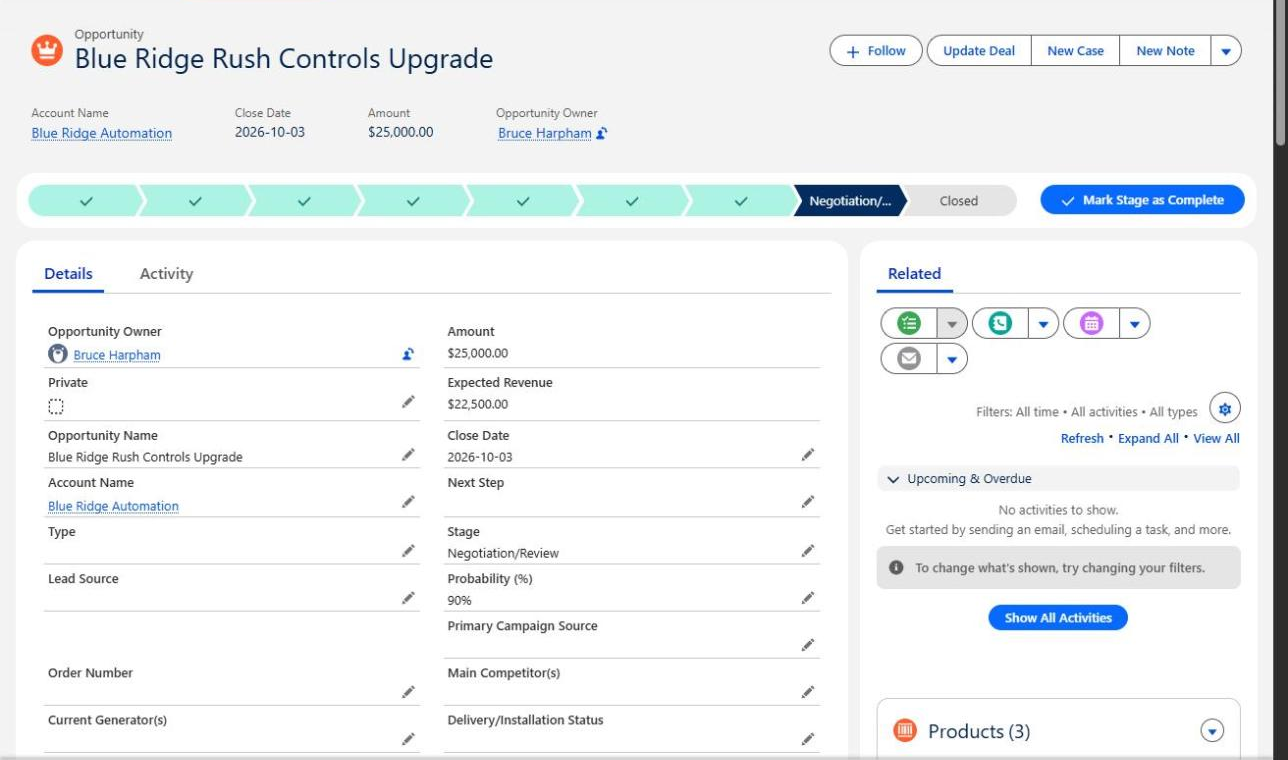
An opportunity in Negotiation/Review shows 90% probability and $22,500 of Expected Revenue. The Path looks advanced, but the close date has passed, Next Step is blank and no activity is scheduled. Captured November 12, 2026.
Salesforce calculated everything on that screen correctly. The open question is whether the stage is true.
Seven Salesforce opportunity stages best practices
1. Define stages by what the buyer has done
Problem: Deals advance on seller activity or optimism. A proposal was emailed, so the deal moves to Proposal, even though the customer hasn't opened it.
Business consequence: Late-stage value grows faster than buyer commitment, and leaders over-invest in deals that haven't earned it.
Better practice: Write each stage as an observable buyer milestone with entry and exit criteria: "customer confirmed the problem and decision process," not "discovery call held." Salesforce's own Collaborative Forecasting Best Practice Guide recommends defining entry and exit criteria for moving from stage to stage.
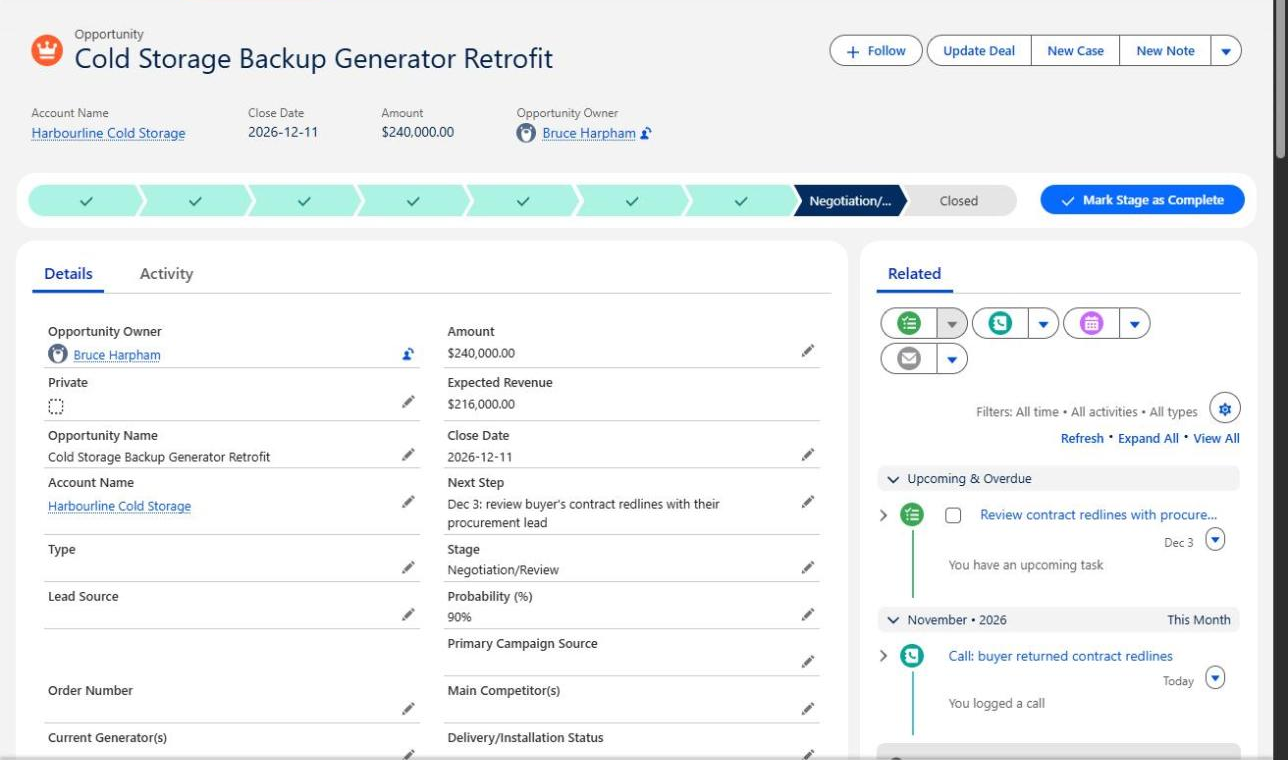
The same stage and probability as the earlier opportunity, but here the record shows why: a logged call records that the buyer returned contract redlines, and a dated Next Step and task name the procurement review. Captured November 12, 2026.
Management check: "What evidence shows the customer has actually progressed?"
2. Use only the stages you need
Problem: The stage picklist has grown to ten or twelve values that few people can explain, including defaults nobody uses.
Business consequence: Similar deals land in different stages, so comparisons between sellers, teams and quarters become unreliable.
Better practice: Keep the minimum number of stages that separate commercially meaningful progress. Salesforce's Trailhead guidance suggests you minimize the number of stages and standardize stage names. There's no universal right number. A consulting firm with a two-week sales cycle may need four open stages; a manufacturer negotiating six-month capital-equipment purchases may legitimately need separate stages for technical evaluation and procurement.
Management check: "Could every seller explain the difference between each pair of adjacent stages?"
3. Make definitions consistent between teams
Problem: "Proposal" means one thing to one sales manager and something else to another.
Business consequence: Leadership adds up opportunities that aren't commercially equivalent, then makes staffing and target decisions on the total.
Better practice: Document the definitions, train on them with real deals, and test them. Take five current opportunities, ask two managers to stage them independently, and discuss every disagreement. Disagreements are useful: they show exactly where the wording is loose.
Management check: "Would two different salespeople place this opportunity in the same stage?"
4. Treat probability as an assumption, not a promise
Problem: A deal shows 90%, so leaders treat it as 90% likely to close.
Business consequence: Forecasts look precise without being accurate. Stage probability is a default attached to a picklist value; it says nothing specific about this buyer.
Better practice: Keep Stage, Probability and Forecast Category distinct in conversations. They're related but not identical: in Lightning Experience, owners can override the forecast category that their stage would normally assign. Salesforce's forecasting best practices also recommend adjusting close probability based on historical data. Check how deals at each stage actually closed, segmented by deal type or size where volumes allow, before trusting the percentages. Our forecast accuracy article covers the wider forecasting picture.
Management check: "Where did our stage probabilities come from, and when did we last compare them with real outcomes?"
5. Watch for opportunities that stop progressing
Problem: Advanced-stage deals sit untouched for months while close dates move forward a few weeks at a time.
Business consequence: Managers can't tell a healthy pipeline from accumulated hope. The sole RevOps person at a six-seller company described this tension in an April 2026 RevGenius discussion: managers opened opportunities readily but resisted closing deals that were fading. One reply reframed the debate as a single question: would you bet this quarter's forecast on this deal?
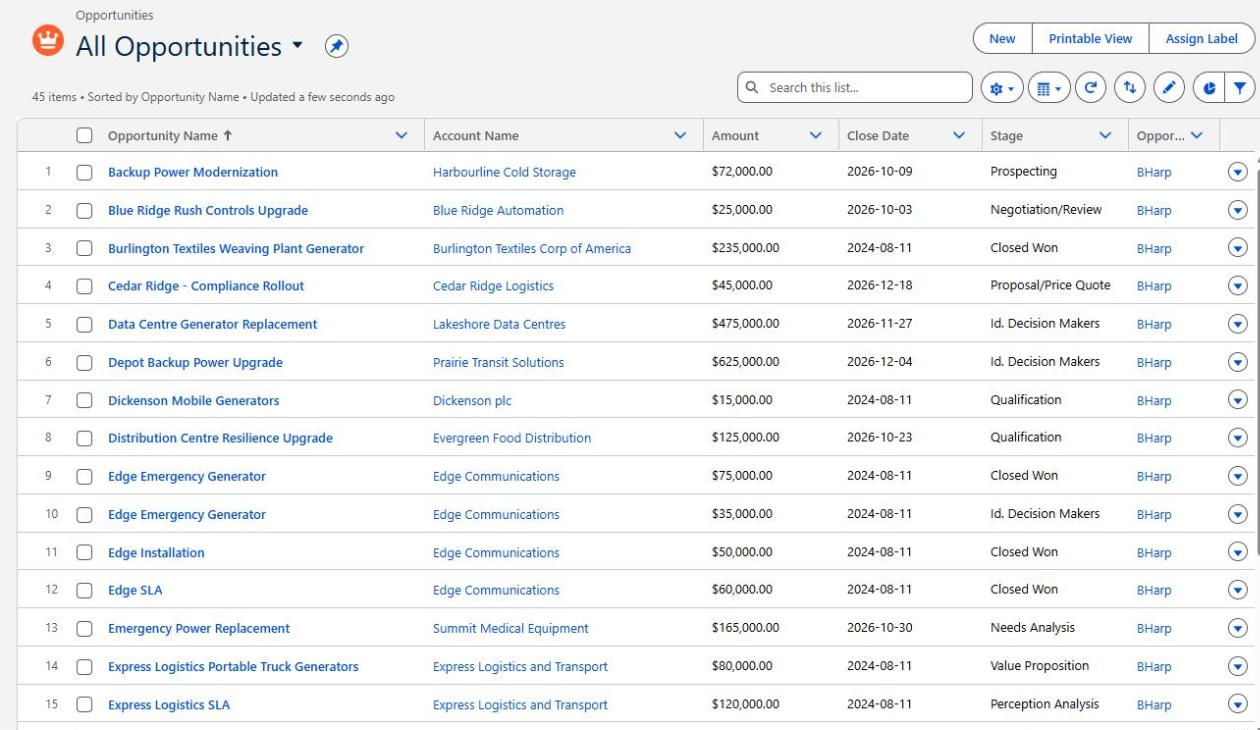
Open opportunities as of November 12, 2026. Several, including one in Negotiation/Review, have October close dates that have already passed.
Better practice: Review time in stage, repeated close-date changes, overdue next steps and deals with no recent customer activity. Plan this before you need it: a Trailblazer Community answer explains that trending average stage duration over time needs reporting snapshots, which only capture data from the day you start them. Keep one important nuance: long buying cycles exist. A slow deal isn't automatically a bad deal; an unexplained one is the concern. Our data quality article shows how to start with the one report leaders trust least.
Management check: "Which opportunities have stopped making meaningful progress, and why?"
6. Add safeguards without obstructing sellers
Problem: Each pipeline-quality fix adds another mandatory field or validation rule.
Business consequence: Sellers spend more time on administration, legitimate updates get blocked, and people learn to type whatever satisfies the rule.
Better practice: Decide which information is essential at each stage, then use the lightest control that works: Path guidance first, narrowly scoped validation only where a missing fact causes real harm. Our article on opportunity stage requirements for better handoffs walks through one tested example.
Management check: "Is the information we're demanding worth the effort of collecting it?"
7. Review whether stages still match how customers buy
Problem: Stages were configured during implementation and never revisited as products, markets and buying committees changed.
Business consequence: Salesforce gradually describes an outdated version of how the company sells.
Better practice: Once or twice a year, review definitions with sales managers and RevOps against recent won and lost deals. Change them deliberately rather than constantly: every redefinition breaks trend comparisons, so record when it happened and what changed.
Management check: "Does Salesforce still represent the way customers actually buy from us?"
Salesforce opportunity stages examples: what good definitions look like
Here is an example set for a B2B services business. Your names and milestones should reflect your own sales process; this is not a required Salesforce configuration.
| Stage | Buyer milestone | Evidence needed | Warning sign to investigate |
|---|---|---|---|
| Prospecting | A target account has responded to outreach | Reply or meeting request from a named contact | Many opportunities with no customer contact recorded |
| Qualification | Buyer confirms a relevant problem and willingness to explore | Problem, contact role and rough timing noted | Deals stay here for months without a next meeting |
| Discovery / Needs Analysis | Buyer shares requirements and decision process | Requirements, decision-makers and budget approach documented | Proposal requested before decision-makers are known |
| Proposal | Buyer has received and reviewed a specific proposal | Review meeting held or written feedback received | Proposal "sent" with no acknowledgement |
| Negotiation | Buyer is discussing terms, price or contract language | Redlines, procurement contact or term discussion logged | Close date passes with no scheduled next step |
| Closed Won | Buyer has committed | Signed agreement or purchase order | Won deals later reopened or cancelled |
| Closed Lost | Buyer has declined or the deal has stopped | Loss reason recorded | Lost reasons left blank or always "price" |
Closed Won and Closed Lost are outcomes. The open stages describe progress toward a buying decision. Notice that the table has no probability column: assign percentages after you've checked how your own deals have historically converted, not before.
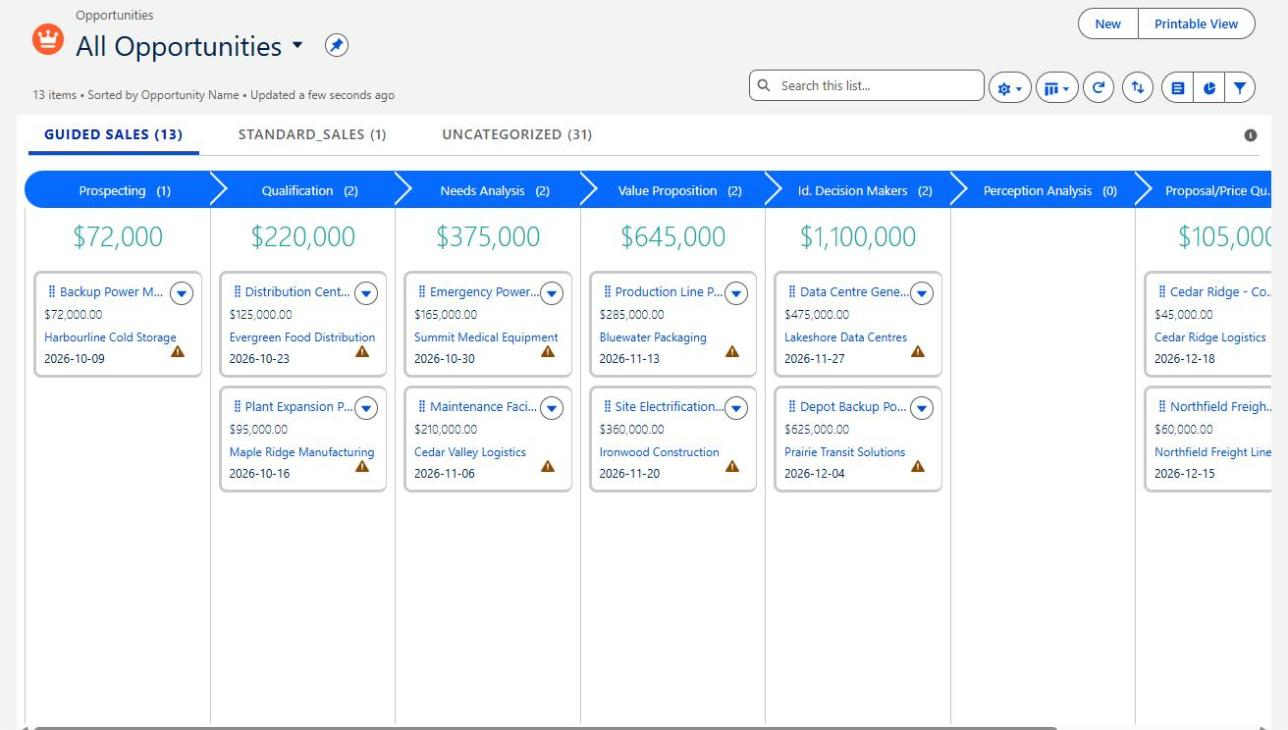
The same opportunities in Kanban view, grouped by stage with counts and totals. Every total depends on sellers applying stage definitions the same way.
Five questions to ask in your next pipeline review
- Which late-stage deals have a documented buyer action from the last two weeks?
- Which close dates have moved more than once, and what changed each time?
- Where would two managers disagree about a deal's stage?
- When did we last compare stage probabilities with actual win rates?
- Which deals are we keeping open for comfort rather than evidence?
If those questions take a long time to answer, the problem isn't the meeting. It's the information the meeting depends on. Our article on three questions to ask before trusting this quarter's forecast goes further on the forecast call itself.
When Salesforce configuration needs to change
Many stage problems are definition and management-habit problems, and they're cheaper to fix with agreement and review than with new automation. Configuration earns its place when the agreed definition can't be supported by what's on the record: stages that no longer match the process, probabilities that contradict history, no way to see stage history or close-date changes, or controls that block legitimate work. That's when a focused configuration review makes sense, ideally after everyone has agreed what the stages mean.
Can you trust what your Salesforce pipeline is telling you?
When salespeople use different definitions of Proposal, Negotiation and Commit, leadership may be making decisions on inconsistent information.
Logic Conduit helps businesses examine the gap between their Salesforce configuration and how sales actually happen. We can review your opportunity stages, identify reporting weaknesses and develop a practical improvement plan that supports both management and the sales team.
Tell us where your Salesforce pipeline is giving you unreliable answers.