Salesforce Forecasting: 3 Questions to Ask Before You Trust This Quarter's Number
The quarterly forecast call starts at nine. By ten past, nobody has discussed the number. Someone is still explaining why Salesforce and the spreadsheet disagree, and which large deal was "in" last week but may not be now.
People describe this moment in public forums. One self-described sales leader says their team uses Salesforce and Gong but still builds detailed forecasts in spreadsheets to report upward. They describe the forecast as fairly accurate; the complaint is the tedious work and limited visibility. Another contributor describes three large deals slipping while an exported forecast stayed unchanged, and leaders then keeping competing shadow forecasts. These are individual accounts, not evidence of how common the problem is.
Salesforce forecasting cannot tell you that a buyer has changed plans. It can put the deal facts your team has recorded into one live view, so you can see where they no longer match what people know. Below are three questions to ask before you trust this quarter's number, tried on a small fictional dataset. Two led to changes we could make and show. The third exposed a gap we could not close in our test environment, and that gap is worth checking in your own org.
The example: a fictional supplier and five deals
Northbeam Pump & Filtration is a fictional industrial supplier that sells pumping equipment and service agreements. Its customers, deals, amounts, dates and commercial facts are all invented. Amounts are opportunity values in dollars. They are not recognized revenue, cash collected or profit.
This demonstration uses a standard Salesforce Opportunity report, not the native Forecasts page. Forecasts was not switched on in our test org, and switching it on is an org-wide change. The report covers opportunities closing in the current fiscal quarter, October 1 to December 31, 2026. It groups them by Forecast Category and is limited to the five fictional customer accounts.
Before the review, Northbeam's sales team agreed what Commit means: the buyer has confirmed budget, has agreed a decision date inside this quarter, and has no known approval step still outstanding.
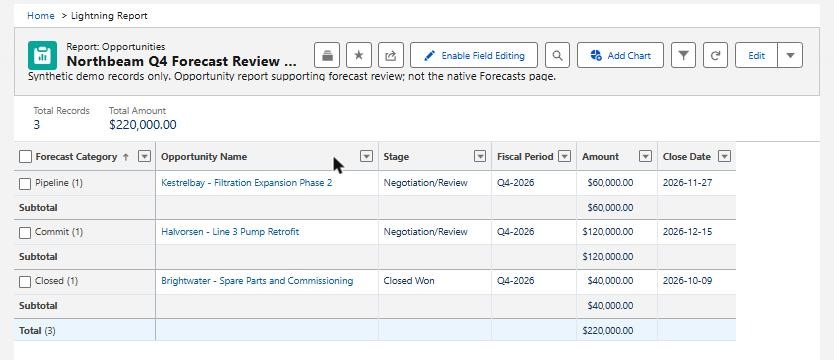
Before: $220,000 of opportunity value closing in Q4 2026. That is 40,000 already won (Brightwater), 120,000 in Commit (Halvorsen) and 60,000 in Pipeline (Kestrelbay). This is an Opportunity report, not the Forecasts page.
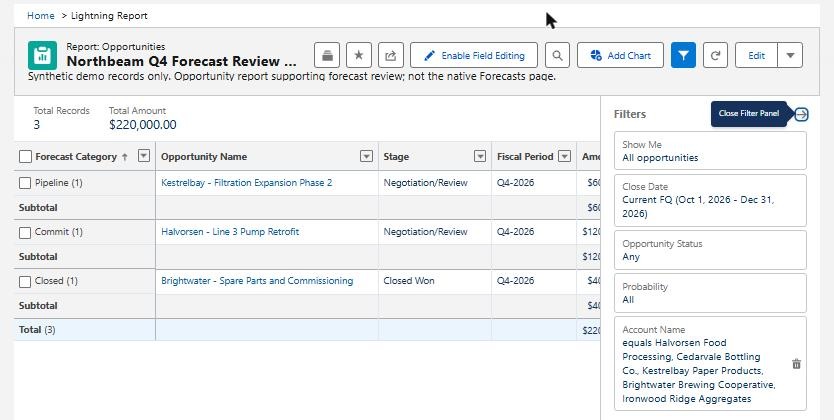
The report's filters: close dates in the current fiscal quarter, and only the five fictional customers. The "after" view later in the article uses the same report, filters and columns.
Question 1: Are the deals in the right quarter?
Close date decides which quarter a deal counts in. When it goes stale, the forecast is wrong in two directions. A deal that has moved still sits in this quarter, and a live deal with an old date drops out of view. Both errors matter when you are approving spending or booking installation crews.
We saved a second copy of the report that shows every quarter and adds Forecast Category as a column. It showed two records that no longer matched what Northbeam knew:
- Halvorsen – Line 3 Pump Retrofit (120,000) showed a December 15 close date. The buyer had told the rep that its capital approval had moved to a February board meeting.
- Cedarvale – 3-Year Pump Service Agreement (80,000) was still open with a September 25 close date, in a quarter that had already ended. The buyer had since confirmed a November 20 decision.
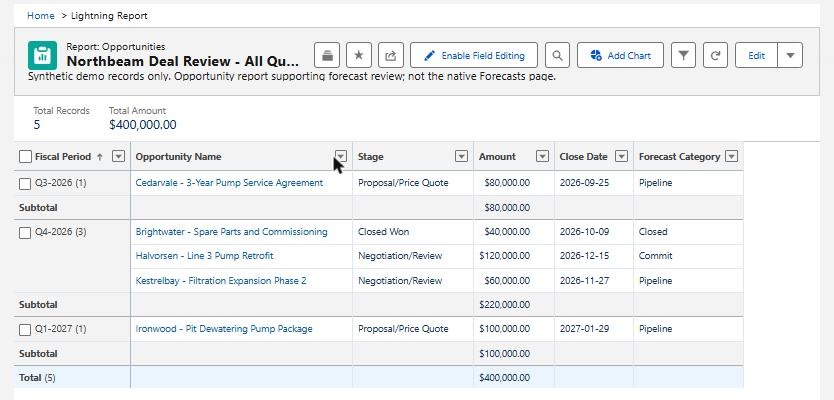
Before, all quarters: an open deal stranded in a past quarter (Cedarvale, Q3-2026) and a postponed deal still counted in this one (Halvorsen, Q4-2026, Commit). Total across all five deals: 400,000.
We changed only those two close dates, editing them directly in the report: Halvorsen to February 26, 2027 and Cedarvale to November 20, 2026. We did not push every old date forward. Each change came from a stated buyer fact.
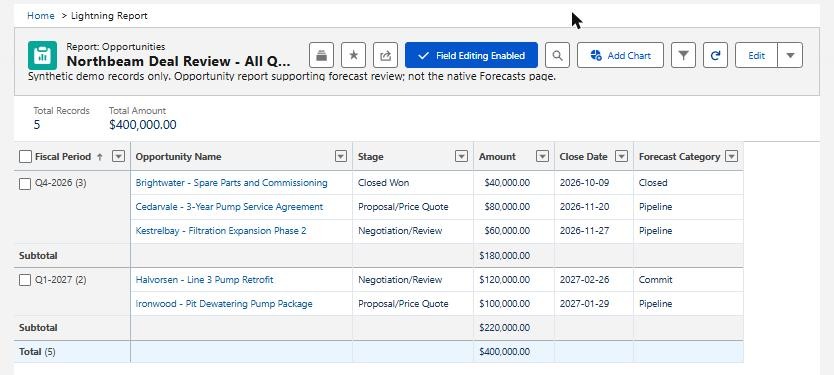
After, all quarters: Q4 2026 now holds 180,000 and Q1 2027 holds 220,000. The five-deal total is still 400,000, so value moved between quarters and none was added or lost. Halvorsen still shows Commit in Q1 2027. The "Field Editing Enabled" button only shows that inline editing was on.
What the manager gets: a named answer to "Which deals moved?" The system effort was two field edits. The real work is the conversation with the rep. A list of overdue close dates tells you which conversations to have, but it cannot supply the new date.
Question 2: Does Commit reflect the meaning you agreed?
Commit is a label. A rep chooses it, or a stage-to-category mapping sets it. The Salesforce forecasting module on Trailhead explains that each opportunity stage maps to a forecast category, and that admins can change the mapping. Neither route tells Salesforce whether the buyer will sign. If Commit drifts into "deals I feel good about," the committed number stops helping you plan.
Against Northbeam's three criteria, Halvorsen failed because its approval no longer fell in this quarter. Kestrelbay – Filtration Expansion Phase 2 (60,000, due November 27) had not completed the engineering sign-off its buyer had agreed to. It was already in Pipeline, so its record matched the facts.
Moving Halvorsen's date took it out of this quarter, so current-quarter Commit fell from 120,000 to zero. But the record still says Commit, now in Q1 2027. Changing a date does not reconsider the category.
We intended to move Halvorsen to a less certain category as well. We could not make that change in our test org. Forecast Category could not be edited from the report or list view, and every open stage was mapped to Pipeline. So that correction is untested here, and the next quarter's view still overstates Halvorsen.
What the manager gets: a practical question for each Commit deal: "What needs to change before we call this committed?" It is also a prompt to check two things in your own org. First, can the people who review deals actually update the category? Second, what does your stage mapping do? If every open stage maps to Pipeline, any Commit you see was set by hand, and changing the stage will not keep it current.
Question 3: Can you explain the changed number?
We refreshed the original current-quarter report. Its filters, grouping and columns are the same as the "before" view.
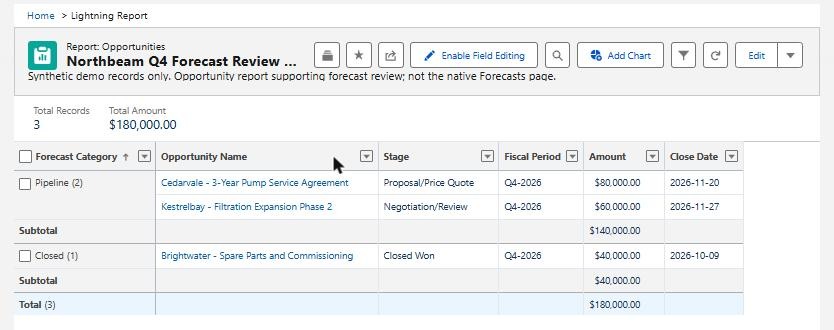
After: $180,000 closing in Q4 2026, with 40,000 won and 140,000 in Pipeline. No current-quarter deal is in Commit. Compare it with the first screenshot: same report, same filters, same columns.
| Opportunity | Q4 before | Q4 after | What changed |
|---|---|---|---|
| Halvorsen – Line 3 Pump Retrofit | 120,000 Commit | Not in Q4 | Close date moved to Q1 2027; category unchanged |
| Cedarvale – Service Agreement | Not in Q4 | 80,000 Pipeline | Close date moved from Q3 into Q4 |
| Kestrelbay – Filtration Phase 2 | 60,000 Pipeline | 60,000 Pipeline | No change |
| Brightwater – Spare Parts | 40,000 Closed | 40,000 Closed | No change (won October 9) |
| Ironwood – Dewatering Package | Not in Q4 (Q1 2027) | Not in Q4 (Q1 2027) | No change |
| Q4 total | 220,000 | 180,000 | Net −40,000: −120,000 and +80,000, both from date changes |
By category, Q4 moved from 40,000 Closed, 120,000 Commit and 60,000 Pipeline to 40,000 Closed, 0 Commit and 140,000 Pipeline. Keep those three figures separate. In the native Forecasts page, a cumulative rollup such as Commit Forecast already includes Closed deals, according to the same Trailhead module, so adding Closed again would count it twice. Salesforce's forecasting definitions also say that a manager's adjustment does not change the underlying rollup. A native forecast total can therefore differ from a report like this one.
The number went down, and for planning it is more useful: it now reflects what buyers have said, and every dollar of movement is tied to a named deal. That does not prove the forecast is more accurate. Only the quarter's results can show that.
A saved, shared report can also reduce reliance on a stale export, because everyone opens the same live view instead of comparing copies. It does not keep history by itself. A Trailblazer Community member asked in 2021 how to compare the forecast made at the start of a quarter with the eventual result. We did not test historical tracking or any spreadsheet connection. If you need that comparison, keep a dated copy of the view at the start of the quarter.
What to ask for before the next forecast call
- A current-quarter view with close dates you can defend, plus a short list of open deals still dated in a past quarter.
- A written meaning for Commit, and confirmation that the people reviewing deals can change the category when a deal stops meeting it.
- A before-and-after explanation by opportunity that keeps date moves separate from category changes.
The forecast review checklist turns these into questions you can use in a weekly review. None of this requires a forecasting overhaul. It does require someone to own the definitions and to confirm that your Salesforce setup lets people act on them.
About this demonstration: Northbeam and all customers, records and amounts are fictional. We tested this on October 18, 2026, in a Salesforce Developer Edition org, using standard Opportunity reports with inline editing rather than the native Forecasts page. Two close-date corrections were made and observed. The planned forecast-category correction could not be made in that org and is reported as untested.
If your managers still rebuild the forecast before they can discuss it, talk to Logic Conduit about the forecast view or sales workflow behind it.