Salesforce Lead Scoring: Why Sellers Ignore the Score (and How to Fix It)
It is Monday morning and a sales development rep opens a queue sorted by lead score. Near the top is someone who attended three webinars and clicked every nurture email, but works at a company the business would never sell to. Further down sits an operations director at an ideal-size customer who filled in one form and went quiet. The rep skips the first lead, calls a few from memory and quietly stops trusting the number. The manager now has a ranking nobody uses, marketing has a threshold sales questions, and the scoring process no longer changes who gets called first.
When sellers ignore a lead score, they are usually making a reasonable judgment about a number that does not match what they see. The fix is rarely to tell them to follow it. It is to make the score worth following: aimed at the right outcome, built on trustworthy inputs and clear about why each lead ranks where it does. This article covers five common reasons Salesforce lead scores get ignored, what to change for each, a practical audit and how to choose between Salesforce's scoring options.
What a Salesforce lead score is supposed to do
A lead score is a number (or grade) that ranks leads so sellers can decide which ones deserve attention first. In Salesforce it can come from rules your team writes with fields and formulas, from Sales Cloud Einstein Lead Scoring, or from Account Engagement scoring and grading. These options work differently, and they are compared near the end of this article.
Whichever you use, the score only earns sellers' attention if it consistently puts suitable prospects ahead of unsuitable ones. The five problems below are the usual reasons it does not.
Why sellers ignore the score
1. The score predicts something sellers do not care about
"Good lead" can mean several things:
- The lead was converted to an account and contact.
- An opportunity was created when the lead was converted.
- Sales accepted the lead after a first conversation.
- The resulting opportunity was eventually won.
These are not interchangeable. In many orgs, lead conversion is a process step, not proof of a qualified opportunity or a sale. If one rep converts every lead before a conversation and another converts only after discovery, "converted" means different things, and any score tuned against that history inherits the inconsistency. Sellers notice when highly scored leads rarely turn into real conversations.
How to fix it: agree on one primary outcome for the score, write it down and use it to judge every later change. If the business cares about qualified opportunities, review the score against opportunities, not conversions alone.
2. Sellers cannot see why a lead ranks highly
Most scores blend three different questions into one number:
- Fit: Is this the kind of organization and person we sell to? Industry, size, region and role are typical inputs.
- Engagement: How much has this person interacted with us? Email clicks, page visits, webinar attendance and form fills are typical inputs.
- Readiness: Has this person signalled they want a conversation now? A demo request or a direct reply carries different weight from a newsletter click.
When fit and engagement are simply added together, a very active poor-fit lead can outrank a quiet ideal customer. The total tells a seller that a lead ranks highly, not why, so the seller falls back on instinct.
To show the effect, we built a deliberately simple rules-based score in a Salesforce Developer Edition org for a fictional company, Northlake Fleet Software, which sells maintenance software to mid-sized transportation firms. The six leads and their companies are invented. The point values were chosen by hand for this illustration. They are not Einstein predictions and say nothing about which leads would convert.
On narrow screens, scroll the table sideways.
| Component | Illustrative rule | Points |
|---|---|---|
| Fit Points (formula) | Industry is Transportation | 40 |
| Fit Points (formula) | 50 to 1,000 employees | 30 |
| Fit Points (formula) | Title contains "Fleet" or "Operations" | 30 |
| Engagement Points (number) | Entered manually to stand in for marketing activity | 0–100 |
| Combined Lead Score (formula) | Fit Points plus Engagement Points | 0–200 |
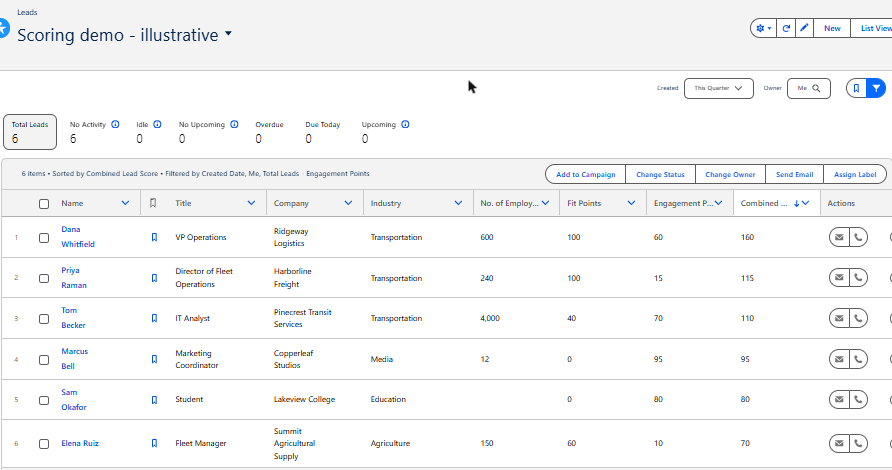
Illustrative leads sorted by the combined score. Marcus Bell (Fit 0, Engagement 95) ranks fourth and Sam Okafor, a student (Fit 0, Engagement 80), ranks fifth, both above Elena Ruiz, a fleet manager at a mid-sized company (Fit 60, Engagement 10).
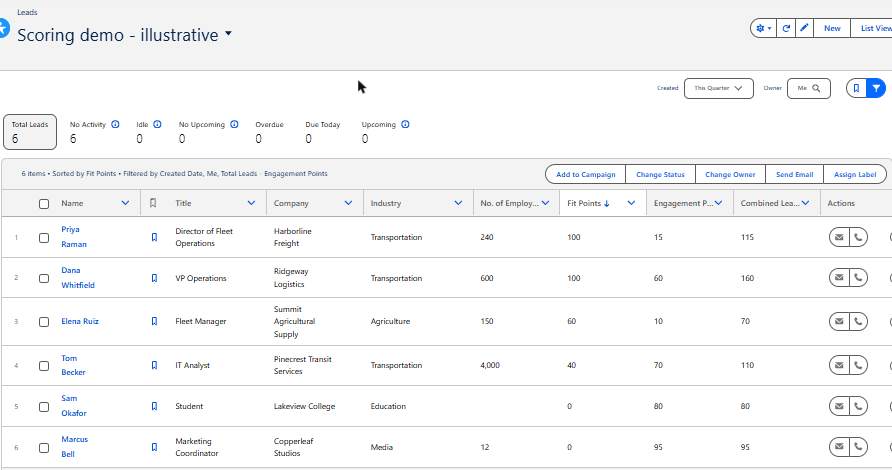
The same leads and columns sorted by Fit Points. Elena Ruiz moves to third, while the two zero-fit leads fall to the bottom. Priya Raman ranks first on fit despite low engagement.
Neither ordering is "correct". A business might rightly want to call Marcus if he has asked for a demo. What changes is the conversation: instead of debating whether a 95 is good, the team can decide how much engagement should outweigh poor fit, and whether a fit score of zero should keep a lead out of the sales queue regardless of activity.
How to fix it: show the parts, not just the total. In a custom score, keep fit and engagement as separate visible fields and treat readiness signals, such as a demo request, separately. Account Engagement already separates a grade for fit from a score for activity. Einstein Lead Scoring shows the fields with the strongest positive and negative influence on each lead's score.
3. The inputs are blank or inconsistent
Fit rules depend on fields such as industry, company size and title. In the demonstration, Sam Okafor's employee count is blank, so the size rule contributed nothing. In a real org, blank, free-text or inconsistent fields across lead sources quietly lower scores for leads that might be suitable, and raise doubts about every score.
How to fix it: measure how often each fit field is blank, by lead source, before adjusting points. Fixing a web form, import template or integration mapping can do more than changing the formula. This is where Salesforce data quality work pays off.
4. Activity points reward noise
Engagement scores can grow from activity that says little about buying interest, or that was not human at all. One Marketo user described in July 2025 that most scored opens and clicks appeared to be non-human and were triggering sales alerts, hurting marketing's credibility with sales. Deliverability specialist Al Iverson wrote in January 2023 that security scanners can inflate Account Engagement click data. Neither report measures how often this happens in your org, but both are reasons to check which activities earn points. Points that never expire add to the problem, because a burst of activity from last year can still look like interest today.
How to fix it: give the most weight to deliberate, higher-intent actions such as form submissions and demo requests, be cautious with opens and single clicks, and let older activity lose weight. Einstein Behavior Scoring weights engagement by frequency and recency. A custom or Account Engagement score needs decay rules that someone designs on purpose.
5. Nobody owns the rules
A rule that awards 30 points for a webinar is a judgment. That is fine if the team agreed to it and reviews it against outcomes. It becomes a problem when nobody remembers why the number exists and campaigns, markets and sales processes have moved on. In a November 2021 community thread, a team twelve months into its scoring model said sales feedback showed too many leads that were not sales-ready were being passed on. Experienced replies advised comparing what converted and rejected leads had in common before simply raising the threshold. That advice applies equally in Salesforce.
How to fix it: name one owner for the scoring rules, agree who must be consulted on changes and set a review rhythm, for example quarterly and after a major campaign or process change.
How to check whether your score is fixed: a practical audit
You do not need a new tool to find out whether sellers have good reason to trust the score. Start with evidence you already have:
- Confirm the target outcome. Use the outcome agreed for the score; if there is none yet, agree it first.
- Inspect real examples at both ends. Pull ten recent high-score and ten low-score leads. Ask two sellers which they would call first and why.
- Review outcomes by score band. Build a report of leads from a recent period grouped by score range, with the agreed outcome alongside. Look for whether higher bands actually produce better results, and allow enough time for outcomes to occur.
- Examine the exceptions. High scores with no meaningful outcome, and low scores that became good opportunities, show where the rules or inputs are wrong.
- Check the inputs and activity points for blank fit fields and noisy activities.
- Record the owner and the next review date.
The companion lead scoring audit checklist turns these steps into a review you can bring to a sales and marketing meeting.
Choosing a Salesforce lead scoring approach
If the audit shows the current method cannot be repaired, or you are scoring for the first time, it helps to know the Salesforce options are licensed, configured and explained differently. The summary below reflects Salesforce documentation checked on October 26, 2026. Confirm edition and licence details for your own org with Salesforce before planning around them.
| Approach | What it measures | What you need | Watch for |
|---|---|---|---|
| Custom rules-based score (fields, formulas, Flow) | Whatever your team decides: for example, points for industry, company size or a demo request | Admin time and agreed rules; no separate scoring licence | Points that reflect opinion rather than outcomes; rules that nobody reviews after launch |
| Sales Cloud Einstein Lead Scoring | How closely a lead resembles leads that previously converted, using most Lead fields by default | Sales Cloud Einstein (included in Performance and Unlimited, extra cost in Enterprise); for your own model, at least 1,000 leads created in the last 200 days with at least 120 converted | The model learns from your conversion history, including inconsistent conversion habits |
| Account Engagement scoring and grading | Score: points for prospect activity. Grade: fit against a profile, from F to A+ | Account Engagement; scoring rules and grading profiles configured for your business | Activity points that keep accumulating; default profiles that were never edited |
| Account Engagement Einstein Behavior Scoring | A 0–100 score comparing a prospect's engagement with other prospects, using machine learning | Account Engagement Advanced or Premium with Salesforce Enterprise, Performance or Unlimited; for a tailored model, six months of engagement data for connected prospects and at least 20 prospects linked to opportunities | Duplicate prospects are not combined; person accounts are not supported |
A few details matter when choosing between them:
- Einstein Lead Scoring asks you to pick the milestone. With custom settings, you choose whether Einstein learns from leads converted to accounts and contacts or from leads converted with an opportunity. If you score all leads together and lack enough data for your own model, Einstein can use a global model built from anonymized data from many customers. Creating segments disables that fallback, and each segment must meet the data requirements on its own. Salesforce says Einstein reanalyzes lead data about every 10 days, and its FAQ says leads with no new or updated activity in the last 200 days are not scored. Turning the feature on requires the Customize Application, Modify All Data and View All Profiles permissions, and reps need read access to the Company, Phone and Email fields. Salesforce's FAQ also notes that scores cannot be exported; they are visible on lead records, list views and reports.
- Account Engagement separates interest from fit. Its score reflects activity, while its grade reflects how well explicit information matches your ideal profile. Every prospect's grade starts at D and moves up or down as criteria match.
None of these approaches is automatically better. A well-defined rules-based score can be easier for sellers to understand than a model trained on messy history. A model can find patterns your team would not have written down. The right choice depends on your target outcome, data volume and licences.
When an admin can fix it, and when outside help makes sense
Many of the fixes above are within reach of an internal Salesforce admin: adjusting point values, splitting a combined score into visible components, adding a list view or report by score band, or cleaning up a fit field.
Outside help becomes proportionate when the score depends on several systems or teams at once. Examples include scores written by marketing automation, enrichment tools or integrations; duplicate leads and prospects splitting activity across records; multiple business units with different definitions of a good lead; or routing that depends on the score, so a poor ranking also sends leads to the wrong owner. Getting prioritized leads to the right person is a separate lead routing question, and the shared definitions behind the score belong in your marketing-to-sales handoff.
Bring the leads your sellers skip
If your sellers are working around the lead score, contact Logic Conduit for a scoped scoring and data-flow review. Bring your current scoring criteria, a list of lead sources, and a few examples of leads your sellers disagree with the score about. The conversation can help clarify whether the next step is configuration, data cleanup or a closer look at the integrations feeding the score.
About the demonstration: built on October 26, 2026 in a Salesforce Developer Edition org with three custom Lead fields and six fictional leads, viewed by a single administrator in a private list view. Engagement points were entered manually. Einstein Lead Scoring and Account Engagement were not configured or tested; their descriptions come from Salesforce documentation.