Salesforce Account Hierarchy Best Practices: Are You Missing Revenue From Your Biggest Customers?
A sales team can work five accounts for a year without anyone noticing they belong to the same customer. That is what Salesforce account hierarchy best practices are really for — and why they matter to a sales leader, not only to an administrator.
One rep is chasing a new contract at a plant in Hamilton. Another is renewing with a site in Calgary. A third is quoting a distribution arm that has been buying quietly since 2021. Every one of those deals looks sensible on its own. What nobody has is the number that matters to you: what this customer is worth in total, who owns the relationship, and whether anyone is negotiating against a colleague.
That gap is rarely a people problem. Salesforce can represent the corporate relationships behind your customers, but only if someone has told it how those relationships work — and only if the structure reflects how the customer actually buys, not just how it is registered.
Your largest customer might look like five unrelated accounts
Account hierarchies are one of the least glamorous parts of a CRM and one of the most consequential. When the structure is wrong, the symptoms show up far from the account record.
A practitioner in a RevOps discussion in September 2026 described an environment where subsidiaries were not linked to the right corporate parents, ownership was split across territories, and enrichment data was matching records to the wrong companies. Of everything on their list, they singled out the hierarchy problems as the most impactful — because their account assignment logic keyed off the location of the ultimate parent, errors in the hierarchy flowed straight into territory changes and, from there, into deal conflicts and split commissions.
The hierarchy is not really about tidiness. It decides who gets the account, who gets paid, and what you see when you ask how a major customer is performing.
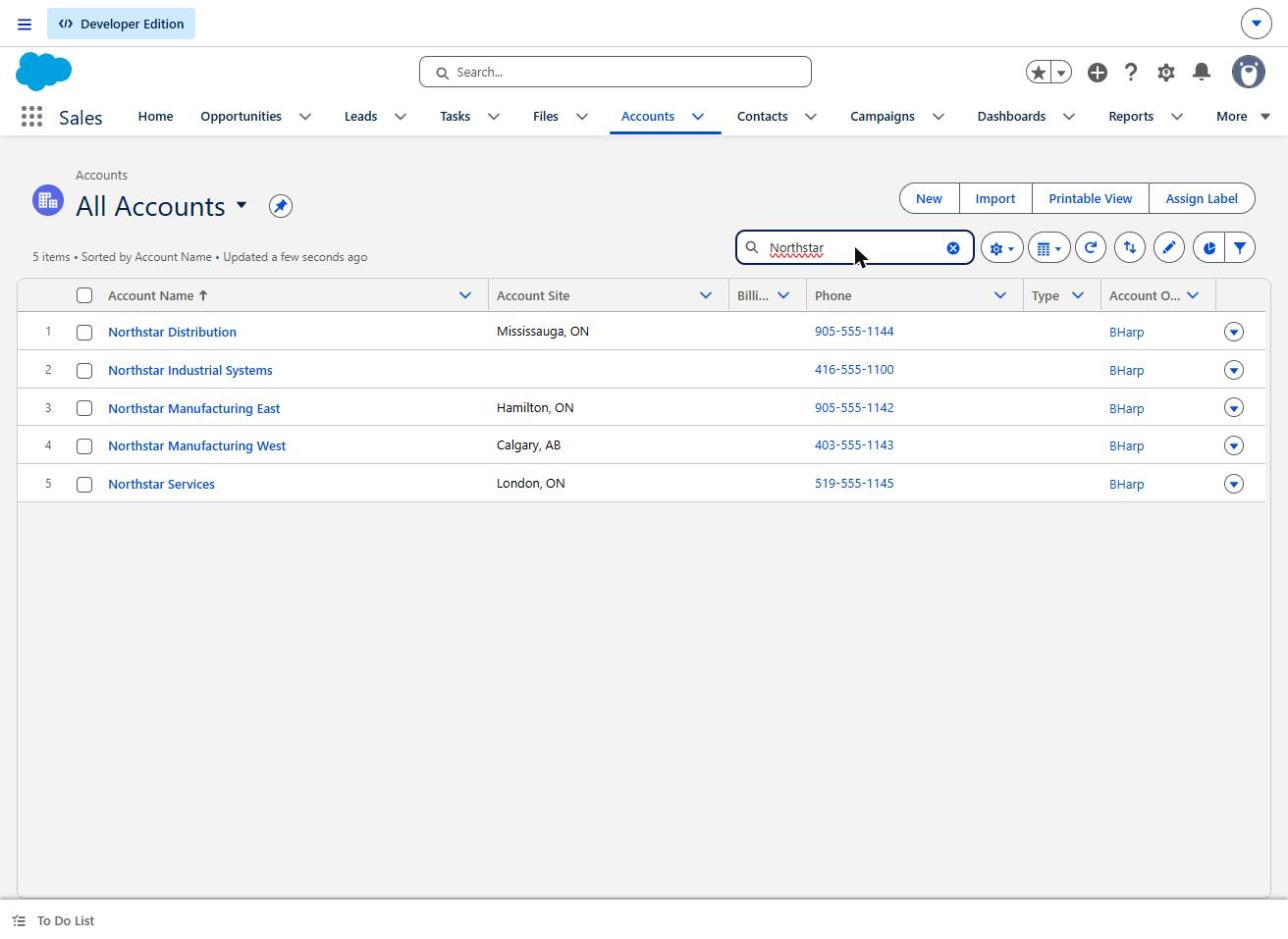
Five accounts for one corporate group, as a standard account list presents them. Nothing in these columns tells a manager that four of them report to the fifth.
Three expensive problems caused by poor account hierarchies
Missed expansion and cross-selling. When subsidiaries sit in the CRM as unrelated companies, nobody sees the pattern. A sales operations contributor in an April 2026 thread described product adoption spreading across multiple business units of the same corporate group while reps continued to work each entity separately, with no view of the whole. The company already had the proof points for an enterprise conversation. It just had no way to see them together.
Territory conflicts and disputed ownership. If assignment rules depend on the corporate structure, then a wrong parent is a wrong territory. Two reps can work the same customer in good faith, each confident the account is theirs. By the time anyone notices, the argument is about compensation rather than coverage — a much harder conversation.
Reporting that quietly misleads. This is the one that reaches the board deck. A parent-level figure nobody has validated produces a number that looks authoritative and is incomplete. We will come back to this with a worked example.
What Salesforce Account Hierarchy actually does
Standard account hierarchy in Salesforce rests on a single field. Populate Parent Account on a child record and Salesforce can display that relationship through the View Account Hierarchy action on the account page.
It is worth being precise about what you get, because the gap between expectation and behaviour is where cleanup projects go wrong.
Salesforce's documentation sets out the boundaries. In Lightning Experience the hierarchy page shows up to 2,000 accounts from each entry point, sorted by name; Salesforce Classic shows up to 500 child accounts. The hierarchy leaves out accounts the viewer does not have permission to see, which means two managers can open the same customer and see different pictures. Person accounts are not supported by the Parent Account field or the hierarchy action at all, and hierarchies cannot be viewed in the Salesforce mobile app in Lightning Experience. Administrators can configure up to 15 hierarchy columns, and by default the hierarchy simply borrows the columns from the Recently Viewed Accounts list view.
That last detail matters more than it sounds. In a Salesforce test org, populating the parent field on four subsidiaries produced the hierarchy below within seconds — accurate, readable, and carrying no financial information whatsoever.
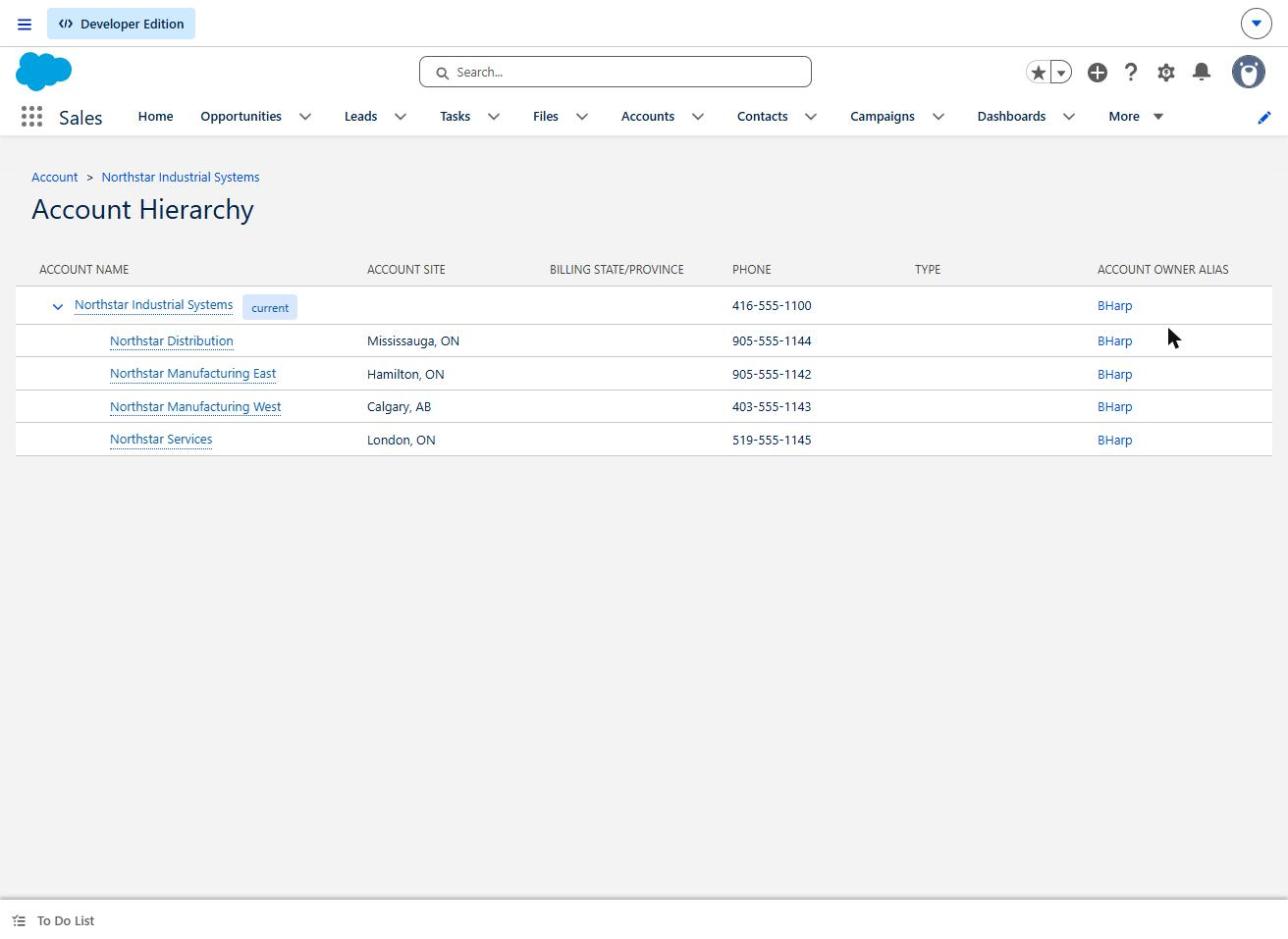
The same records once the Parent Account field is populated. Salesforce now shows four subsidiaries under one parent. That establishes an organizational relationship — not a consolidated revenue report.
Account hierarchy is also not the role hierarchy, which governs record access, and it does not settle legal ownership, territory boundaries, billing responsibility or compensation policy. Those remain management decisions. Salesforce will faithfully display whichever structure you give it.
Five Salesforce account hierarchy best practices
Practice 1: Define the business relationship before you create it in Salesforce
The failure it prevents: a cleanup that encodes someone's assumption about the corporate structure and then propagates it into territories and reporting.
Before anyone edits a record, write down what each account represents: the legal entity, the selling relationship, who signs, who is invoiced, and which team is accountable. A sales leader in an August 2025 thread described exactly this gap — their org represented national customers with central buying authority and individual properties with local contacts, but had nothing in between for the regional decision-makers who actually bought on behalf of several sites at once. The missing layer was a business fact first and a Salesforce question second.
How to test it: take your five largest customers and have two people independently draw the structure from what the CRM says today. Where the drawings disagree, you have found your real work.
The limitation: not every commercial relationship is a parent-child tree. Partnerships, joint ventures, shared buying groups and dual affiliations may need a different model, and forcing them into one hierarchy will cost you accuracy somewhere else.
Practice 2: Separate the legal parent, the commercial parent and the buying authority
The failure it prevents: a technically correct hierarchy that sends your team to the wrong building.
Third-party enrichment data generally gives you the legal structure — ultimate parent, immediate parent, registered entity. That is useful, and it is not the same as knowing who holds the budget. The April 2026 discussion above drew this distinction explicitly, separating the legal parent from the commercial parent. A group can be wholly owned from one head office while purchasing decisions sit with a regional operating company that has its own targets and its own procurement team.
How to test it: for a sample of child accounts, ask the rep who signed the last contract and who set the budget. If the answer is consistently a different entity from the one in the parent field, your hierarchy is describing a company structure rather than a buying structure.
The limitation: you may need both views. Some organizations keep the legal structure in the standard hierarchy and record the commercial relationship in a separate field. That is a deliberate trade-off, not a workaround, and it needs documenting so the next administrator does not "fix" it.
Practice 3: Settle ownership and territory rules before you change any relationships
The failure it prevents: a data cleanup that lands as a compensation dispute.
This is the lesson from the September 2026 RevOps account. Where territory assignment derives from the hierarchy, editing parent fields is not a data-quality task — it is a quiet territory realignment, carried out without the governance a realignment would normally get. Agree in advance who owns the parent relationship, who owns each subsidiary, how credit is shared on a group deal, and who adjudicates a disputed assignment.
If your coverage model already depends on territory rules, it is worth reviewing those alongside the hierarchy; our notes on territory management checks before a realignment cover that ground. Where several people legitimately contribute to one group deal, opportunity splits are usually a better answer than arguing about the account record.
How to test it: run the proposed changes past one affected rep before you make them. If they can tell you what it does to their number, you have explained it adequately.
The limitation: sales leadership owns this decision, not the CRM team. A hierarchy project that tries to settle compensation policy by configuration will stall, and should.
Practice 4: Treat subsidiaries and regional accounts as legitimate records
The failure it prevents: an enthusiastic deduplication exercise that merges away real business relationships.
A subsidiary is not a duplicate. A contributor in a March 2026 discussion described separate records for one corporate parent across US, EMEA and APAC teams — some created deliberately for ownership and reporting, others accumulated over time through inconsistent practice. Those two categories look identical in a duplicate report and need opposite treatment.
Decide your test before you start: a distinct legal entity, billing requirement, regional owner or reporting need will each justify a separate record. Salesforce's own guidance suggests using the Account Site field, or a naming convention carrying the location, to tell legitimate locations apart — the structure that makes "IBM - Dallas" and "IBM - Chicago" readable at a glance rather than suspicious. True duplicates are a separate problem with a separate fix, covered in why duplicate accounts slip into Salesforce.
How to test it: before any merge, confirm that no open opportunity, contract or billing arrangement depends on the record you are about to retire.
The limitation: more records mean more maintenance. Every deliberate regional account is one more thing to keep accurate when the customer reorganizes.
Practice 5: Test the reporting, then maintain the structure as the business changes
The failure it prevents: confident parent-level numbers that are quietly wrong.
A visible hierarchy does not give you a consolidated report. The two are separate pieces of work, and the second is where most of the surprises live. A contributor in a January 2026 thread wanted a chart on a parent account showing work from its child accounts, and found their filter on the current account ID did not produce the parent-level view they expected.
Here is the same class of problem, demonstrated. In the test org, the group had three open opportunities: $48,000 on the parent itself, $62,000 on one manufacturing subsidiary and $27,500 on the distribution arm — $137,500 in total. Grouping an opportunity report by Parent Account produces this:
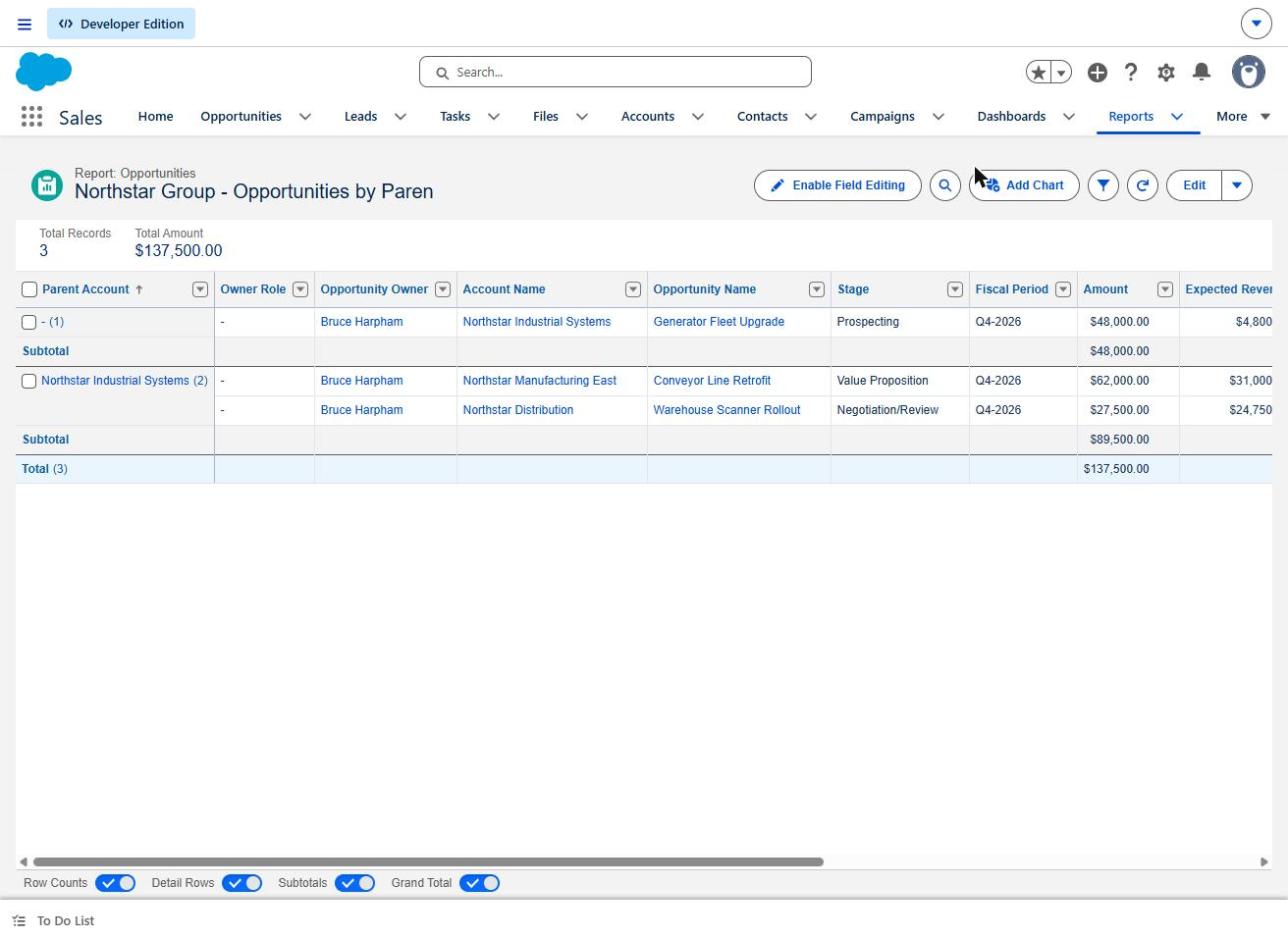
The row carrying the customer's name subtotals $89,500. The group's actual total is $137,500. The parent's own $48,000 deal sits in the unlabelled group above it, because the parent has no parent of its own.
Nothing here is broken. The report is doing exactly what it was asked to do. But a manager scanning for the customer's name reads $89,500 — roughly two-thirds of the real figure — with no cue that anything is missing. Two details are worth knowing: the subtotals stayed blank until the Amount column was explicitly summarized, and grouping by Parent Account reaches one level up, so a three-level group needs more than this report gives you. More traps of this kind are collected in our piece on Salesforce report types.
How to test it: calculate the expected total by hand for one customer group, then check it against the report before anyone presents it.
The limitation: maintenance never finishes. A practitioner selling to enterprise manufacturers in August 2025 described customers that constantly acquire other companies and carry many subsidiaries — a market where the structure changes faster than any one-time cleanup can hold. A prospect can become part of a major customer without anything in the CRM noticing. Decide who reviews the hierarchy, and how often, before the project closes.
What should sales management ask before approving a hierarchy cleanup?
Five questions that will tell you whether the work is ready:
- Which of our corporate customers currently have multiple Salesforce accounts, and do we know why?
- Can we see the whole relationship and its open opportunities in one place today?
- Who owns the national, regional and subsidiary relationships, and who decides when that is disputed?
- What happens to coverage and credit when a customer acquires or sells a business?
- Has anyone checked a consolidated report against the underlying records by hand?
If the answers are vague, the cleanup is not ready — and the reporting built on top of it will inherit that vagueness.
Fix the account structure before you miss the next opportunity
None of this reflects badly on your team. Account structures drift for ordinary reasons: reps create records to get a deal moving, regions set up their own conventions, enrichment tools fill in what they can, and customers reorganize without telling anyone.
A focused account hierarchy review is a contained piece of work. Take a sample of high-value customer groups, establish who actually buys and who owns each relationship, confirm what management needs to see, and set out a correction plan that accounts for the territory and compensation consequences before any records change. That is usually enough to tell whether you have a small tidying job or a structural one — and either answer is more useful than not knowing.
If you would like a second opinion on how your account structure is affecting commercial visibility, get in touch. It helps to bring one customer group you suspect is fragmented; that is normally where the picture clears fastest.