Salesforce Record Types Best Practices: Avoid Costly Process Mistakes
Salesforce record types best practices exist for one reason: to stop a small configuration decision from silently rewriting how people work.
A services lead opens a new opportunity for a six-month consulting engagement and goes to set the stage. The value her team uses every week is not in the list. She picks the closest option, notes the real status elsewhere, and moves on. Nobody files a ticket — nothing looks broken from her side, the dropdown simply has different options than before. Three months later the pipeline report is wrong, forecasting is arguing with sales, and the cause is a record type setting nobody remembers changing.
That is the shape of most record type failures: workarounds, data that will not reconcile, staff losing confidence in the system. This is for the people who approve these changes — operations directors, CRM owners, sales and service managers — with enough detail for your administrator to act.
What record types do — and what they don't do
A record type binds a record to a business process and a page layout, and narrows which picklist values are available. On Opportunity that process is the sales process, controlling Stage; on Case it controls Status, on Lead, Lead Status.
Record types are not security. Salesforce's guidance is blunt: "Don't use record types as an access control mechanism." Availability on a profile governs whether a user can create or edit records of that type. It does not decide who can read records — that comes from the sharing model, roles, sharing rules and field-level security. If anyone believes a record type is hiding sensitive deals from other teams, audit that assumption separately, today.
Record types are not the only reason a value is missing. Salesforce notes that "Each record type maintains its own list of available values", but a value can also be inactive at field level, excluded from the business process, blocked by a dependent mapping, or hidden by field-level security. Blaming record types for every missing dropdown sends your administrator down the wrong path.
Record types are not page layouts. Layout assignment, Lightning app pages and Dynamic Forms also shape what a user sees and can disagree with each other; changing one does not reliably change the others.
Seven record type best practices
1. Make one person accountable for each record type
Why it matters: record types multiply because nobody owns the list. Each adds layouts, picklist subsets, profile assignments and test cases someone pays to maintain.
The check: inventory every record type per object with a named process owner, the business process it points to, and records created in the last 90 days. One whose owner cannot describe how its process differs is a consolidation candidate — but cost the merge out first, since historical records and automation reference it.
2. Verify the default from the user's seat, not the setup screen
Why it matters: a wrong default means staff create records through the wrong process without being asked to choose.
The check: log in as a representative user from each affected profile and start a record the way they actually do. In our test org, opening the new-opportunity URL directly skipped the record type prompt and applied the profile default. The setup page looked correct; the user experience did not match it.
3. Trace a missing picklist value in order, not by guesswork
Why it matters: staff stop reporting these. They invent a workaround, and data quality degrades from that day.
The check: confirm the value is active on the field, included in the business process, present in the record type's selected values, correctly mapped if dependent, and visible under field-level security. For Opportunity Stage, inspect the sales process before touching the field — our Salesforce opportunity stages best practices guide covers the forecasting fallout.
4. Treat deployment as unproven until a user confirms it
Why it matters: a release can succeed technically and still deliver nothing to the people who needed it.
One administrator described exactly this after a pipeline deployment: "the picklist value did get deployed, but it is not selectable." The metadata was in the target org; the value still could not be chosen. A different route eventually worked, though the thread never isolated the cause.
The check: acceptance evidence is a named user, on the target profile, selecting the value and saving the record. Not a green deployment status.
5. Check whether the data model, not the setting, is wrong
Why it matters: record types model process variants, not attributes of individual line items. Forcing them to do so produces a structure nobody can report on.
A Stack Exchange question from January 2026 shows the pattern: an administrator built Veg and Non-Veg record types on an Order object, expected the menu picklist to filter, and reported that "all menu options are appearing regardless of which Record Type is chosen." The sharper issue came in the comments — one order can contain both kinds of item, so classifying the whole order was the wrong model.
The check: ask whether the thing you are classifying genuinely has one process state at a time. If it does not, the answer is a field or a child object, not a record type.
6. Inspect historical records explicitly
Why it matters: deactivating a record type stops new records being created with it, but existing records keep that type and its layout. Deactivation is not a migration.
An administrator who reworked an Opportunity layout across roughly 50–60 fields found new opportunities reflected the change while older ones did not, having tried the obvious: "I refreshed. Cleared cache. Double checked I hit save." Responders raised record types and layout assignment among several hypotheses; no root cause was confirmed — these symptoms are ambiguous from outside.
The check: report on record type by record age before and after any change, and open a sample of old records as an ordinary user.
7. Map the downstream dependencies before, not after
Why it matters: record types are referenced by things that fail quietly.
The check: search for the record type in sharing rules (one scoped to a single type may not cover a new one), Flow decision branches, validation rules, assignment rules, reports and integration field mappings. Our guides on Salesforce Flow best practices and Salesforce validation rule examples cover the two that most often block users; for Case, see case management best practices.
Demonstration: two sales processes, two stage lists
Tested in a Salesforce Developer Edition org on 16 November 2026. A live configuration test, not a mockup.
We created a sales process named Professional Services Engagement from the master list, removed four stages — Value Proposition, Id. Decision Makers, Perception Analysis and Negotiation/Review — then created an active Opportunity record type of the same name, bound to that process and available to all profiles.
Starting a new opportunity presented a record type choice, with the default pre-selected.
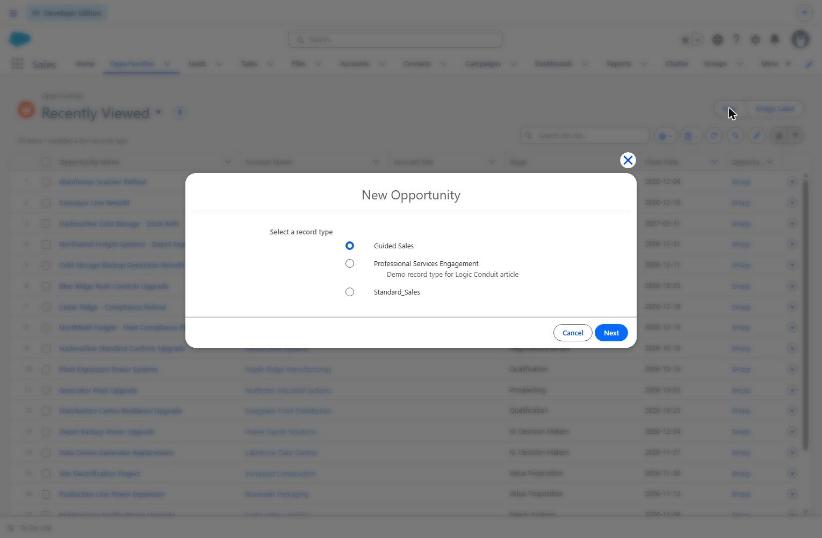
Figure 1. Starting a new opportunity in the test org on 16 November 2026. Three record types are offered and the profile default is pre-selected.
Under the existing Guided Sales record type, Stage offered ten values.
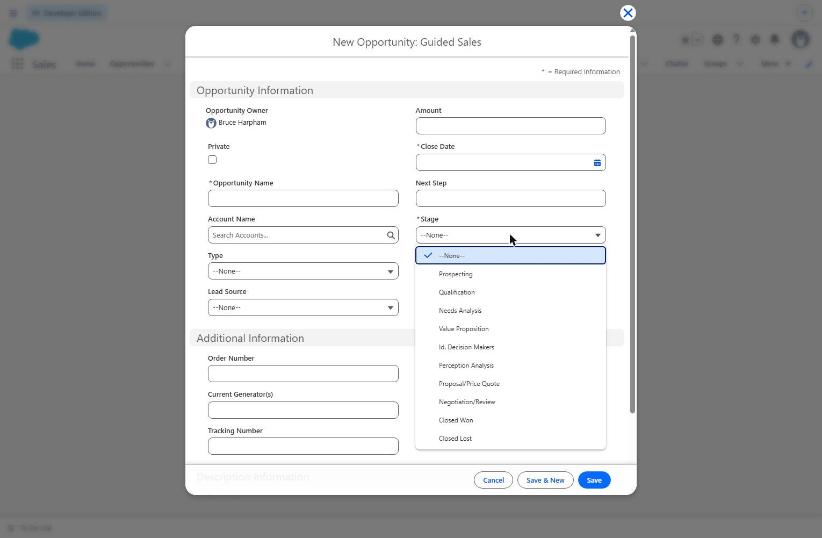
Figure 2. The Stage picklist under the Guided Sales record type: ten values.
Under Professional Services Engagement, the same field for the same user offered six.
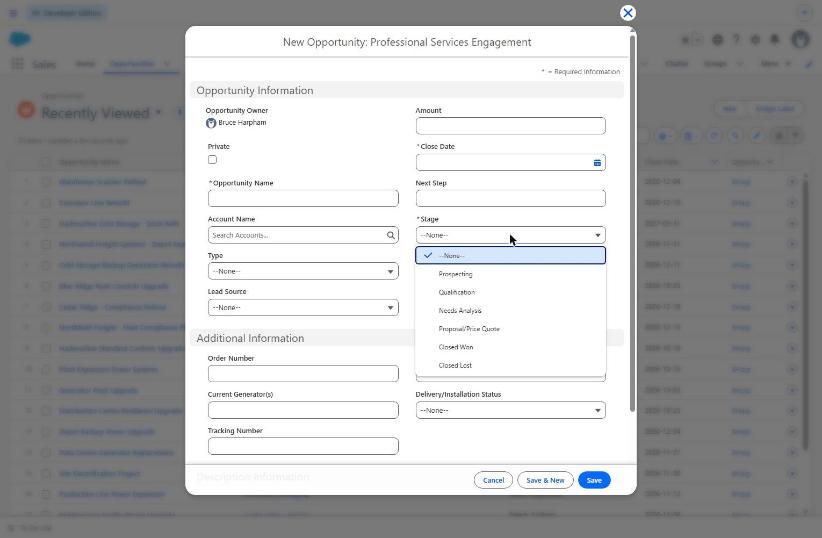
Figure 3. The same Stage field, same user, under the Professional Services Engagement record type: six values. Four stages are absent because the bound sales process excludes them.
Nothing changed on the Stage field itself; the four missing values are still there, still active. An administrator looking only at the field would conclude everything is fine, while the services team cannot record a negotiation stage. That gap — between the field definition and the user's actual choices — is where the cost lives.
No opportunity record was saved during this test.
What a manager should ask before approving a record type change
- Which business process does this represent, and who owns it?
- Which profiles get it, which is their default, and has someone started a record as one of them?
- Which picklist values change, and does any team rely on one being removed?
- Which sharing rules, flows, validation rules, reports and integrations reference a record type on this object?
- What happens to existing records, and have we opened a sample of old ones?
- What is the acceptance evidence — which named user confirmed which action in the target org?
- What is the rollback plan if sales cannot log a deal on Monday morning?
If the answer to question 6 is "the deployment succeeded", that is not acceptance evidence.
When a focused assessment is justified
Most organizations do not need a record type overhaul, but one afternoon of disciplined inspection on the workflow actually causing friction.
A Salesforce Record Type and Workflow Assessment from Logic Conduit covers inventory by process owner, business process fit, defaults as real users experience them, picklist and dependency tracing, automation and sharing impacts, test evidence, and a prioritized plan separating risky changes from safe ones.
If employees see the wrong process, cannot choose a needed value, or work around Salesforce configuration, bring one affected workflow and an example. Logic Conduit can help scope a focused investigation before recommending changes.
Sources
- Salesforce Help, Considerations for Creating and Updating Record Types and Picklists — https://help.salesforce.com/s/articleView?id=sf.customize_recordtype_considerations.htm
- Salesforce Help, Troubleshoot Missing Picklist Values — https://help.salesforce.com/s/articleView?id=platform.troubleshoot_picklist_values.htm
- r/salesforce, Picklist still not available for record type post deployment — https://www.reddit.com/r/salesforce/comments/1reorqz/
- Salesforce Stack Exchange, How to filter Picklist values based on Record Type in Salesforce?, asked 30 January 2026 — https://salesforce.stackexchange.com/questions/438724/
- r/salesforce, Edited the Opp page layout, newly created opps are updated, but no opp already created is, why? — https://www.reddit.com/r/salesforce/comments/1in176h/