Salesforce Case Management Best Practices: When Customer Complaints Become Revenue Problems
Most guides to Salesforce case management best practices start with setup screens. This one starts with an illustrative customer scenario. A regional distributor's largest account reports a critical equipment failure three weeks before its renewal conversation. The email lands in a shared inbox, Email-to-Case creates a record, and an auto-acknowledgement goes out within a minute. The case sits in the general support queue. Two days later the customer replies to the acknowledgement; that reply is attached to the case, but nothing else changes. By the time the account manager hears about it, the customer has written three times and nobody has answered once.
On the service manager's weekly report, nothing looks wrong: cases closed are up, average resolution time is flat.
The software is working. The business is not. The gap between the two is where retention risk, wasted agent hours and unreliable SLA reporting accumulate quietly, and it is the gap this article is about.
Why a Salesforce case-management problem becomes a business problem
Case management failures show up at three levels, and executives usually only see the third.
Technical. Assignment rules, queues, escalation rules, entitlements and Email-to-Case each do one narrow job. Salesforce documents different jobs for assignment rules, escalation rules and milestones: route ownership, act on ageing cases, and track required service steps. When they are configured separately, by different people, over several years, they stop telling a consistent story.
Operational. Agents compensate. They search old emails to reconstruct what a customer was told, re-ask questions a colleague already asked, and hold onto cases personally rather than trust the queue. Work gets done, but it is invisible and expensive.
Financial. Two costs are worth investigating before anyone tries to estimate churn.
The first is service labour spent on work that should not exist. Every handoff that restarts an investigation, every misrouted case that bounces between queues, and every customer who has to repeat their history to a second agent consumes paid time without moving the case forward. A manager can estimate this without a consultant: take monthly case volume, estimate the share that involve a handoff, a repeat contact or a misroute, and multiply by the extra minutes each one costs and by a fully loaded hourly rate. For an illustrative 22-working-day month, 25 cases a day × 20% rework × 15 extra minutes ÷ 60 is 27.5 agent-hours. Your figures will differ; the point is that the estimate can be checked against a sample of real cases.
The second is management decision quality. When the main service dashboard reports cases closed and average resolution time, it can show improvement while resolution quality falls, because a case closed with the wrong answer and a case closed with the right one count the same. Staffing, tooling and pricing decisions made on that dashboard inherit the error. This cost is harder to put a dollar figure on than wasted labour, but it is the one that eventually reaches the renewal conversation, so it is the one an executive should care about most.
Customer retention risk and contractual SLA exposure also deserve attention. Better routing, response and reporting can reduce avoidable service failures; they do not guarantee a renewal or contractual compliance.
Seven Salesforce case-management best practices
The screenshots below are supplied Salesforce demonstration views with sample cases, not customer outcomes or proof of end-to-end email delivery or timed escalation. Each practice follows the same pattern: the symptom a manager can observe, the business consequence, where to look in Salesforce, the change, and how to know it worked. Setup clicks are deliberately left out.
1. Route cases to an accountable team, not just to a queue
Symptom. Cases sit in a general queue with a changing owner, or one catch-all assignment rule entry whose criteria amount to "always true" sends everything to the same place.
Consequence. A queue with work in it is not proof anyone is working it. High-priority cases age alongside routine ones.
Diagnostic. Open Case Assignment Rules and read the active rule's entries in sort order. Assignment rules evaluate entries top-down and stop at the first match, so a broad entry early in the order silently defeats every entry below it. The same engine routes leads, and the same mistakes apply; see Salesforce lead assignment rules best practices. Confirm that the relevant intake path actually invokes the rule; a configured rule is not proof it ran. Then check queue membership: who is actually watching each queue?
Change. Put specific entries (priority, product, account tier) above the catch-all. Make the catch-all a named triage queue with a named owner who is measured on clearing it.
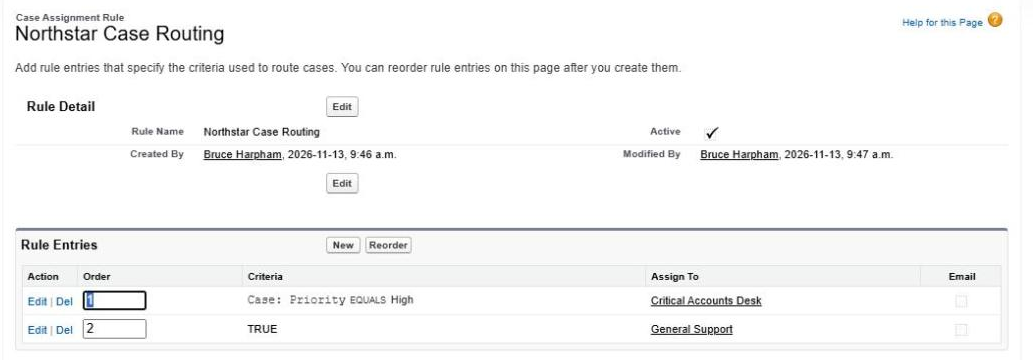
Two rule entries are enough to separate critical work from everything else. The order matters: if the TRUE entry were first, every case would land in General Support and the priority entry would never run.
Measure. Median time from case creation to first owner who is a person, not a queue.
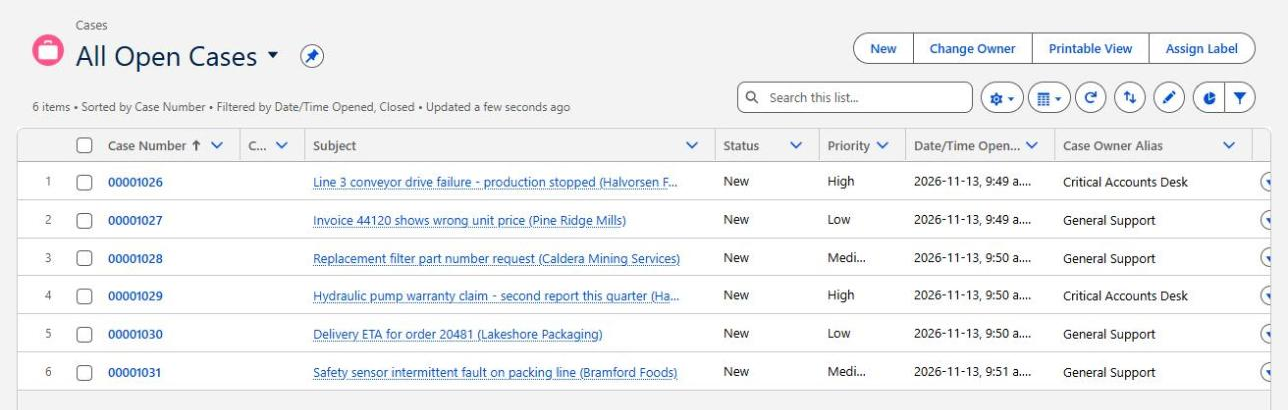
This supplied list view shows six sample cases: two High-priority cases owned by Critical Accounts Desk and four by General Support. The ownership pattern is consistent with the rule above, but the image alone does not establish which automation assigned them or whether an agent has started work.
2. Track substantive response and resolution, not case creation
Symptom. Auto-response rules send an acknowledgement, and "first response" reporting counts it.
Consequence. The customer's experience is silence; the report says 100% within SLA.
Diagnostic. Compare the timestamp of the first outbound email authored by an agent against the first automated email. If your reports cannot tell them apart, your SLA numbers are not measuring what the contract means.
Change. Agree what a substantive first response means under your service promise, and record a message that addresses the issue. An acknowledgement or visible status change should not count unless the agreed definition explicitly allows it. Use entitlement milestones for response targets where you have Entitlement Management; where you do not, a custom date field set by automation when an agent first replies is a workable fallback.
Measure. Agent-authored first-response time by priority.
3. Use escalation rules and SLAs that reflect real obligations
Symptom. Escalation rules exist but escalations are rare, or they fire on cases nobody considers urgent.
Consequence. Missed contractual commitments, or escalation fatigue that trains people to ignore alerts.
Diagnostic. Escalation rules act on cases; entitlement processes contain milestones for required support steps. Escalation rules reassign or notify when a case stays open past a threshold; entitlements and milestones define and track what a specific customer is owed. Check which one your contracts actually map to, and whether the business hours attached to each match your real support hours and holidays.
Change. Map each contractual target to the right control: tracking a response deadline and notifying a manager may need complementary mechanisms. Test the boundary conditions: a case created at 4:55 p.m. on the day before a holiday, with the relevant business hours applied.
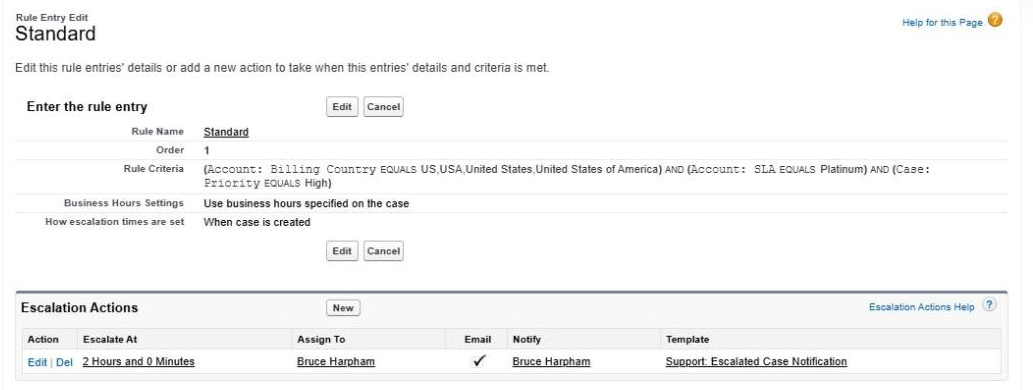
An escalation rule entry reads like a contract clause: who it applies to, which clock it uses, and what happens at the deadline. The "Business Hours Settings" line shows which clock to investigate. This configuration screen does not prove that the action fired or that a notification was delivered.
Measure. Milestone violations by account tier, and escalations that resulted in a reassignment versus those ignored.
4. Preserve customer history across agents and channels
Symptom. Customer emails arrive in several individual mailboxes; agents forward threads to each other; a customer's reply creates a new case or appears as a new conversation in their inbox.
Consequence. Every handoff restarts the investigation. The customer repeats themselves and concludes nobody is in charge.
Diagnostic. List every address a customer could legitimately write to. How many are Email-to-Case routing addresses? For the rest, where does the history live? Then send a test reply from a case and check how it appears in a real customer mail client, because case association on the Salesforce side and conversation grouping on the customer's side are different problems.
Change. Consolidate supported intake into configured Email-to-Case routing addresses, and standardise how agents reply from the case. Review threading limitations, including the warning against sending one conversation to multiple routing addresses. Test your supported mail clients rather than assuming a Salesforce case association guarantees inbox grouping.
Measure. In a sampled set of customer conversations, compare the shared inbox with the case email history and count missing messages. A Salesforce-only report cannot count emails it never received.
5. Make closure and reopening rules meaningful
Symptom. Cases are closed when the agent sends an answer, not when the customer confirms. Reopened cases are rare in reports because agents open a new case instead.
Consequence. Closed-case counts rise; the same problem is solved twice.
Diagnostic. Compare cases per contact per 30 days with your reopen rate. If repeat contacts are high and reopens are near zero, investigate whether the closure and reopening definitions are hiding repeat work. The pattern alone does not establish agent intent.
Change. Consider an open "Awaiting customer confirmation" status with an agreed follow-up deadline, then a closed state when your resolution policy is satisfied. Define when a reply should reopen the same issue and when a genuinely new issue needs a new case. Test automation and reporting against that policy.
Measure. Reopen rate and repeat-contact rate, reported together.
6. Measure quality and repeat contacts alongside throughput
Symptom. The main service dashboard is cases closed per agent per week.
Consequence. Throughput is a workload measure, not a service measure. It rewards closing fast and penalises the agent who takes the complicated case.
Diagnostic. Ask what the dashboard would show if every case were closed and immediately reopened. If the answer is "it would look great", the dashboard is incomplete.
Change. Pair throughput with reopen rate, first-contact resolution, and a sample of case reviews.
Measure. First-contact resolution by case type.
7. Review chronic exceptions and refine the process
Symptom. The same handful of cases appear in every weekly review. Everyone knows which customers are "difficult".
Consequence. Long-running cases are where renewal risk concentrates, and where institutional knowledge is lost when staff change.
Diagnostic. Report on cases open more than 30 days with more than one owner change. Read five of them end to end.
Change. A short monthly exception review owned by a manager, with the explicit question: what configuration or process change would have prevented this case from getting here? If the answer keeps pointing at automation nobody understands any more, the Salesforce Flow best practices guide covers how to make that automation survive staff turnover.
Measure. Count of cases over 30 days old, trended monthly.
Five real-world problems that expose weaknesses in case management
These public accounts from the r/salesforce community illustrate the patterns. They are individual reports, not a representative sample or independently confirmed diagnoses. The linked accounts were checked for this publication; the operational interpretations below remain questions to investigate in your own organisation.
The investigation that restarted. A Salesforce partner described a support issue that had been open for months, after which a change of engineering team meant, in their words, "they will need to start from scratch." This concerns Salesforce's own support operation, not a product defect, and that is the point: even a mature service organisation loses continuity when ownership changes without the investigation history travelling with it. Ask how many of your long-running cases would survive the departure of the current owner. (source)
Alerts for everyone else's work. A Salesforce user wrote that they were "getting distracted with email alerts all day long" about cases outside their responsibility, and was considering building a browser extension to filter them. That is a reported notification problem being worked around at the individual desk; the thread does not establish the configuration root cause. When agents build their own workarounds, the configuration has stopped matching the team structure. (source)
Ten mailboxes, no shared history. A user asked how to consolidate customer email from roughly ten individual mailboxes, because when someone is away "another rep has to pick up from scratch." Email-to-Case can centralise intake, but only for addresses it is configured to receive. The commercial question is how much customer history currently lives in personal inboxes that leave with the employee. (source)
Replies that look like new conversations. A user testing Email-to-Case reported that inbound customer replies reached the case, while agent replies appeared as separate conversations in the customer's inbox. The report supports checking both ends of the exchange; it does not establish a universal Salesforce defect or a tested fix. (source)
The catch-all nobody understood. An administrator inheriting an org found an assignment-rule entry set to "TRUE" and asked how to add a specialist queue without disrupting existing routing. The discussion also raised routing-address ownership as another layer to inspect. The management lesson is to map the actual intake path before changing a rule whose role nobody can explain. (source)
Five Salesforce reports a service manager should review
None of these is exotic, but not all are available out of the box. Where a report needs a custom field or history tracking, that is noted. The first supplied demonstration view is shown below. Check your edition, enabled features and report permissions before assuming every report is available. Salesforce lists service-feature availability, including Entitlement Management and its edition limits.
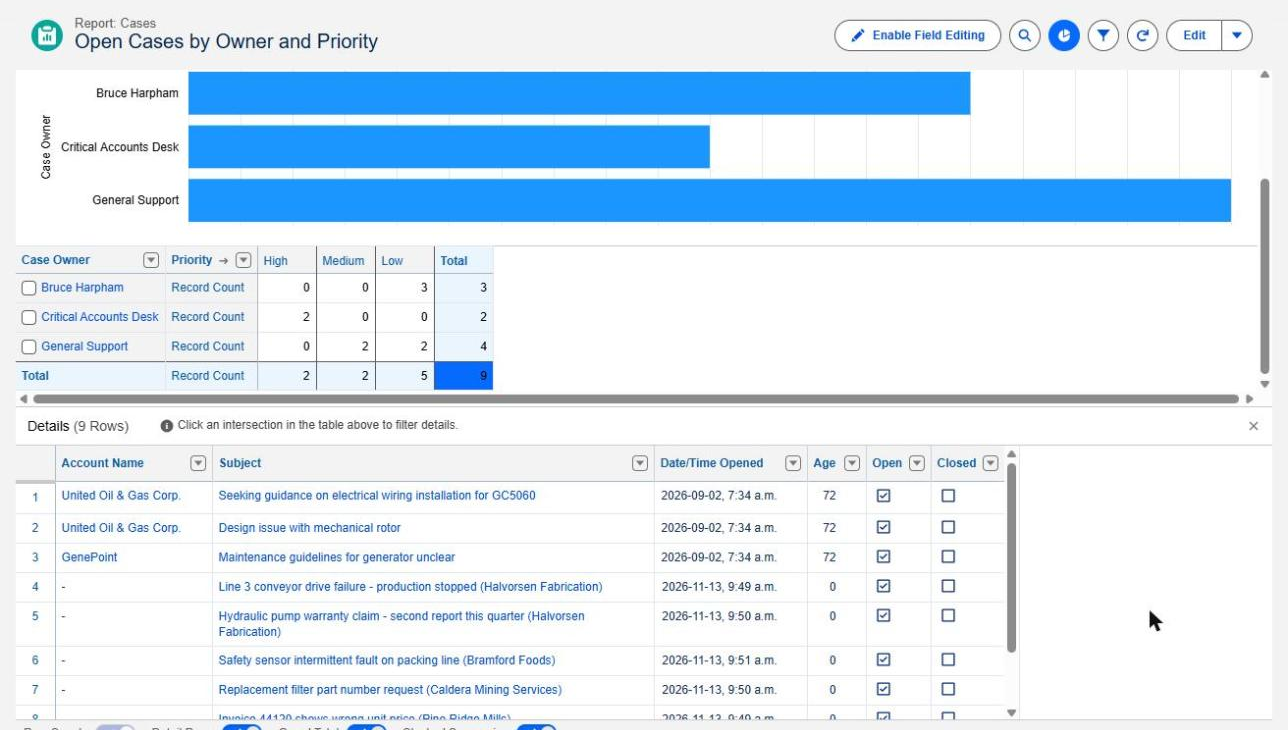
A standard Cases report, grouped by owner and priority with Closed set to false. The matrix answers "who holds what"; the details table underneath is where the three 72-day-old cases become visible. A chart of totals alone would have hidden them.
- Open cases by age, priority and owner or queue. Native. A standard Cases report grouped by Owner and bucketed by Age does this. If the owner is a queue, check who is accountable for pickup; queue ownership alone does not establish inactivity.
- Cases approaching or exceeding SLA milestones. Requires Entitlement Management with milestones configured; the Cases with Milestones report type then exposes target and completion dates. Without entitlements, you need a custom target-date field.
- Reopened cases and repeated customer contacts. A reopen report needs a defined closed-to-open transition, captured through tracked Status history or purpose-built automation. A checkbox identifies cases reopened at least once; it does not count every reopening. Case History reports expose tracked changes, but their old/new values cannot be used as filter conditions, so transition counting may need additional processing. Repeat contacts can be approximated by grouping cases by Contact over a date range.
- Resolution times by case type, severity and team. Use an agreed elapsed-time measure, such as Closed Date minus Created Date, and separate calendar time from business-hours SLA time. Split by Type, Priority and a team field if present. Include a median where supported; a 90th percentile may need an export or analytics tool. State how reopened cases are handled, rather than treating elapsed time as active agent effort.
- Cases with multiple reassignments or extended inactivity. Requires case history tracking on Owner, or a custom owner-change counter. Last Modified is only a rough proxy for inactivity because automation can update it. Use a defined "last agent activity" date when you need to measure human follow-up. Case field history must be configured for the fields whose changes you need.
A manager does not need a new dashboard to start. These five reports, reviewed weekly for a month and checked against real conversations, can help locate process failures. If building them raises questions about which report type to use, the Salesforce report types guide covers the common traps.
When to commission a Salesforce case-management review
A review earns its cost when one or more of these is true:
- Escalations are missed repeatedly, or nobody can explain why one fired.
- A large backlog persists even after hiring.
- Teams disagree about who owns a category of case.
- SLA results are reported but not trusted by the people who read them.
- Agents or managers keep spreadsheets alongside Salesforce to track what is really happening.
- Customers complain while the dashboard says service is improving.
A bounded diagnostic does not need to start with a redesign. Pick one recurring failure, pull the twenty most recent cases that show it, and trace each through intake, assignment, response, escalation and closure. Use that sample to decide whether the next step is a configuration repair, a reporting correction, a process change or a deeper investigation. Where the fixes keep coming, a monthly Salesforce support arrangement may be a better fit than a one-off project.
Are customers getting lost in your Salesforce case-management process?
Logic Conduit helps service and operations leaders investigate case routing, escalation, reporting and service workflows to find where operational problems are creating avoidable cost or customer risk. We start with a focused review of one recurring failure before anyone considers a broader redesign.
Get in touch to talk through the one case pattern that worries you most.