Salesforce Account Planning: Turn One Customer Priority into Owned Work
Most sales teams have account plans. Fewer have a plan that tells a manager, on a given Tuesday, what the team believes about a customer, what it still needs to prove, who is doing that work and when the next decision is due. When the plan lives in a slide deck or a seller's head, the review turns into a status chat and the same question comes back next month.
This guide shows a small Salesforce account planning routine you can run with one customer priority: write down what is known and assumed, assign the work that closes the gap, and check whether the evidence has actually arrived before anyone commits more time. The example uses ordinary Account records, a Note and Tasks in a Salesforce test org with a fictional customer, not Salesforce's native Account Plans feature.
The scenario: one account, two plants, one open question
Cedarline Packaging is a fictional customer with two plants. The team has a working relationship at the West plant. The sales manager believes the East plant has a similar service need, but nobody has confirmed it with the East operating team, and nobody knows who owns budget there.
That is a common and reasonable position to be in. Expansion ideas usually start as an informed guess. The risk is not the guess; it is treating the guess as a forecastable opportunity before the customer has said anything.
So the plan has one priority: find out whether the East plant need is real, and who would decide on it.
Step 1: Separate what you know from what you assume
Start with a short summary on the account that any manager can read in thirty seconds. In the demonstration, this lives in a Note related to the Cedarline Packaging account:
- Known: the West plant relationship is active.
- Assumed: the East plant has a similar service need, not yet confirmed by the customer.
- Missing: the East operating contact and the budget-owner route.
- Next review: November 12, after the contact and two use cases are confirmed.
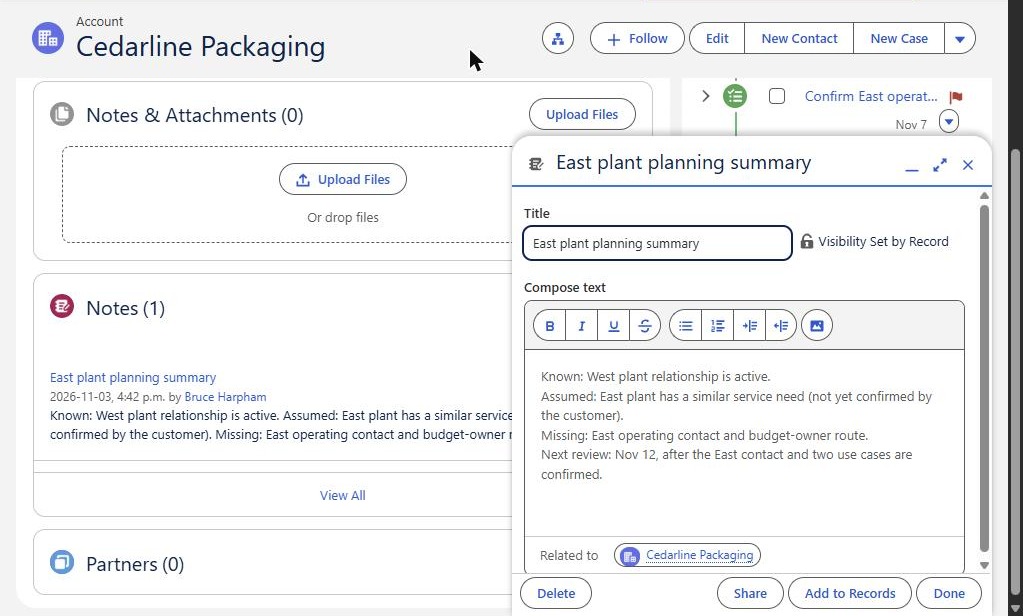
The planning summary saved as a Note on the Cedarline Packaging account and reopened after a page reload. It records a known West relationship, an assumed East need, the missing East contact and budget-owner route, and the November 12 review.
Writing "assumed" next to the East need is the most valuable word on the page. It stops the plan from quietly turning a hope into a pipeline number, and it tells everyone what the next piece of work is for.
A practical note: we first tried to store this summary in the Account Description field, but that Playground replaced the text with a default value after saving. We did not try to work around that automation. In your own org, pick one agreed place for the summary and confirm it actually keeps what people type.
Step 2: Turn the gap into owned, dated work
Each item marked missing or assumed should become a task with an owner and a due date. In the demonstration there are three:
- Prepare East plant review agenda, due November 4.
- Confirm East operating contact and budget-owner route, due November 7.
- Record two validated East service use cases, due November 12.
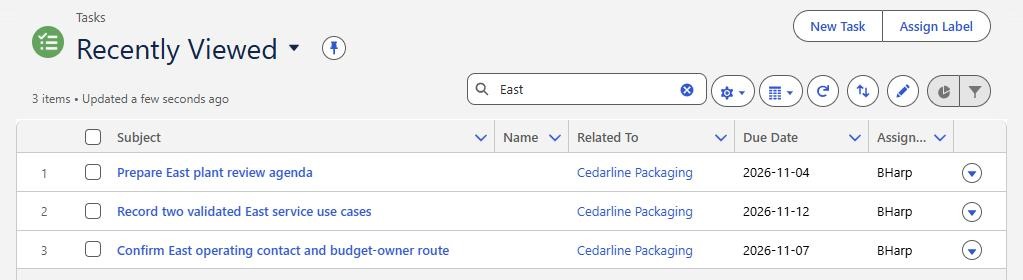
The three planning tasks, each related to Cedarline Packaging with a due date and an assigned owner. This list view does not display task status; status is shown on the account timeline in the next screenshot.
Notice that the tasks map directly to the gaps in the summary. The contact task closes the "missing" line. The use-case task tests the "assumed" line. The agenda task is preparation. Keeping that link visible makes reviews shorter, because the manager can ask one question per task: is the gap closed yet?
Step 3: Review what changed, and what did not
Once the agenda task is marked complete, the account tells a more useful story. On the account timeline, it now sits under past activity for November, while the contact and use-case tasks are still listed as upcoming.
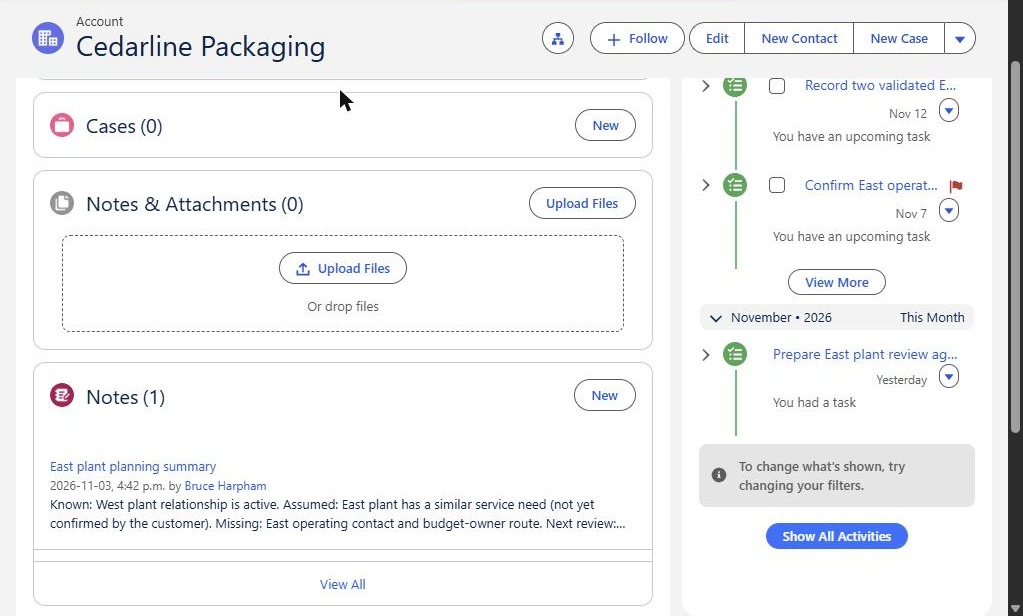
After the agenda was completed: the agenda task appears under past activity, while the contact-route and use-case tasks remain open with unchecked boxes. The planning note is unchanged.
Here is what this screen establishes, and no more: the preparation step is complete, and the customer-validation work is not. It does not show that the East plant wants anything, that revenue will grow, or that any objective has moved.
That is the management lesson worth keeping. Finishing an agenda feels like progress, and it is useful work. But preparing for a conversation is not the same as learning something from the customer. If the review treats completed preparation as evidence of demand, the plan drifts toward optimism without new facts.
Step 4: Make the decision the plan exists for
At the November 12 review, the manager should be able to choose one of three outcomes and record it on the account:
- Proceed: the East contact and budget route are confirmed and two use cases are validated by the customer. Create or update the opportunity.
- Keep validating: some evidence has arrived but the route to a decision-maker is still unclear. Set one new dated task and a new review date.
- Park it: the East team does not see the need, or no one owns budget. Update the summary so the assumption is no longer carried forward.
Parking an idea is a good outcome. It frees the team to spend time where the customer has shown interest.
Where native Account Plans fit
Salesforce does offer a native account planning object. Its developer documentation describes the AccountPlan object as holding customer information with measurable objectives and executable steps, available in API version 62.0 and later. Related measure calculation definitions let a measure's current value be calculated from other records.
This comparison is based on documentation only; we did not test those features here. Availability depends on your edition and setup, so check your own org before planning around it. Either way, the routine above still applies: one priority, clear owners, customer evidence and a dated decision.
Common ways account planning stalls
- Too many priorities. Five goals per account means none get reviewed properly. Start with one.
- Tasks without a link to the gap. If no one can say which assumption a task tests, it is activity, not planning.
- Summaries that do not persist. Confirm that the field or record you choose keeps its contents. Automation can overwrite text without anyone noticing.
- No decision date. Without a review date, assumptions roll forward indefinitely.
If your team needs help elsewhere in the account record, see our guides to Salesforce user adoption, choosing Salesforce report types, duplicate rules for account names and three forecasting questions. This article is narrower: it covers how a manager turns one account priority into owned work and a decision.
Get help setting up an account-planning workflow
Logic Conduit helps sales and operations teams design a practical account-planning workflow in Salesforce: where the summary lives, how tasks link to each priority, and what a manager reviews each cycle. We can start with a scoped pilot on a few key accounts before anything is rolled out more widely. Contact Logic Conduit to talk through your accounts and your current setup.