Salesforce FIELD_CUSTOM_VALIDATION_EXCEPTION: How to Find the Cause and Fix It
Short answer: FIELD_CUSTOM_VALIDATION_EXCEPTION means Salesforce checked the record against rules your own organization created, decided it did not qualify, and refused to save it. The words after the status code were written by somebody at your company, not by Salesforce. Your job is to find who wrote them, decide whether the rule is right, and — nearly always — fix the data or the mapping rather than switch the safeguard off.
If you arrived here because an integration is failing and nobody can tell you how many records are missing, skip to the business section below. That is usually the more expensive half of the problem.
Expert summary — the 250-word version
FIELD_CUSTOM_VALIDATION_EXCEPTION is the API status code returned when a DML operation is rejected by org-defined validation logic. The accompanying text is the rule author's own message, and the bracketed field is the error location, not necessarily the field at fault.
Common causes: a rule whose formula evaluates to TRUE for the incoming record; a rule that fires only at a particular stage or record type, so it passes in testing and fails in production; an integration or Flow writing a subset of the fields the rule assumes; and — frequently misdiagnosed — addError() from an Apex trigger, a record-triggered Flow custom error, or managed-package logic, all of which surface under the same status code.
Fastest safe diagnostic sequence: capture the verbatim error with the record Id and the acting user; search Setup → Object Manager → object → Validation Rules for the exact message text; if no rule matches, query ValidationRule via the Tooling API, then check Flows, triggers and installed packages; reproduce with a debug log on the integration user to see which class raises the exception.
Preferred remediation, in order: correct the source value or mapping; sequence the process so required fields arrive before the stage demanding them; fix a genuine defect in the rule. Bypasses — a custom permission, a hierarchy setting, a profile exclusion — are legitimate but must be scoped, authorized, logged and time-bound; deactivating a rule org-wide removes the control for everyone it was written to protect.
Confirm a permanent fix by rerunning the original failing payload, then reconciling record counts against the source system.
The beginner-friendly walkthrough
What follows is the long version, because the hard part of this error is rarely the fix — it is working out which of several very different mechanisms produced an identically-worded failure.
Everything below was reproduced in a Salesforce Developer Edition org.
Step 1 — Read the message properly
A typical error, as an integration or the API returns it:
FIELD_CUSTOM_VALIDATION_EXCEPTION | Direct customer accounts need an ERP
account number before they can be activated. | field (AccountNumber)
Three different things are bundled together here, and separating them saves real time:
| Part | What it is | Who wrote it |
|---|---|---|
FIELD_CUSTOM_VALIDATION_EXCEPTION |
The API status code — the category of failure | Salesforce |
| "Direct customer accounts need an ERP account number…" | The error message | Someone at your company |
field (AccountNumber) |
The error location the rule author chose | Someone at your company |
That middle section is the most useful string you have: it is almost certainly searchable inside your own org.
One caution about the third column: the error location is only where the author chose to display the message. A rule can display against one field while testing several others, so it is not proof that AccountNumber is the field at fault.
Step 2 — Find out what was saving
Before changing anything, establish what was running — a person editing a record, a data import, a scheduled integration, or a Flow or Apex job. Each leaves its evidence somewhere different, and an import error file gives you a complete list of failures where a connector log may show only the most recent ones.
Collect three things before you touch Setup: the verbatim error text, at least one affected record Id, and the username the operation ran as. Integration users often have different permissions and record access from the administrator investigating, which is a common reason a problem "cannot be reproduced".
Step 3 — Find the rule
Go to Setup → Object Manager → the object → Validation Rules and look for a rule whose error message matches the text you captured. The list shows each rule's name, error location, message and active status. In the test org used here, the rule looks like this:
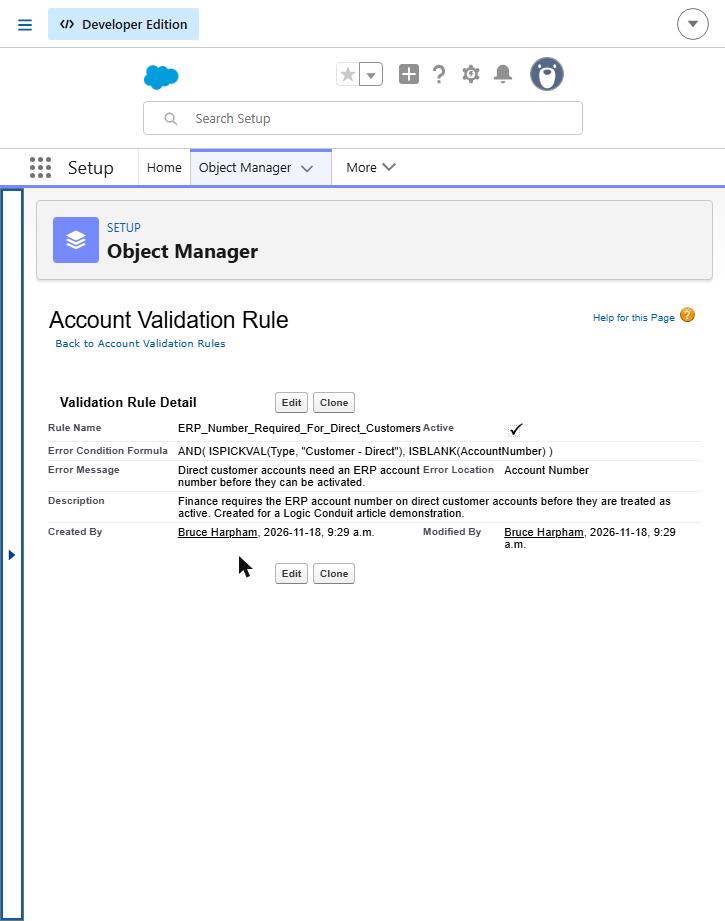
The rule as configured: it fires only when an account is a direct customer and the account number is empty.
If you find a matching rule, read it and move to Step 4. If you do not, go to Step 6 — that is where the genuinely difficult cases live.
Step 4 — Read the formula in plain English
The rule above uses this error condition formula:
AND( ISPICKVAL(Type, "Customer - Direct"), ISBLANK(AccountNumber) )
Translated: both of the following must be true — the Type picklist is "Customer - Direct", and the Account Number field is empty.
The single most important thing to understand is that the logic runs the opposite way round from how most people read it. The formula describes the problem, not the requirement: when it returns TRUE, Salesforce blocks the save; when it returns FALSE, the record goes through.
So this rule does not say "account numbers are required". It says "account numbers are required on direct customers". That conditional quality is why these rules surface late: everything works until a record reaches the particular combination the rule cares about.
Here is that rule meeting three records through an API-style write, with the status code exactly as an integration receives it:
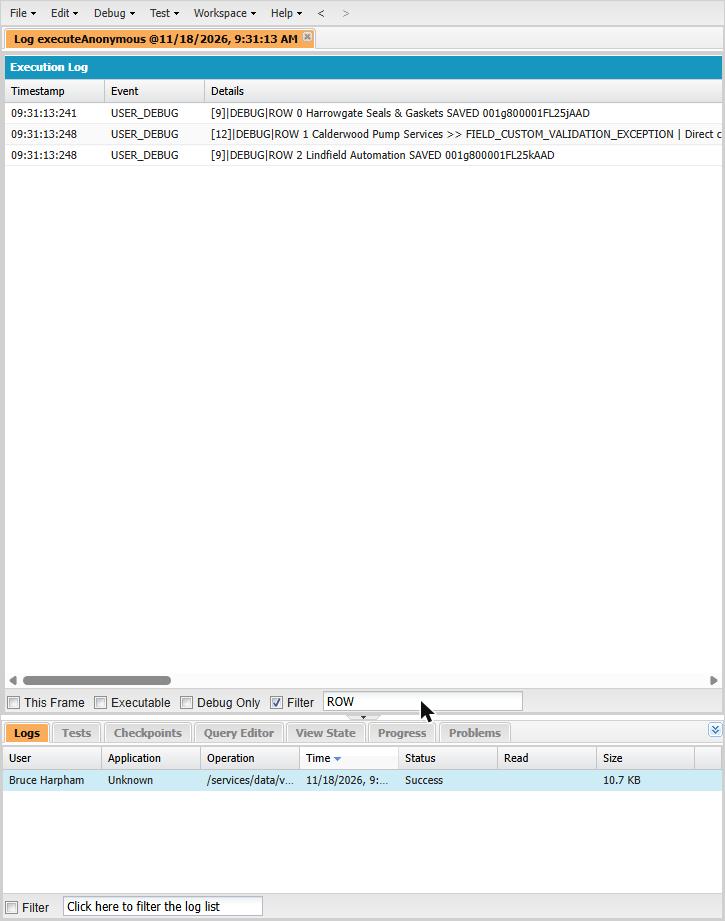
Three records through one API-style write. Only the middle one is rejected, and the status code is returned exactly as an integration would receive it.
Three records, three different outcomes:
| Record | Type | Account Number | Result |
|---|---|---|---|
| Harrowgate Seals & Gaskets | Customer - Direct | ERP-10042 | Saved |
| Calderwood Pump Services | Customer - Direct | (blank) | Rejected |
| Lindfield Automation | Prospect | (blank) | Saved |
The third row is the one worth dwelling on. Lindfield has no account number either, and saved without complaint. Debugging from the error log alone, "the account number field is required" would have been a reasonable and completely wrong conclusion.
Step 5 — Correct the data, not the safeguard
The internet's most popular answer to this error is to deactivate the rule. It works, in the sense that pulling a smoke alarm's battery stops the noise. Try these first, roughly in this order:
- Correct the source value. The data in the sending system is wrong or empty. Fix it there, so it stays fixed.
- Fix the mapping. The value exists, but the integration sends it to the wrong field, or in a format the rule rejects.
- Change the sequence. The record legitimately has no value yet when the integration writes. Move the stage change later, or populate the field earlier.
- Fix the rule. Sometimes it is simply wrong — firing on record types nobody intended, or lacking an exception for a process that cannot supply the field. If you are starting to suspect the rule is over-broad rather than the data, that is a different question, and which enforcement rules are worth keeping is where to take it.
Supplying the missing value and running the same record again is all it took here:
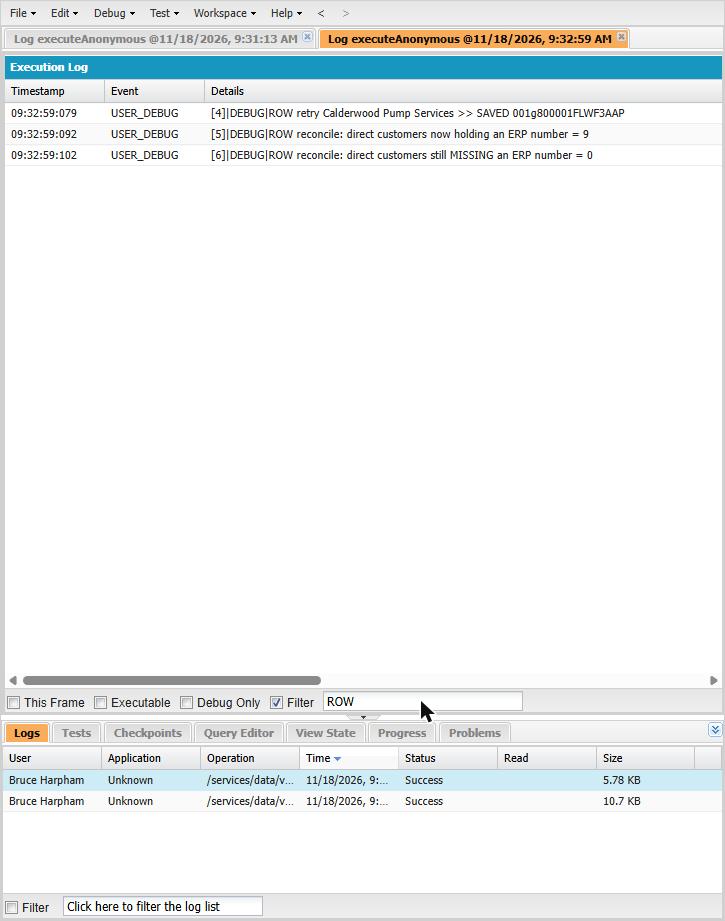
The same record saves once the account number is supplied, followed by two reconciliation counts.
If you do need a bypass, build it deliberately: a custom permission or hierarchy setting checked inside the formula, granted to a named integration user, documented and reviewed. That is a different thing from deactivating the rule for everybody and hoping someone remembers to switch it back on.
Step 6 — When there is no rule to find
This is the case that burns a week.
The status code says "custom validation", so it is natural to assume a validation rule. It is not always one. Apex can reject a record with addError(), record-triggered Flows can raise custom errors, and managed packages ship their own logic — all of which surface under this same status code.
Two public threads show how this plays out. In the first, a practitioner could not find the rule producing his error. He queried the ValidationRule object through the Tooling API filtering on active rules and nothing matched; he deactivated the rules he suspected and the error continued. The accepted answer, from a Forum Ambassador, pointed at a record-triggered Flow custom error or an Apex class invoked by a trigger. No confirmed root cause is recorded — worth knowing in itself, because it means "I searched the validation rules and found nothing" is a recognised dead end rather than a sign you missed something obvious. (thread)
In the second, a consultant updating a Financial Account in an org running the Financial Services Cloud managed package received this status code with a message about needing access to AccountContactRelation.Contact. The debug log showed the package's own FinServ.FinancialAccountTrigger raising it. The only reply, four months later, asks whether a solution was ever found. (thread)
That second case is doubly instructive: the status code suggested a validation rule and the message suggested a permissions problem, while the source was managed-package Apex. Changing permissions would not have fixed a validation failure, and hunting validation rules would never have found package code.
A short escalation checklist when the rule will not turn up:
- Search the message text across validation rules on related objects, not only the one you write to.
- Query
ValidationRulethrough the Tooling API, including inactive rules. - Check record-triggered Flows for custom error elements, and Apex triggers (and the classes they call) for
addError(). - Reproduce with a debug log on the integration user and read which class raises the exception.
- Confirm whether your save is updating a related record that fails its own rule.
Step 7 — Retest and reconcile
Fixing the one record that someone complained about is not the same as fixing the incident. Rerun the original payload, confirm it saves, then reconcile — because the failed batch may have left your systems disagreeing. Check that previously successful records were not overwritten by a retry, that every failed record is resolved or on a list with an owner, that retries have not created duplicates, that counts match the source system, and that downstream processes actually received the records.
The reconciliation query in the screenshot above is deliberately simple: direct customers holding an ERP number, and those still missing one. Note that the first count includes accounts that already existed in the org, not only the test records — a reconciliation number is only meaningful when you know what it is counting.
Step 8 — Stop it happening again
Most organizations hit this error repeatedly, with a different rule each time. The pattern is consistent: a rule was added for a good reason by someone thinking about the user interface, and an automated process nobody consulted now writes to the same object.
Practical prevention:
- Write rules with the integration in mind. If a process genuinely cannot supply a field when it writes, the rule needs a scoped exception rather than a nightly argument.
- Agree an integration contract — which fields each system owns, which are mandatory, at which stage.
- Validate before sending. A preflight check costs far less than a reconciliation.
- Handle errors structurally. Failed records need an owner and a status, not only a log that rotates.
- Monitor the error rate, not just the errors. A steady trickle of rejections is a design problem wearing a disguise.
- Test rule changes against automated writes, not only a person clicking Save.
Deciding in advance which failures a connector should retry, fix or escalate is what turns that error queue from a backlog into a process.
Salesforce's own documentation carries a neat cautionary example: a validation rule on the User object can block the Outlook integration from updating an internal field, so the welcome screen and the error reappear at every login until an administrator adjusts the rule. Nobody wrote that rule to break Outlook. (Salesforce Help)
The expensive version of a small error
Everything above takes an administrator an afternoon. This error is worth a manager's attention because the technical fault and the business damage are not the same size, and are not discovered at the same time.
Consider an illustrative case. Harrowgate Seals & Gaskets is a mid-sized B2B manufacturer. Orders and customer records originate in their ERP system and flow into Salesforce overnight, where sales and customer service work from them. Finance, reasonably, asks that direct customers carry an ERP account number before anyone treats them as active, and an administrator implements that as a validation rule.
The ERP assigns account numbers when credit terms are approved — which happens after the first order is entered. So every new direct customer arrives in Salesforce, for a day or two, without the number the rule insists on. Salesforce rejects those updates. It is behaving exactly as designed. The rule is defensible. The integration is working. And the business has a problem.
What tends to follow, in a scenario like this one:
- Recently-won customers are missing from Salesforce, or frozen at an earlier state.
- Operations and sales are looking at different versions of the same account.
- Someone discovers the gap and starts re-keying records by hand, which works and therefore never gets escalated.
- Pipeline and service reports quietly stop matching the ERP.
- Orders need manual intervention; the people doing it build private spreadsheets.
- The connector's error queue accumulates, owned by nobody in particular.
- Leadership cannot distinguish "synchronized" from "rejected", because both look like silence.
These are plausible consequences of the scenario described, not measured outcomes from a real client. But the shape is consistent: nobody experiences this as an error message. They experience it as a CRM that cannot be trusted, which is a much more expensive thing to fix than a formula.
Estimating what it is actually costing
You do not need a sophisticated model to decide whether this deserves budget. Start with the direct rework:
Failed records × average investigation and rework time × fully loaded hourly cost
Three hundred rejected records a month, twelve minutes each to investigate and re-enter, at a fully loaded $55 an hour is roughly $3,300 a month in rework alone — and rework is the cheapest category on the list. Consider adding, where you can evidence them:
- Delay cost on orders that waited for manual intervention.
- Time spent reconciling reports that disagree.
- Duplicate records created by well-intentioned retries, and the cost of merging them later.
- Decisions taken on numbers that were incomplete.
Resist the temptation to put a revenue figure on the last one unless you can actually trace it. The rework number is usually sufficient to justify the work, and it has the advantage of being defensible.
When to bring in outside help
Most individual instances of this error should be fixed in-house, and quickly. The signals that something structural is wrong are about pattern, not difficulty:
| Situation | Reasonable response |
|---|---|
| One rule, one object, cause understood | Fix internally |
| Error sits inside Apex, a Flow or a managed package | Involve a Salesforce developer |
| Integration maps the wrong fields or writes at the wrong stage | Involve whoever owns the integration |
| Repeated failures across several objects; a backlog nobody owns; conflicting rules between applications; recurring manual bypasses; business-critical processes delayed | Commission specialist support |
That bottom row is the one worth being honest about. Repeated manual bypasses are the clearest signal of all: when switching a rule off has become routine, the control has already stopped working, and the data quality it was protecting is gone whether or not anyone has noticed yet.
When a validation error becomes a business operations problem
There is a real difference between fixing a bad record and fixing an unreliable process.
Fixing the record is what we walked through above: find the rule, correct the data, retest. Worth doing, and often enough.
Fixing the process is a different question, and it is the one that comes up when the same error keeps returning with a different rule attached each time. It means asking which system owns which field, which validation belongs at the Salesforce layer and which belongs upstream, what happens to a record that fails, who is accountable for the error queue, and how anyone would know if synchronization silently stopped tomorrow.
Logic Conduit does that work, usually as a scoped Salesforce Integration Sprint. A typical engagement starts by establishing what is actually failing and how much of it — the error backlog, which objects and rules are involved, whether the causes are validation rules, Apex, Flows or package logic, and where Salesforce and the source system currently disagree. From there we redesign the validation and integration contract so legitimate business rules stay enforced without blocking the processes that have to run, implement error handling and reconciliation that makes failures visible and owned, and leave your team with controls they can maintain.
What improves is not primarily the error rate. It is that failures become visible, counted and owned, your reports agree with the systems they are drawn from, and nobody is quietly re-keying records to keep things moving.
If recurring Salesforce integration or data quality failures are consuming more of your team's week than anyone has fully measured, that is worth a conversation.