Salesforce Data Sync and the Cost of Manual Work and Missed Updates
Salesforce data sync becomes a management problem when employees must re-enter invoices, wait for financial reports or chase updates that should have arrived automatically. The cost shows up in staff time, delayed decisions and business handoffs that need manual rescue.
In a published case study, Satva Solutions describes a Canadian flooring business whose Salesforce–QuickBooks integration was not working properly. Staff manually copied bills and invoices between systems, while account managers waited for accounts receivable and payable reports. Satva reports that the subsequent integration saved more than $25,000 in manual data-entry expenses. The client is unnamed, and the savings period and calculation are not clearly disclosed. This is a provider-reported result, not a savings benchmark. Satva case study
For an executive, three questions deserve attention: How much work is being repeated? Which decisions depend on stale information? Who notices when an update fails, and how long does repair take?
This guide covers updates between Salesforce CRM and external business systems. Salesforce also uses “data sync” for extracting data into CRM Analytics; configuration guidance for that use is in its CRM Analytics lesson.
Where disconnected systems become expensive
Start with the workflow employees are trying to complete. A missing invoice status might cause a sales representative to ask finance for an update. A failed lead handoff might leave a prospect waiting. Neither problem is visible in a report that only says the integration ran.
| Business symptom | Executive concern | What to measure |
|---|---|---|
| Staff copy the same transactions between systems | Recurring labor expense and rework | Hours spent entering, checking and correcting records |
| Account managers wait for billing information | Delayed customer or collection decisions | Age of information and time spent waiting |
| Enquiries fail to reach the sales team | Paid demand may not receive timely follow-up | Missing handoffs and elapsed time to first action |
| Sales and finance cannot reconcile their numbers | Management decisions rely on disputed reports | Unexplained differences and time spent reconciling |
These are risks to investigate in your business. A sync error count alone cannot tell you how much revenue was lost or how much an improvement will save.
A real example of missed sales handoffs
Driftless Agency describes repairing the HubSpot–Salesforce integration supporting IDEXX's veterinary software division. Its case study reports demo and form submissions silently failing to reach Salesforce, along with tasks going to the wrong owners. The agency says a single field-mapping correction cleared more than 1,000 sync errors. Driftless case study
The same engagement also addressed scoring rules that prevented existing-customer expansion leads from qualifying. Scoring and synchronization were separate defects; fixing a connection alone would not have addressed both. The case study does not quantify lost or recovered revenue.
For a sales leader, this suggests a useful check: select a sample of recent demo requests and trace each one through to an assigned owner and a recorded follow-up. The business outcome is a completed handoff, not simply a contact record in both systems.
Connected data can still leave finance with disputed numbers
In a May 2025 Reddit discussion, a practitioner described finishing an 18-month consolidation involving three Salesforce organizations and HubSpot setups. New private-equity ownership then wanted sales, pipeline and annual recurring revenue reconciled with accounting. Bringing the data together had not completed that management requirement. Practitioner discussion
This is an anonymous, self-reported account, not an audited case study or evidence of a particular sync failure. It illustrates why reconciliation should be part of the business scope. Agree what each measure means, which system supplies it and how differences will be explained. A Salesforce data sync project cannot resolve conflicting definitions of revenue merely by moving more records.
Estimate the cost before buying another tool
Use your own workload and costs to build the business case. Separate labor, delayed cash and potential sales exposure so the same impact is not counted twice.
- For manual work, record monthly hours spent entering, checking and repairing data. Multiply by the agreed fully loaded hourly cost to estimate current labor expense. Count only the portion the proposed change can realistically remove as a potential saving.
- For delayed billing, track the value and age of invoices held up by missing information. Distinguish delayed cash collection from permanently lost revenue.
- For missed sales handoffs, identify affected enquiries and follow-up delays. Assess opportunity value separately; do not count every missing lead as a lost sale.
- For reporting disputes, record reconciliation time and the decisions that must wait for an explanation.
Compare the avoidable cost with implementation, subscriptions, monitoring and ongoing support. Released staff time may create capacity without reducing payroll. Make that distinction explicit in the approval request.
Choose one business handoff to repair first
Select a workflow with a clear owner and a visible consequence when it fails. For example, finance owns invoice payment status, and account managers need that status in Salesforce before discussing an overdue balance with a customer.
Agree which system owns the value, how quickly it must appear and what happens when the update is rejected. Salesforce's architecture guidance identifies timing, direction, volume and maintainability as integration selection factors. It also recommends considering access to external data without copying it when a local copy is unnecessary. Salesforce data integration guide
| Decision | Example pilot agreement |
|---|---|
| Business outcome | Account managers can see the billing system's payment status in Salesforce |
| Ownership | Finance owns payment status; Salesforce owns sales account assignments |
| Timing | A 15-minute freshness target chosen for this hypothetical pilot |
| Test evidence | Compare expected and actual values for 20 synthetic accounts |
| Failure handling | Missing matches and rejected updates reach a named operations owner |
| Acceptance | Correct values arrive within the target; failed updates are visible and repairable |
The timing and sample size above are illustrative acceptance criteria, not Salesforce limits or observed results. Your pilot should reflect the consequences and workload of your business.
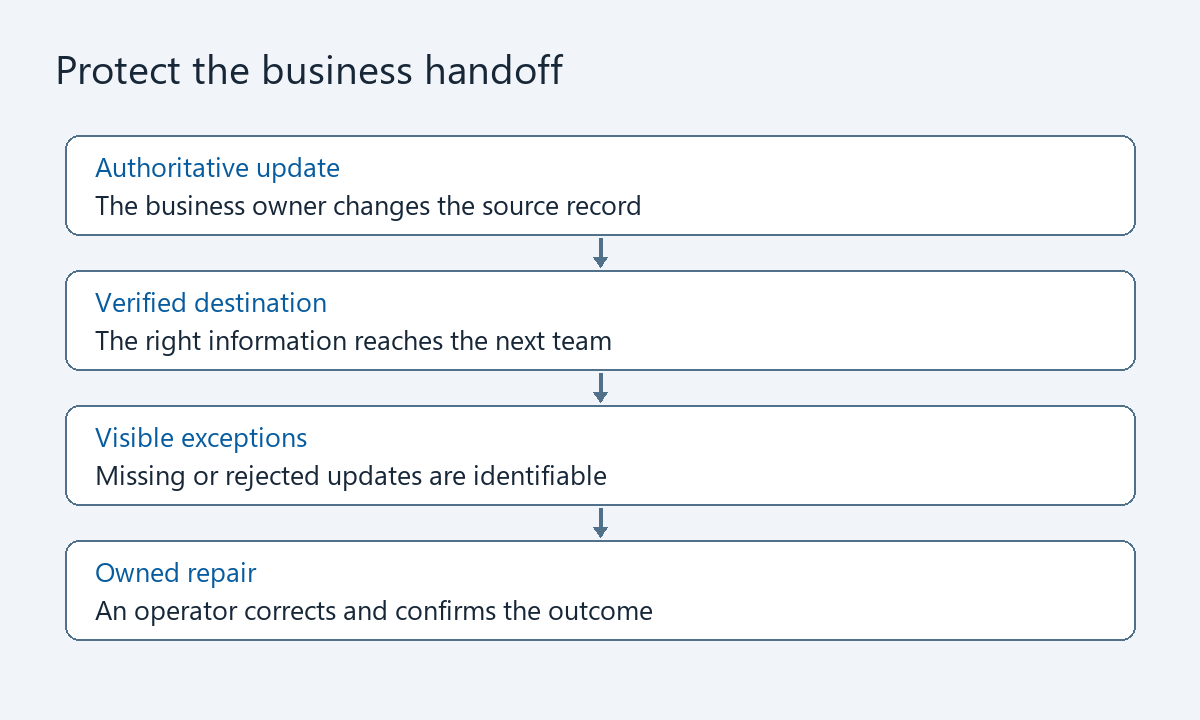
Ask whether the Salesforce data sync tool completes the workflow
A connector that supports both application names may still need mapping, permissions and operating rules configured for your business. Ask the provider to demonstrate the complete handoff using representative test records.
Require answers to these questions before comparing proposals:
- Does the correct information reach the person who needs it within the agreed time?
- Can one system overwrite a field owned by the other?
- What happens when a customer cannot be matched, a value is cleared or a record is deleted?
- Can an operator identify the affected records after a failure and confirm their repair?
- Who monitors the connection, handles alerts and supports changes after launch?
- What are the setup costs, recurring charges and handover requirements?
Give each provider the same scope and acceptance criteria. Include duplicate cleanup, initial loading, testing and rollout in the setup estimate. Include subscriptions, monitoring and failed-record repair in the operating estimate.
Agree who can pause writes and how incorrect updates will be assessed. Disabling an integration stops future work; it does not undo changes already made.
Technical checks your implementation team should cover
Executives need evidence that these controls support the business outcome. The implementation team should document and test the details.
Record matching and safe retries
For a Salesforce API integration, use a stable cross-system identifier to match records. Salesforce supports inserting or updating a record by an external ID: no match creates a record, one match updates it and multiple matches produce an error. Salesforce external ID reference
Record matching does not establish that every business action is safe to repeat. The team should test repeated requests and any downstream automation, then define how uncertain outcomes are checked before retrying.
Recovery after an outage
Salesforce retains platform events and change data capture events for 72 hours. A subscriber can use a stored replay ID to retrieve events within that window; the IDs are opaque and should not be calculated from previous values. Salesforce also documents circumstances in which retained streams can reset. Salesforce event durability
Require a separate plan for comparing source and destination records after a longer outage or an unresolved discrepancy. Recovery is complete when the business records are correct and exceptions accounted for.
Access and diagnostics
Have the administrator confirm which objects and fields the integration can read or change. Test restricted access, limit unnecessary customer data in diagnostic logs and keep credentials out of working documents. Assign an owner for credentials, monitoring and maintenance.
Frequently asked questions
What is Salesforce data sync?
Salesforce data sync keeps selected data aligned between Salesforce and another system. For management, its value depends on whether that alignment removes repeated work and supports timely, correct business actions.
Will fixing synchronization automatically recover revenue?
No. It may restore a failed handoff or reduce manual work, but revenue depends on what happens afterward. Measure the repaired workflow and its business result separately.
How do we know the integration is working?
Trace representative transactions from the source to the destination and the responsible employee. Check correctness, timing, rejected records and demonstrated recovery. A successful job status alone is insufficient evidence.
Bring the business problem to the integration discussion
Choose one costly handoff. Bring examples of affected records, the monthly repair effort, the acceptable delay and the person who owns the outcome. That gives a consulting engagement a concrete scope and a result you can assess.
Explore Logic Conduit's Salesforce Integration Sprint or contact Logic Conduit to discuss the workflow your team needs to repair.