Salesforce Lead Assignment Rules Best Practices for Clear Ownership
Salesforce Lead Assignment Rules Best Practices for Clear Ownership
The most useful Salesforce lead assignment rules best practices start with a business decision: when a Lead qualifies for more than one team, who should own it? Agree on that priority, put the entries in the intended order, and verify the resulting owner with representative Leads before releasing a change.
For a sales operations manager, the concern is practical. If a Canadian technology prospect could belong to either a regional team or an industry team, both teams need the same answer. A configuration that saves successfully does not establish that the ownership decision is right.
The example below shows how that ambiguity appears in Salesforce. It uses fictional data in a Trailhead Playground, followed by a short review process you can use with your administrator.
1. Decide which team wins when criteria overlap
Salesforce evaluates assignment-rule entries in order and stops at the first match. See Salesforce’s Set Up Assignment Rules documentation.
That makes entry order an expression of your routing policy. Salesforce does not decide that an industry-based condition is more important than a country-based condition.
Suppose your business has an Enterprise Sales queue for technology prospects and a Canada Sales queue for Canadian prospects. Before editing the rule, settle this question: Who owns a technology prospect in Canada?
Neither condition is inherently more specific. Each describes a different characteristic, and either could be the intended priority. “Put specific entries first” is useful only when the team has defined which exceptions should take precedence.
Write that decision in plain language alongside the configuration. For example: “Technology prospects go to Enterprise Sales, including prospects in Canada.” If regional coverage should take priority instead, document that policy and order the entries accordingly.
2. Verify ownership with an overlapping Lead
Consider Maya Bennett at Eastern Systems, a fictional prospect used in a Trailhead Playground demonstration. Her Lead record has Industry set to Technology and Country set to Canada, so she qualifies for both queues.
Here is how ownership changed with the entry order:
| Entry order | Expected owner | Recorded owner |
|---|---|---|
| Industry = Technology first; Country = Canada second | Enterprise Sales | Enterprise Sales |
| Country = Canada first; Industry = Technology second | Canada Sales | Canada Sales |
With Technology first, Maya’s new Lead record went to Enterprise Sales. After Canada moved to the top, editing and saving her record sent it to Canada Sales. In both cases, the routing fields stayed the same and “Assign using active assignment rule” was selected.

In this fictional example, Technology is evaluated before Canada.
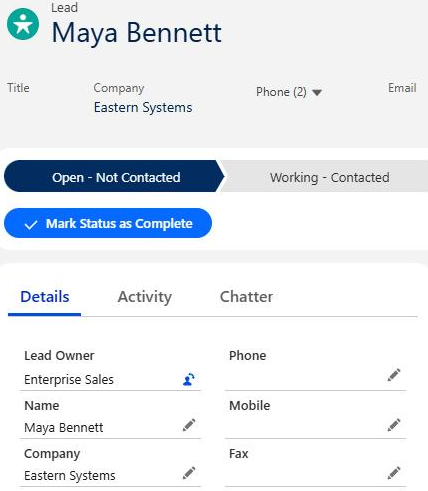
Maya’s new Lead record is assigned to Enterprise Sales.

The same rule after reordering: Canada is evaluated before Technology.
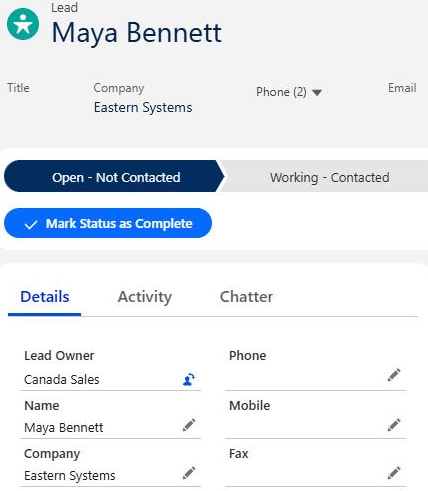
After the reorder and another save using the active assignment rule, Maya’s Lead owner is Canada Sales.
The results follow Salesforce’s documented evaluation order. This example covers one manually entered Lead: first created, then edited. For a closer comparison in your own testing, use the same operation each time—for example, create a fresh Lead for each rule arrangement.
Before releasing a change, record the inputs, intended owner and actual owner. Checking the rule in Setup is only half the job; check the Lead record too.
3. Make the fallback an accountable destination
Salesforce recommends a final entry without criteria to catch records that earlier entries did not assign. Keep that entry last. General Sales serves that role in the example above, although this demonstration did not test an unmatched Lead.
Treat the fallback as a responsibility decision. Who reviews that queue? What should they do when a Lead arrives without enough information for a more targeted route? Who corrects the underlying criteria if the same exception keeps appearing?
A queue needs people responsible for it. The demonstration queues had no members, so an ownership change alone did not establish a working sales handoff. Before using a queue operationally, ask your administrator to verify the intended people can access and work its Leads.
Add a Lead that matches none of the targeted entries to your acceptance checks. State its expected owner before saving, then inspect the result. Do not assume a fallback works because it is visible in Setup.
4. Check each entry path before relying on the rule
In this Playground, “Assign using active assignment rule” was selected when creating and editing Maya’s Lead. Check how assignment is triggered in your own configuration rather than assuming every layout or Lead source works the same way.
Ask your administrator to document how each Lead source invokes assignment. If your business uses manual entry, website forms, imports or integrations, check each relevant path separately. The example here covers manual entry and editing only.
Start with the paths you actually depend on. For each one, keep a short record of the source, routing inputs, invocation method, expected owner and observed owner. A successful manual-entry test should not be used to sign off an integration path.
A short review before your next routing change
Use these questions in a working session with your sales operations lead and Salesforce administrator:
- Priority: Have we agreed who owns a Lead that matches multiple entries?
- Coverage: Have we checked an overlap, a normal route and a fallback case?
- Invocation: Have we verified each Lead source that matters to this release?
- Responsibility: Is someone accountable for working the destination queue?
- Release control: Have we recorded the current configuration and the steps to restore it if checks fail?
Use the checklist to plan your own review, including the fallback and Lead sources beyond the manual example shown here.
Correct ownership is one part of follow-up. It does not establish that a salesperson acted, that response times improved or that revenue increased. If those are your goals, measure them separately after the routing behavior is understood.
Get a clear answer on Lead ownership
If your team cannot explain why a Lead reaches a particular owner, bring one example to Logic Conduit. We help businesses configure Salesforce around their sales and operational processes.
Tell us where your Lead handoff gets stuck. Describe the expected owner, the actual owner and how the Lead entered Salesforce. That gives us a concrete starting point for discussing the routing problem and an appropriate scope of work.