HubSpot Salesforce Integration Best Practices: 5 Checks Beyond “Connected”
A “Connected” status is a starting point. Your sales and marketing teams need to know whether the right records arrive, the right person owns them, and important changes keep reaching the destination.
The most useful HubSpot Salesforce integration best practices are to define record eligibility, assign authority for important fields, verify lead ownership, limit activity sync to useful records, and check affected records after changes or repairs.
In our controlled test, a HubSpot contact marked Marketing Qualified Lead reached Salesforce with the expected owner. Its Salesforce status was Open – Not Contacted. Those labels describe different stages of work: we verified delivery, not human follow-up.
Below, five first-hand reports show where to focus a review, followed by our test evidence. The reports are attributed observations; their causes and proposed remedies were not independently verified in the affected organizations.
Five checks to prioritize in your integration review
Use the symptom closest to your team's problem to choose a starting point. These are diagnostic priorities, not conclusions about the cause.
| If your team sees… | Start by checking… | Ask for this evidence |
|---|---|---|
| Fresh contacts arrive; older records stay stale | Existing-record eligibility, linked IDs and sync triggers | A destination update on an older affected record |
| Salesforce fills with low-value activity | Which event categories generate tasks | Activity growth by category and a named business use |
| Sync breaks after a CRM change | Mappings, identifiers and dependent automation | Before/after settings and existing-record test results |
| Extra copies of the same person appear | The record creation path | IDs, creation times and automation context |
| Leads arrive but miss the intended salesperson | Ownership before and after first sync | The destination owner and salesperson's working queue |
What the official Salesforce and HubSpot guides get right
HubSpot’s implementation planning guide starts with business outcomes, record eligibility, field ownership and assignment. That is a useful agenda for a joint sales and marketing discussion before anyone changes a setting.
Salesforce’s operational excellence guidance adds the continuing responsibilities: monitoring, consistent procedures and learning from incidents. Its integration patterns address recovery and the danger of processing the same operation repeatedly.
Use those guides as references. Then ask how the principles hold up when existing records, employee workflows and later changes enter the picture.
Five best practices drawn from real integration problems
1. Test both new contacts and existing-record updates
In a June 2026 HubSpot Community report, an administrator described rebuilding the integration. Newly created Salesforce contacts reached HubSpot, while existing contacts remained pending without visible sync errors. The discussion does not establish a confirmed cause or a verified recovery.
For a manager, this is a testing gap worth recognizing: a successful new-record demonstration leaves the existing database unproven. If older prospects remain stale, employees may have to check them individually before taking action.
Ask the analyst to compare one successful new record with one affected existing record. Check the linked Salesforce record ID, current eligibility and the event expected to trigger synchronization. Treat an old association as a hypothesis until the evidence supports it.
HubSpot’s connection guidance notes that installation does not automatically synchronize every record. Its inclusion-segment guidance also distinguishes eligibility from a sync trigger, with exceptions around initial synchronization.
Before a wider resync, preserve the affected population and inspect the destination results from a small sample. Acceptance should cover new records, existing records and previously failed records.
2. Limit activity sync to information your team uses
A June 2025 Reddit account described nearly three million Salesforce tasks following synchronization of marketing email activity. The author reported that tasks occupied 87% of data storage. These are self-reported figures from one organization, not a benchmark or an independently verified storage audit.
The management issue is whether the copied activity helps someone make a decision. A sales rep may need a useful engagement summary without needing every email interaction to become another Salesforce record.
HubSpot’s activity documentation distinguishes one-way Timeline sync from two-way Activity sync. It also explains that repeated marketing email opens or clicks can create multiple Salesforce tasks through Timeline sync.
Have the analyst identify the actual sync method, inspect a small sample of generated tasks and measure growth by activity category. Ask sales which categories they use for follow-up or reporting. Evaluate HubSpot Embed if the requirement is visibility rather than a reportable Salesforce task.
Agree the future activity scope before planning historical cleanup. Retention, reporting and deletion effects need a separate assessment. Every synchronized activity category should have a named business use and an owner who reviews its growth.
3. Review CRM changes for dependencies in both systems
In a March 2026 custom-object report, changing a Salesforce object’s API name was followed by errors on existing synchronized records. The author later reported recovering through remapping and deleting and recreating a small dataset. We have not independently verified that result, and it is not a safe general repair prescription.
An API name is an identifier used by software. Changing it deserves a different review from changing a label that employees see on screen.
Before approving such a change, ask the administrator to inventory mappings, record associations and dependent automation. Preserve the existing configuration and record identifiers. In a nonproduction environment, test what happens to an existing pair of records as well as a newly created pair.
If existing relationships fail, gather the affected IDs and sanitized errors for vendor support before considering a reset. Define what restoration would mean, including related records and reporting continuity.
The useful management question is simple: who must review a CRM change because another system depends on it? Treat identifiers, field definitions and routing rules as shared operational dependencies.
4. Trace duplicate creation before planning cleanup
A May 2026 community post reported extra Salesforce contacts after a HubSpot sync, concentrated around two sales reps’ accounts. Later, the author explicitly rejected the suggestion that the reps had manually created them. The visible discussion does not establish the root cause.
That distinction matters. Blaming employee behaviour too early can leave the actual creation path untouched while adding unnecessary training or restrictions.
Ask the analyst to construct a short record timeline: IDs, creation times, creating users, associations and relevant automation. Compare an affected account with an unaffected one. A “Created By” value is evidence about the execution context; it does not, by itself, prove that a person clicked New.
Test duplicate controls through the integration path, rather than relying only on what happens when an employee saves a record manually. Include a repeated update to an existing person and check that the expected record remains the one being updated.
Keep the original records while investigating relationships and deletion settings. A useful duplicate investigation explains how the records were created before recommending a merge or cleanup.
5. Verify lead ownership in Salesforce
In a 2018 first-hand comparison, an administrator reported different Salesforce assignment outcomes depending on whether the HubSpot contact already had an owner. This is historical evidence, not proof of current behaviour in your account.
Current HubSpot mapping and owner guidance explains that a matching active owner assigned in HubSpot before initial sync can become the owner of a new Salesforce lead. An existing Salesforce lead follows a different first-sync ownership path.
Before changing routing, agree which system should assign the salesperson and what should happen when territory information is incomplete. Then test an owned contact, an unowned contact and a match to an existing Salesforce record. Check the final owner and the salesperson’s working queue, not just record creation.
Also record the qualification time and the expected follow-up deadline. A lead can reach Salesforce correctly and still receive no human response. That is a separate process failure requiring its own evidence.
For a wider review, use our marketing-to-sales handoff questions. A completed technical handoff needs an accountable recipient; completed follow-up needs evidence of action.
What our Salesforce–HubSpot handoff test revealed
On November 5, 2026, we created one synthetic HubSpot contact, marked it Marketing Qualified Lead and assigned it to Bruce Harpham. The existing native integration was already connected. Its test inclusion segment selected email addresses containing lc-test-; qualification stage was not the eligibility criterion in this setup.
The corresponding Salesforce Lead was created, and we checked its matching name, email, title and owner directly in Salesforce.
| Acceptance check | Observed result |
|---|---|
| HubSpot qualification label | Marketing Qualified Lead |
| Destination record | Matching Salesforce Lead |
| Name, email and title | Matched the synthetic source values |
| Salesforce owner | Bruce Harpham |
| Salesforce Lead Status | Open – Not Contacted |
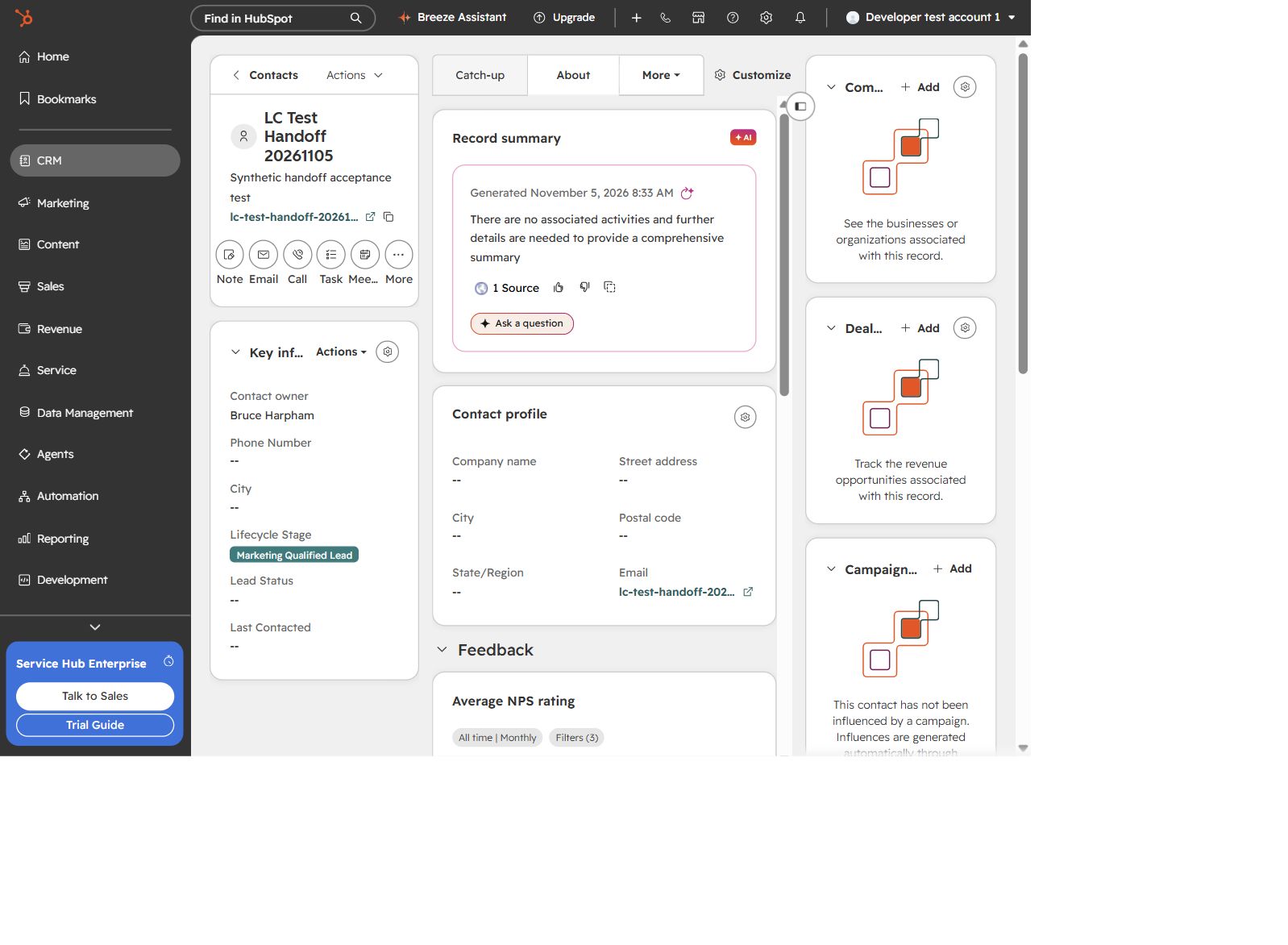
The source contact used the existing test inclusion criteria. Controlled demonstration, November 5, 2026.
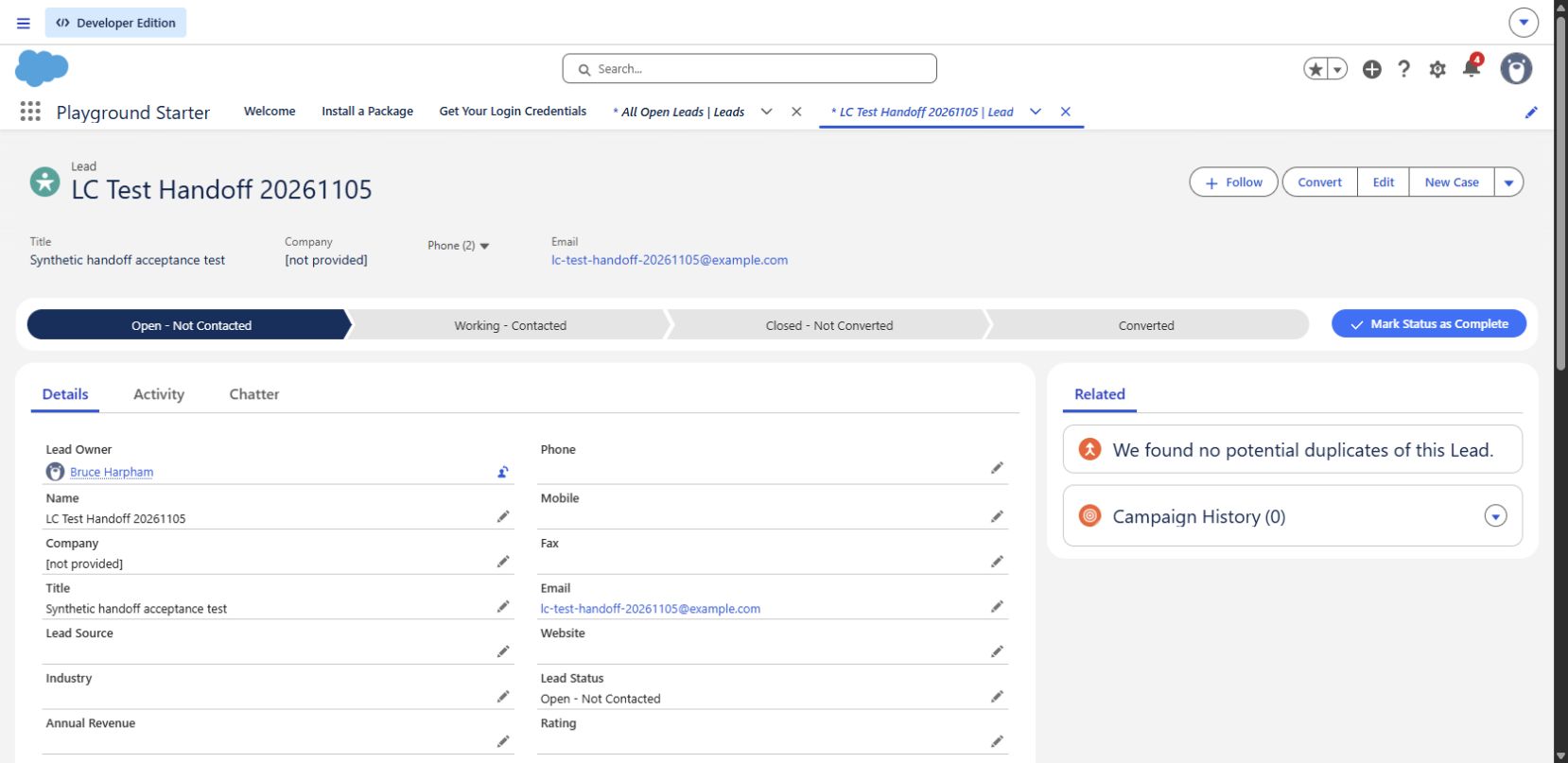
We verified the destination record rather than relying on the connection’s status alone.
This establishes one technical handoff under this configuration. It does not prove human follow-up, territory routing, every mapping, existing-record updates or recovery of earlier errors. The contrast between the source qualification label and destination work status is a reason to agree what each stage means, not evidence that the integration lost qualification data.
Logic Conduit’s separate picklist repair article documents an October 2026 test in which a HubSpot value was rejected by Salesforce. The published account distinguishes the configuration repair from later verification that the destination record had recovered.
Use that worked example when the immediate problem is a failed field update. The checks here address the broader operating decisions that keep the connection useful over time.
How to keep a working integration working
Give one person responsibility for coordinating integration health across sales, marketing and administration. That person needs a deputy and a short operating record that survives staff turnover.
Start with this compact review:
| Review area | Evidence to request | Decision it supports |
|---|---|---|
| Lead handoff | Expected eligible leads compared with destination records and owners | Whether the sales queue is complete |
| Field ownership | Important mappings and conflict rules | Which team may change each value |
| Activity growth | Generated records by category and their business use | What deserves continued synchronization |
| Changes | Before/after settings, affected workflows and acceptance results | Whether a change is safe to release |
| Recovery | Previously failed records checked after repair, with exceptions | Whether the incident can close |
HubSpot provides sync-health and API-use monitoring. Use those indicators alongside checks on the business population you expected to arrive. A clean error panel alone does not establish that every expected lead was eligible, triggered and received.
Choose the review frequency around the importance and volume of the workflow. During a launch or significant change, check more closely; in steady operation, use an agreed routine and explicit escalation triggers. Avoid promising a universal “weekly is enough” rule.
Before bulk recovery, identify what must be reconciled: records, important values, ownership and any dependent work. Keep retries bounded and record their results. Afterward, explain outstanding exceptions in language the sales or marketing manager can act on.
Seven questions to ask about your integration
- Which business handoff must work? Name the starting event, destination and person who acts next.
- Which records belong in the sync? Include existing records and important exceptions.
- Who controls each consequential field? Agree how conflicting changes should be resolved.
- Who owns a newly qualified lead? Include fallback ownership and incomplete routing data.
- Which activity records do employees actually use? Review volume against that purpose.
- Who reviews changes in either system? Include mappings, identifiers, permissions and automation.
- What proves recovery? Require destination checks and a reconciled affected population.
These questions give a business sponsor a way to judge the work without learning the integration’s internal configuration.
When an outside integration review makes sense
Bring in help when discrepancies recur, ownership crosses departments, or your team cannot confidently explain which records are current. Start with one consequential workflow and the evidence already available.
A Salesforce–HubSpot Integration Health Review can start with one handoff or report your team cannot trust. Agree a scope that produces three things: the confirmed gaps and their business effects, a prioritized repair plan, and acceptance checks your team can use to judge completion. Include operating instructions and unresolved questions so the result remains useful after the consultant leaves.
Contact Logic Conduit about an integration health review. Describe the handoff or report your team cannot rely on, the systems involved and any deadline. You do not need a technical specification to start the discussion.