Fix HubSpot Salesforce Sync Errors With a Tested Picklist Repair
A lead changes in HubSpot. Salesforce still shows the old information. Your team starts checking records by hand, and a sales manager asks whether the next report can be trusted.
To fix HubSpot Salesforce sync errors, establish what failed, correct the cause, and check the affected Salesforce records before closing the issue. A configuration change alone does not show that the backlog recovered.
This article uses a controlled Logic Conduit test to show that process. A dropdown value accepted in HubSpot was rejected by Salesforce. The original Lead kept its earlier value, and an unrelated Title change also failed to arrive during the initial checks.
The test followed HubSpot contacts into Salesforce Leads through the native connector. It provides a specific picklist example for a wider management problem: knowing when the information your team depends on is current again.
When a sync error becomes a management problem
A stale field deserves urgent attention when it changes what people do next. A stale qualification value may affect who receives a lead. An outdated customer tier may put records in the wrong reporting group. Those are possible consequences to investigate in your workflow.
Before authorizing a wider repair, ask the team:
- What decision or handoff is affected? Name the sales queue, report, or follow-up process.
- How large is the affected population? Separate confirmed failures from records that still need checking.
- What work is keeping things moving? Include manual corrections and repeated reconciliation.
- What will establish recovery? Agree which destination records and business outputs must be checked.
You do not need to diagnose the field configuration yourself. You need a defined problem, an accountable owner, and a clear completion test.
If the same discrepancies keep returning, tell Logic Conduit which workflow is affected. Include the deadline and approximate record count if you know them. You can start with the business problem.
How to diagnose HubSpot Salesforce sync errors
Ask your analyst to open HubSpot's Salesforce integration and inspect Data sync → Sync Health. They should record the error category, affected field, reported value, affected-record count, and first-detected time. Then they should open the corresponding Salesforce record and compare what arrived with what was expected.
HubSpot documents several error categories, including picklists, permissions, and Salesforce validation or automation failures. The reported error determines the next check. HubSpot troubleshooting guidance
Also confirm the destination object and the mapping's update rule. In the test, a HubSpot contact updated a Salesforce Lead. The field mapping allowed HubSpot changes to overwrite an existing destination value. A rule that gives Salesforce precedence can produce a different result. HubSpot mapping guidance
The tested failure was a missing picklist value
A picklist is a field with a defined set of choices. The lab started with three permitted values in both systems. A synthetic contact set to Tier A in HubSpot reached Salesforce successfully.
Next, the test added Tier D in HubSpot only. Its underlying value, tier_d, was absent from Salesforce's restricted picklist.
HubSpot accepted the contact update. Its integration then reported a Restricted picklist value error. The Salesforce Lead retained tier_a.
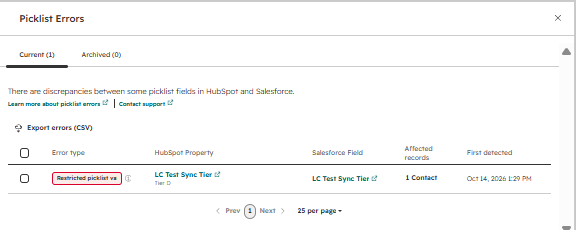
The option label and its underlying value deserve separate checks. HubSpot displayed “Tier A” but sent the internal value tier_a. The analyst compared HubSpot's internal values with Salesforce's option API names, the identifiers used by the integration.
| Test stage | HubSpot value | Salesforce Lead value |
|---|---|---|
| Passing baseline | tier_a |
tier_a |
| After the mismatch | tier_d |
tier_a |
| After verified recovery | tier_d |
tier_d |
The error appeared after the unsupported value was selected, while the Lead retained its old value. See the evidence summary.
Fix a restricted picklist error without removing the restriction
Have the business owner confirm whether the new value belongs in Salesforce before the analyst changes the allowed options.
If it is approved, align the permitted values. In this test, the repair added tier_d to Salesforce and kept the picklist restriction enabled.
If it is wrong, correct the source records and address whatever keeps introducing the unwanted value. A form, import, workflow, or manual selection may need attention.
See the Salesforce configuration used in the repair
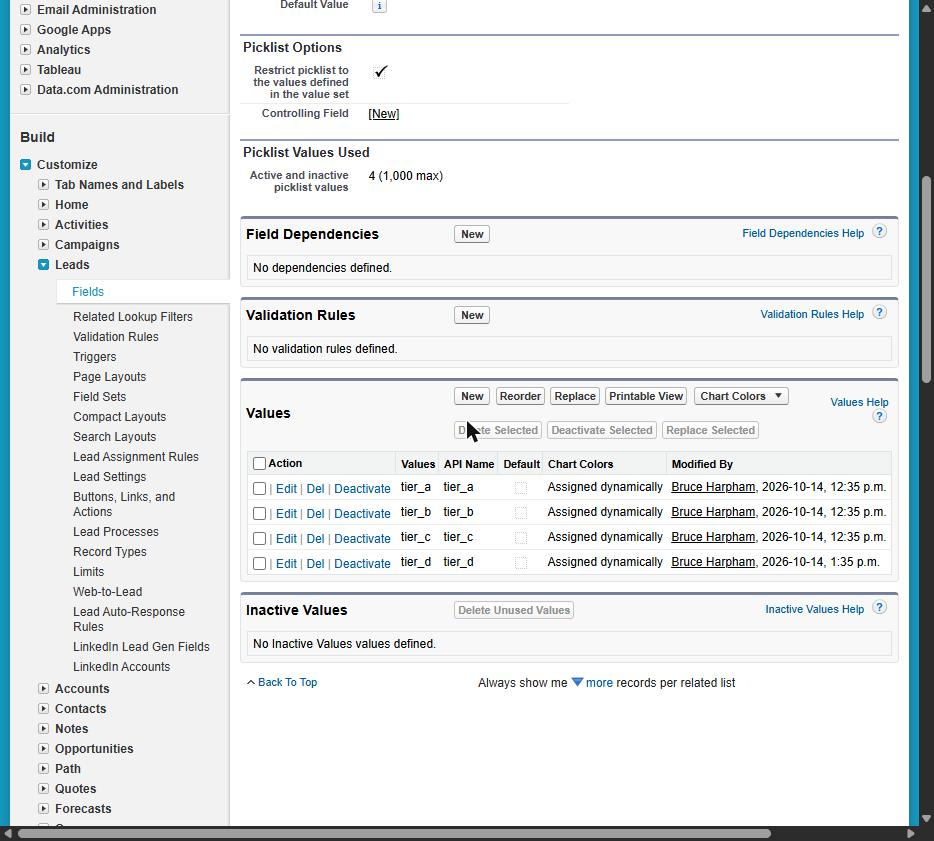
Salesforce's restriction prevents unapproved values from arriving through APIs and other applications. Removing it changes the data control, so assess that decision against the reporting and automation that depend on the field. Salesforce picklist guidance
Other configurations need additional checks. Salesforce documents record-type availability and differences between labels and API names as potential causes of restricted-picklist errors. Record types were not exercised in this test. Salesforce troubleshooting guidance
A corrected setting did not immediately restore the record
The approved value was added in Salesforce at 1:35 p.m. Three resync attempts at 1:36, 1:37, and 1:41 p.m. failed. Refreshing the mapping and changing the contact's Job title did not produce recovery during the initial checks.
The lab log records that the Lead was still unchanged at 8:28 p.m. A manual resync at 8:30 p.m. succeeded. The Salesforce record then showed tier_d, the Title change, and an updated modification time.
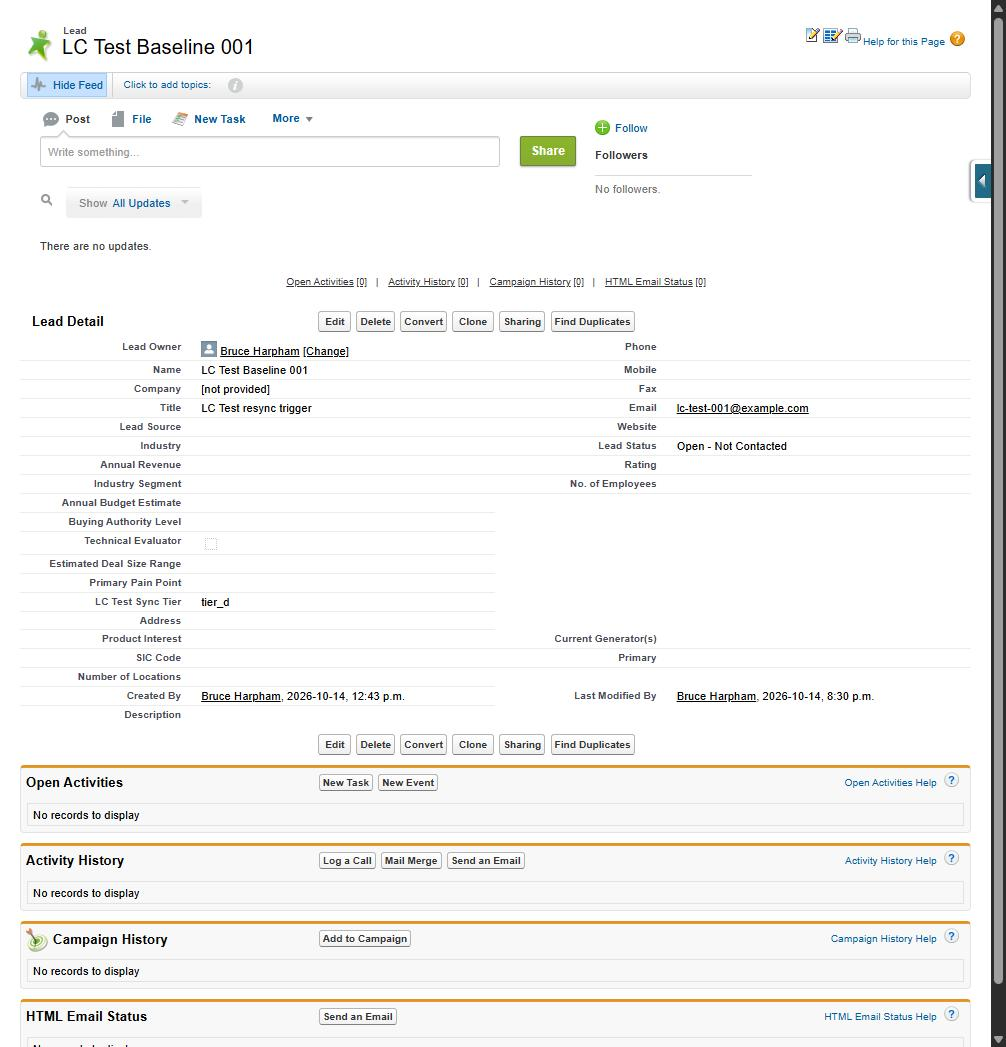
This does not establish a seven-hour waiting requirement. There were no retries between the early failures and the evening attempt. The minimum recovery interval and reason for the delay remain unknown.
For a manager, the useful distinction is between “the configuration has changed” and “the affected records have recovered.” Require the second before treating the incident as resolved.
Verify the Salesforce records before closing the incident
Ask for a short recovery record containing:
- A previously affected Salesforce record with the expected value and a consistent modification time.
- Other important pending changes checked on that record.
- A fresh valid record and an existing-record update that both reach Salesforce.
- The affected population reconciled after resyncing, with remaining exceptions identified.
The lab documented a second contact reaching Salesforce with tier_b, followed by an update to tier_c. It also captured another picklist error after introducing an unsupported tier_x value. A production repair needs equivalent checks across its own affected population.
Forward the analyst recovery checklist to the person investigating. It includes the field comparison, verification steps, and source evidence.
Get help with a recurring HubSpot Salesforce sync problem
A contained field mismatch may be straightforward for your administrator. Bring in help when errors recur, several teams control the settings, or nobody can confidently identify which records are current.
For an initial discussion with Logic Conduit, describe the business process being delayed and what your team has tried. We can discuss a defined repair scope around that workflow.\n\nAsk for a written account of the cause, the configuration changes, the records checked after repair, and the person responsible for future changes. Those deliverables give you a way to judge completion and help your team maintain the integration.
Discuss your HubSpot Salesforce sync problem with Logic Conduit.
Include the affected report or handoff, approximate record count, and any deadline. If you do not have those details yet, explain what your team can no longer rely on. An error message or redacted screenshot is useful if available.
About the test
The test ran on October 14, 2026, using HubSpot's native Salesforce connector, a HubSpot developer test account with a Service Hub Enterprise trial, and a Salesforce Developer Edition org. It used three synthetic contacts and exercised HubSpot-to-Salesforce Lead updates. The mapping was configured as two-way; reverse sync was not tested.
Salesforce Contacts, production environments, bulk volumes, record types, dependent picklists, and multi-select picklists were outside the test. This was a controlled reproduction, not a customer incident.