HubSpot Salesforce Sync Recovery Checklist
Use this checklist for one defined workflow. The worked example is a HubSpot contact updating a Salesforce Lead through the native connector. Confirm the actual object, direction, and mapping rule in your environment.
Confirm the business scope
Record the affected report or handoff, first known failure, deadline, approximate affected population, and incident owner. Separate confirmed failures from records awaiting inspection.
Keep a record of manual corrections so they can be reconciled after recovery.
Capture one affected record
- Identify the source contact and the corresponding Salesforce record.
- Write down the expected field value and the actual destination value.
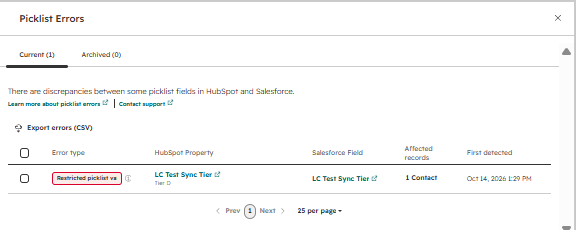
- In HubSpot Connected Apps → Salesforce → Data sync → Sync Health, record the error, property, value, destination field, affected count, and first-detected time.
- Check the mapping's update rule. Do not assume HubSpot is allowed to overwrite an existing Salesforce value.
- Preserve the relevant settings and observation time before changing them.
An unchanged record can have causes other than a picklist mismatch. Follow the actual error category.
Compare permitted values for a picklist error
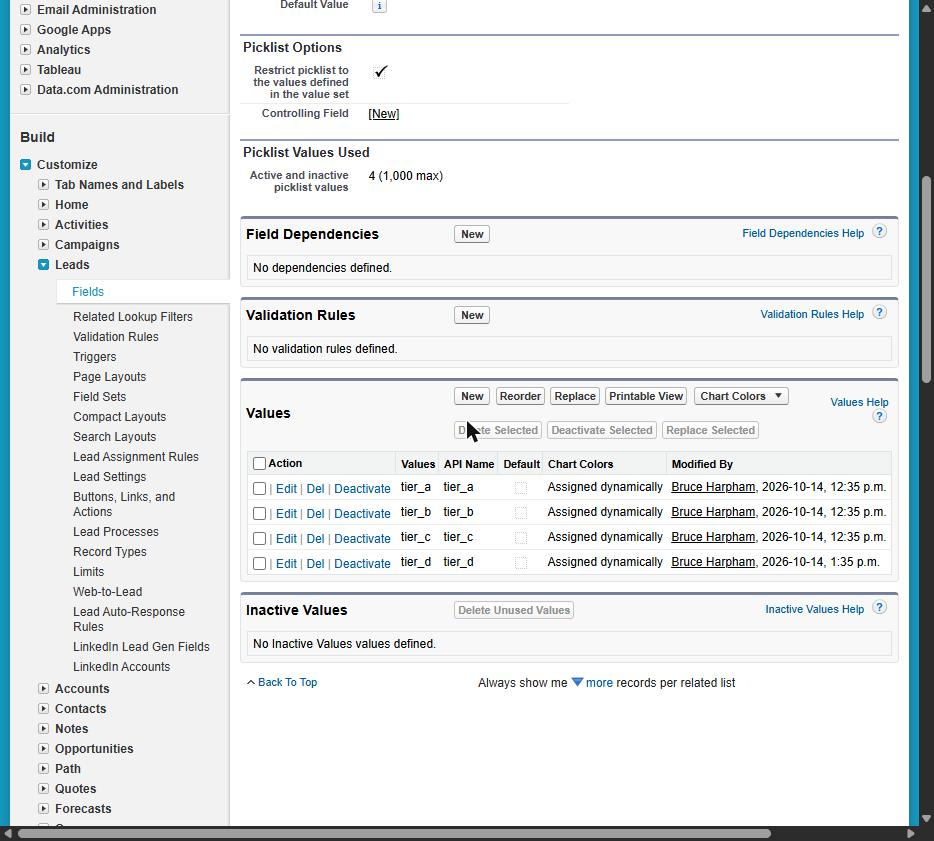
In HubSpot property settings, inspect the option's label and internal value. In Salesforce, inspect the mapped field's option API names and restriction setting.
The worked example used HubSpot property lc_test_sync_tier and Salesforce Lead field LC_Test_Sync_Tier__c. HubSpot label Tier D had internal value tier_d. That value was absent from the Salesforce restricted picklist.
If your configuration uses record types or dependencies, inspect the relevant availability and controlling values as well. Those configurations were outside this test.
Agree on the correction
Have the business owner confirm whether the incoming value is approved.
- If approved, align the Salesforce permitted option and its API name with the intended incoming value, including applicable record-type availability.
- If incorrect, correct the source records and address the process introducing the unwanted option. Clear a value only when a blank is acceptable to the business process.
- Record each configuration change and its previous state.
- Assess the consequences before removing a picklist restriction.
- Use supported refresh and resync actions as appropriate. Do not change several unrelated settings at once.
A mapping refresh was attempted in the lab, but its contribution to recovery was not established.
Verify recovery
- Use a supported resync action for the affected records.
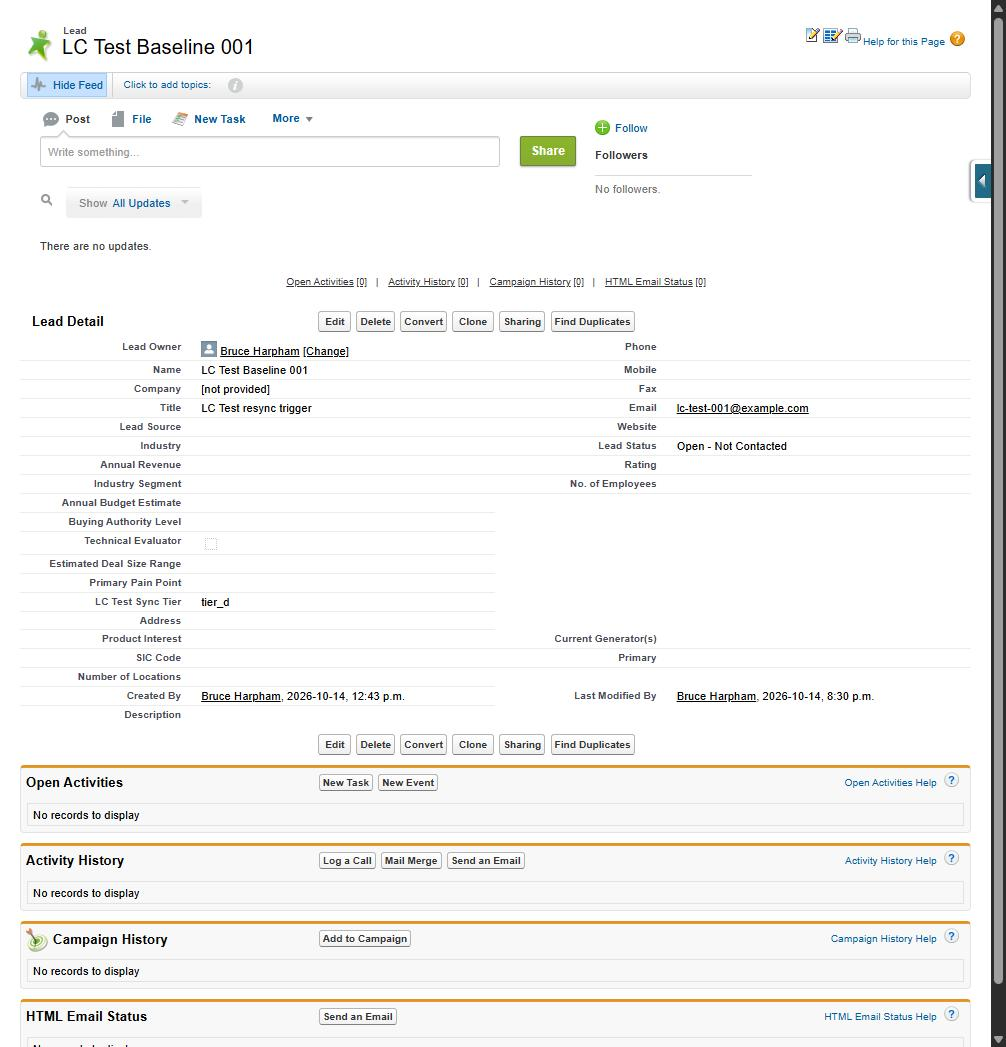
- Inspect Salesforce directly. Check the intended value, record identity, modification time, and other important pending fields.
- Confirm that the related HubSpot error has cleared.
- Test a fresh valid record and an update to an existing record.
- Where authorized and safe in a test environment, confirm that an unsupported value is still rejected.
- Reconcile the affected population after resyncing. List records still unresolved and any manual corrections that need review.
Do not treat an empty error queue as proof that every destination record is correct.
Record the result for the manager
Provide the cause, affected scope, changes made, recovery checks, remaining exceptions, and owner of future changes. Include the observation times and evidence references.
The lab's early retries failed at 1:36, 1:37, and 1:41 p.m. after the value was added at 1:35 p.m. A retry at 8:30 p.m. succeeded. There were no retries in between. This does not establish a required waiting period or the cause of the delay.
Evidence from the controlled test
| Observation | Supporting capture |
|---|---|
| Native connector reported a picklist error for Tier D | HubSpot error screenshot |
| Salesforce included tier_d with the restriction still enabled | Salesforce configuration screenshot |
| Original Lead showed tier_d, the Title change, and an 8:30 p.m. modification time | Salesforce recovery screenshot |
The documented baseline and follow-up checks recorded tier_a reaching Salesforce, a second contact reaching Salesforce with tier_b, and that contact updating to tier_c. Another unsupported value, tier_x, produced a picklist error.
These were manual browser observations, supported by screenshots and a written test log. The captures shown here are redacted publication copies of the lab evidence.
Test date: October 14, 2026. Environments: HubSpot developer test account with a Service Hub Enterprise trial and Salesforce Developer Edition. Scope: native connector, three synthetic contacts, HubSpot-to-Salesforce Lead updates. Production backlogs, Contacts, reverse sync, bulk volumes, record types, dependent picklists, and multi-select picklists were not tested.
Reference documentation
- HubSpot sync-error troubleshooting
- HubSpot field mapping and update rules
- Salesforce restricted-picklist troubleshooting
Return to the article or discuss the affected workflow with Logic Conduit.