Salesforce UNABLE_TO_LOCK_ROW: Find the Contention Before Adding Retries
Your Salesforce sync finishes, but a set of updates fails with UNABLE_TO_LOCK_ROW. The team proposes another retry. As the manager responsible for the process, you need to know whether that will recover the missing work—or leave the same records waiting again tomorrow.
The business exposure depends on what those records support. For example, an overdue account update might delay a customer handoff or leave a report using yesterday’s information. The cost is the unfinished work, the time spent chasing exceptions, and the uncertainty about which system is current.
Before approving a fix, ask for three things: the likely contention point, a comparison showing the proposed change helps, and a way to account for every failed item. A lower error count is useful only if the required work also finishes on time.
What does UNABLE_TO_LOCK_ROW mean?
Salesforce uses record locks to protect data during writes. A competing transaction can fail when it cannot obtain the lock it needs. Salesforce’s current error guide describes a maximum ten-second wait before a lock timeout. Common scenarios include overlapping writes, triggers, imports and related-record updates.
That tells you the failure category. It does not identify the competing transaction or prove that the record in your input file is the only contention point.
For diagnosis, separate two questions: which records did the job intend to change, and which related records could those changes also lock?
Different child records can compete for the same parent
For a master-detail relationship, Salesforce documents that updating a child locks both the child and its parent. Parallel changes to children under the same parent can therefore contend, even when the jobs contain different child IDs. See Salesforce’s record-level locking guidance.
Consider a hypothetical integration updating custom delivery records under a master customer record. Worker A handles one delivery; worker B handles another. If both deliveries share that master, separating the delivery IDs does not separate the parent they need.
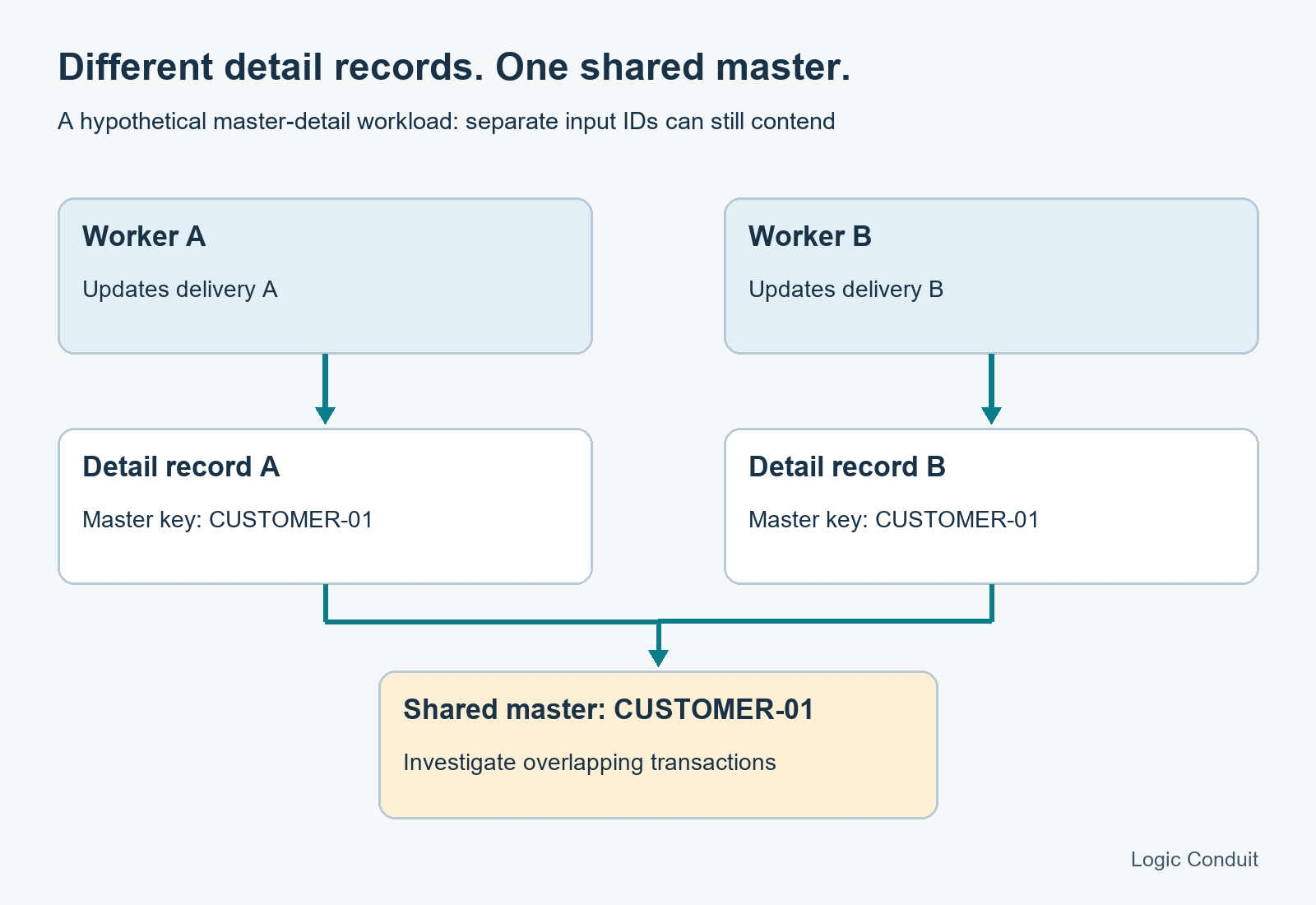
Illustrative master-detail example. The actual contention point depends on the relationship and transaction being investigated.
Ask the team to draw this map for the failing workload. Include the relationships and automation they believe are involved, and identify what evidence supports that belief. Do not assume every lookup behaves like a master-detail relationship.
Collect a failure sample before changing the job
Start with one recurring failure window. Request a small, sanitized sample rather than an unrestricted export of customer data:
- The exact error, timestamp and time zone, job or request identifier, and operation attempted.
- The failed record keys and relevant parent keys, using synthetic or anonymized identifiers for shared inspection.
- The API family and connector settings, including job overlap and worker concurrency.
- Other writes scheduled during that window, plus relevant logs where available.
- The number of attempted items, successful items, failures and unresolved items.
Then compare failures by parent and time. Concentration around one parent is a lead to investigate. It is not proof of causation: the logs and a controlled comparison still need to support the explanation.
Avoid changing scheduling, concurrency and automation together. You would lose the ability to explain which change helped. Prefer one bounded experiment with a recorded baseline, agreed acceptance criteria and a rollback plan.
Choose the remedy that matches the evidence
Salesforce recommends retries for occasional locking failures, and sequencing batches to avoid overlapping updates when contention is frequent. Its locking guidance supports that distinction; the choice for your integration still needs workload evidence.
| Pattern to investigate | Proposed comparison | Trade-off to measure |
|---|---|---|
| Two recurring jobs overlap | Run them in separate windows | Does the later job still meet its business deadline? |
| Workers write children sharing a master | Partition work by the actual contention key, with one writer per key | Does one heavily used parent become a backlog? |
| A transaction holds needed locks while doing substantial work | Review that transaction and compare a narrower change | Do required business outcomes still occur? |
| Failures are occasional and recoverable | Try bounded delayed retries with a defined stopping point | Does recovery finish, and are remaining failures visible? |
These are diagnostic proposals, not universal fixes. A partitioning scheme helps only if it separates the records actually contending. A scheduling change may address two known jobs while leaving another writer unaccounted for.
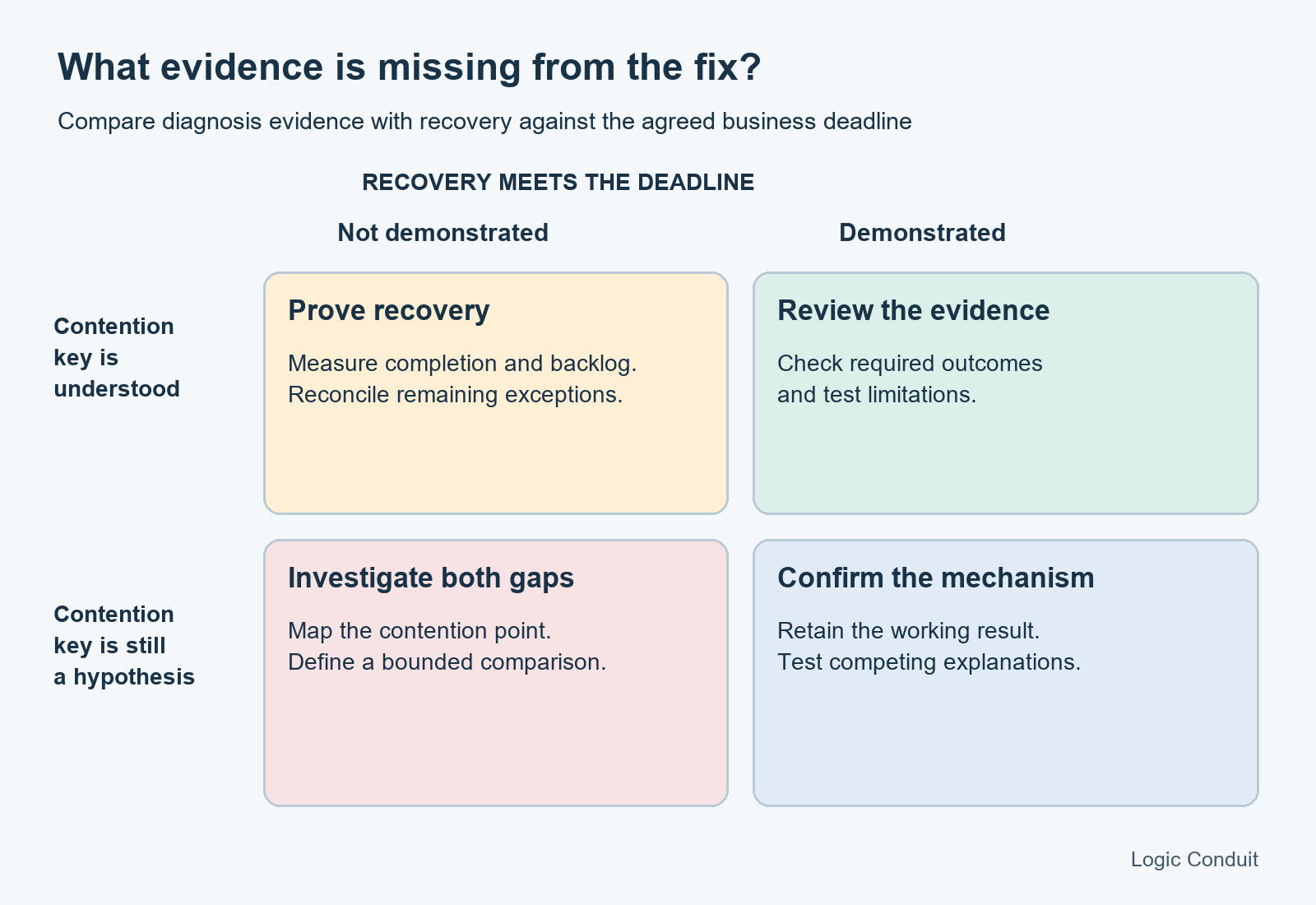
Use the matrix to identify the next piece of evidence. It does not certify production readiness.
Check the API before asking for serial mode
“Use serial mode” needs an API-specific answer. Salesforce’s Integration Patterns guide distinguishes the APIs: Bulk API 2.0 processes batches in parallel and does not support serial mode.
Ask the team to name the API and show the supported setting before prescribing a change. Sequencing your own submitted jobs is a different control from choosing how Salesforce processes batches inside one job. A connector’s concurrency option also needs to be understood at the layer where it applies.
For Bulk API 2.0 data preparation, use the current guidance on organizing data to minimize lock contention. Avoid transferring a recommendation from a different API simply because the error message is similar.
Where this goes wrong
Retrying without accounting for the original outcome. Establish which items failed and what the surrounding process completed before replaying work. The recovery design should say how repeated requests and business actions are handled. A lock error does not justify resending an entire integration blindly.
Making every writer slower. Reducing concurrency can be a useful experiment. Treat it as a candidate change, then measure completion time and the age of outstanding work. A quiet error log with an ever-growing queue is not an acceptable recovery outcome.
Declaring a parent guilty from a chart. A cluster of failures suggests where to look. Retain competing explanations and test the relationship involved; do not redesign the data model solely from that correlation.
Removing automation to make a load pass. Any experiment that bypasses required business behavior needs an explicit plan for those outcomes. Count successful records and verify the required handoffs, calculations or related work separately.
Testing only a calm window. Define a safe, representative comparison that includes the relevant overlap. A run with the competing job absent answers a narrower question than the operating scenario you intend to approve.
The evidence to request before signing off
Use the companion record-locking acceptance checklist to define the comparison. It is a proposed test plan; no Salesforce org experiment has been run for this article.
| Comparison | What to retain |
|---|---|
| Baseline with the known failure pattern | Settings, workload description, errors, duration and unresolved items |
| Same workload with one scheduling or concurrency change | The same measures, plus confirmation of required business outcomes |
| Shared-parent work versus work separated by the suspected contention key | Evidence that the test distinguishes the proposed mechanism |
| Recovery after a bounded failure | Item-level reconciliation, retry limit and owner of remaining exceptions |
Agree the thresholds before running the test. Use your own business deadline and acceptable backlog; this article cannot supply a meaningful universal percentage.
A reviewable acceptance statement is: “Under the agreed workload and overlap, every input item is accounted for, required outcomes are checked, remaining exceptions have owners, and completion meets the stated deadline.” Record the limits of that statement, including differences between the test environment and production.
Bring the failure pattern to an integration review
If the team is repeatedly rerunning the same Salesforce failures, start with a sanitized error sample, a job schedule and a sketch of the affected relationships. Those materials make it possible to discuss the likely contention point and a bounded comparison before committing to a larger redesign.
Contact Logic Conduit to discuss a Salesforce integration review focused on the failing workload, recovery ownership and the evidence needed to approve a change. Include the business deadline the sync must meet—not just the error message.