Salesforce Invoice Object: How to Prevent Duplicate Invoices and Billing Errors
A Salesforce invoice object can hold the right customer and amount while the integration still creates a duplicate invoice. The dangerous moment is a retry after an uncertain response: the accounting system may have accepted the first request even though Salesforce never received confirmation.
That uncertainty leaves the platform owner and finance team with a difficult choice. Resend the request and risk another invoice, or leave it alone and risk an unbilled order. Reliable processing needs a way to identify the original billing action and recover its outcome.
The uncomfortable part is that improving this process may require reconciling existing records and agreeing on invoice ownership before changing automation. Adding a field or increasing the timeout cannot resolve an invoice that already exists under an unknown external ID. Start with the evidence around a failed handoff.
Identify which Salesforce invoice object you use
Check the object's API name, installed package, and applicable product documentation before copying field mappings. Salesforce's Revenue Cloud invoice data model includes Invoice and related billing entities. Salesforce also documents invoice fields for the Salesforce Billing managed package. These are product-specific models; they are not interchangeable schemas.
Your org may instead use a custom object such as Invoice__c, or a connector's packaged object. Treat that name as an example, not an instruction to create it. Inspect the actual object and its field definitions, then record which system generates the invoice and which system displays its status.
Keep three identities separate in your mapping: the Salesforce record ID, the accounting system's invoice ID, and the business action that requested billing. A visible invoice number is useful for people, but it should not carry every integration responsibility.
For QuickBooks Online, the Invoice API reference distinguishes Id, the object's identifier, from DocNumber, its transaction reference number. Updates require Id and SyncToken; the latter represents the object version. This article concerns QuickBooks Online, so do not apply its API details to QuickBooks Desktop.
Understand why a retry can create another invoice
Consider a hypothetical handoff: an approved billing action sends a create request to QuickBooks Online. The invoice is created, but the response is lost. Salesforce still shows the integration as incomplete. A worker then sends another create request without preserving the original operation identity.
The retry has crossed a boundary between two systems. Local failure does not tell you whether the remote side succeeded. This is the general distributed-systems problem described in the AWS guidance on safe retries. Idempotency associates repeat attempts with the same intended operation so they do not add another side effect.
A local duplicate check also needs scrutiny. If two workers both check for an invoice before either records one, both can proceed. A design review should ask where the billing action is durably claimed and what enforces that claim under concurrent processing. A query followed by an insert is not sufficient evidence that the race is controlled.
An External ID helps Salesforce match records for an upsert, but External ID alone does not enforce uniqueness. The Unique setting provides that separate constraint. Where the schema permits it, review both settings and the existing data before proposing a change.
Even a unique local key does not settle an unknown remote outcome. It needs to work alongside destination retry protection and reconciliation.
Trace symptoms to plausible causes before replaying
Use this table as a diagnostic starting point. Each cause is a hypothesis to confirm from records and logs, not a conclusion from the symptom alone.
| Symptom | Plausible cause | Read-only evidence to inspect | Decision before another write |
|---|---|---|---|
| Two invoices appear after a timeout | A successful create was repeated as a new operation | Original and retry request identities, timestamps, destination IDs | Establish which request created each invoice before replaying |
| Two invoices appear without a timeout | Parallel workers or overlapping automation submitted the same billing action | Flow and connector inventory; job IDs; operation keys | Identify all create paths and the concurrency control |
| Salesforce says failed but QuickBooks has an invoice | Remote success was followed by a lost response or failed local acknowledgement | Destination record, stored response, local error and correlation trail | Recover the mapping rather than assume another create is needed |
| Salesforce upsert finds several matches | Matching External ID values already repeat | Field settings and an export grouped by that value | Resolve the identity collision before another upsert |
| A QuickBooks update fails with a version conflict | The request uses an older SyncToken | Current invoice version and the attempted update | Review the intervening change before constructing a new update |
| Invoice exists but customer, tax, or total is wrong | Mapping or business rules differ between systems | Request lines and references against the destination record | Have finance confirm the intended values and correction path |
| A job reports completion but some invoices are missing | The integration recorded job status without resolving each item | Per-item results and the expected billing-action list | Reconcile individual outcomes before treating the run as complete |
Salesforce's REST upsert documentation explains that no match creates a record, one match updates it, and multiple matches return an error without creating or updating a record. That behavior helps distinguish a matching problem from a remote invoice retry problem.
Review the controls for protected invoice processing
The following is a proposed review pattern, not a description of controls already installed in your org. Use it to assess the connector or middleware you have.
Define the billing action. Agree on what constitutes one intended invoice: for example, a particular approved order revision for a specific accounting company. A later installment or approved rebill must remain distinguishable from a retry. The operation identity should remain stable across attempts of the same action.
Record the action before dispatch. Ask for durable evidence of the operation key, target company, intended payload, processing state, and attempt history. Review how simultaneous workers are prevented from submitting the same action independently. The exact storage and locking mechanism depends on the current integration.
Verify the destination retry contract. Inspect actual outbound requests instead of assuming an SDK preserves identifiers. For batch processing, Intuit's own guidance calls for keeping the same request identifier and item identifiers on retries, and warns against depending on execution order. Confirm the contract for the precise endpoint and connector version you use. Do not assume destination protection lasts indefinitely.
Preserve uncertain outcomes. A timeout should lead to recovery of the original outcome through the supported retry contract or reconciliation. If available evidence cannot identify the invoice reliably, route the action for review. Avoid automatically promoting an uncertain operation into a fresh create.
Reconcile and acknowledge. Once the destination invoice is identified, confirm it belongs to the intended customer and billing action, then preserve its ID and outcome in the integration record. Keep invoice creation and invoice delivery as separate review concerns: another email can confuse a customer even when another invoice was prevented.
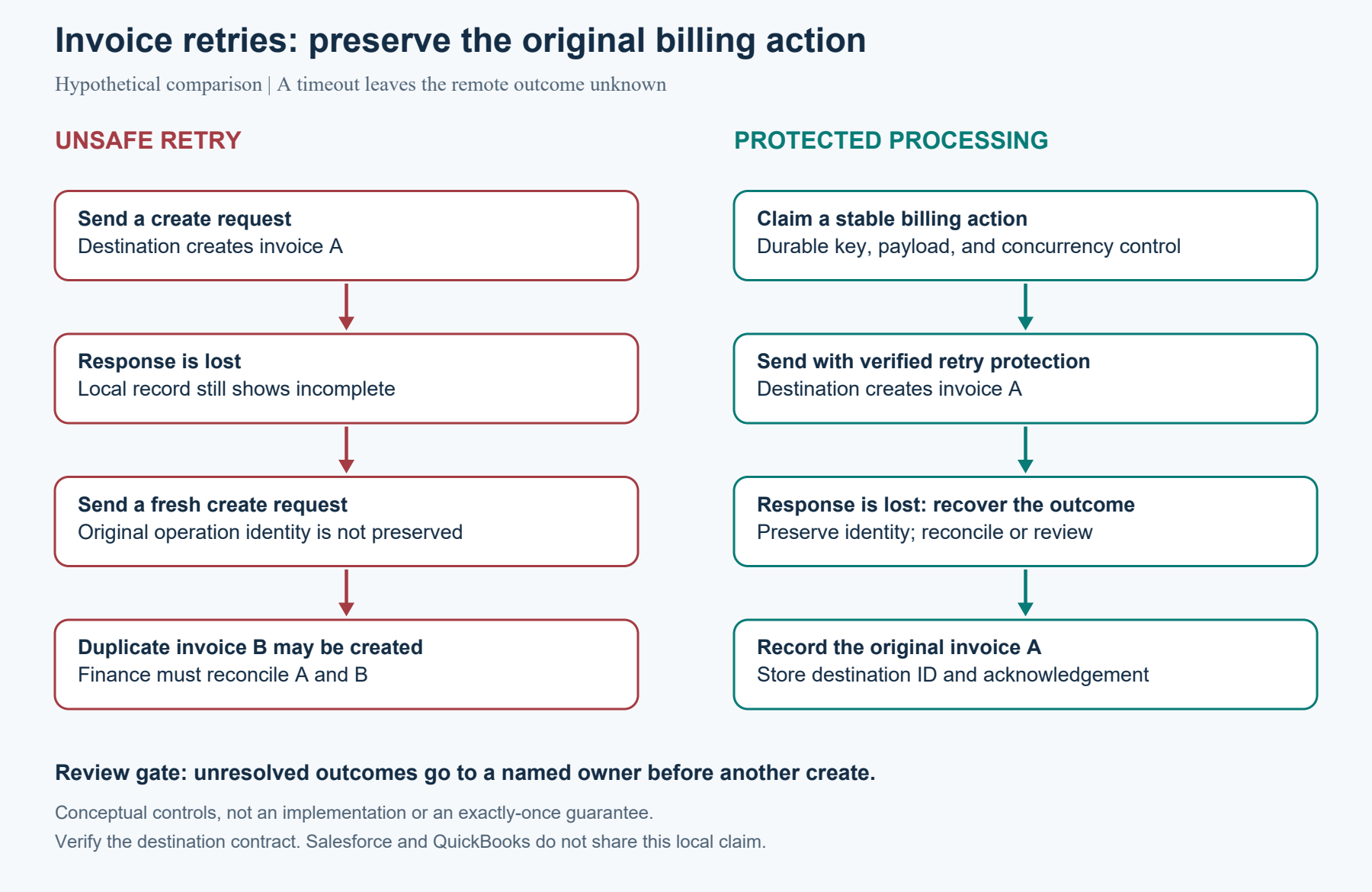
Original conceptual diagram: the protected path requires verified destination retry behavior and durable local controls. It does not imply a shared transaction across Salesforce and QuickBooks.
Where this goes wrong
The key represents the wrong thing. A key based only on customer and amount can confuse legitimate repeat purchases. A new random key on every attempt can make a retry look new. Review a repeat purchase, a retry, and a rebill together so finance can confirm the distinction.
A changed payload reuses an old operation. Preserve the intended payload for a retry. If the approved amount or lines change, resolve the previous action first and use the documented correction process. Do not silently reuse an identity for a different business intent.
An update becomes a create fallback. QuickBooks Online rejects an update with a stale SyncToken. Treat that as a conflict requiring inspection, rather than a reason to create a replacement invoice. Likewise, do not assume repeating a Salesforce upsert suppresses downstream side effects; review the automation it invokes.
Historical duplicates remain unresolved. A better process addresses future attempts. Existing invoices still require finance-led reconciliation, including whether they were sent, paid, or linked to other transactions. Keep deletion, voiding, and rebilling out of a diagnostic review.
Recovery depends on one person's memory. A review queue needs an owner, enough evidence to reconstruct the action, and a clear escalation path. Otherwise, uncertain invoices can remain unresolved while the integration appears operational.
Start with a read-only invoice risk review
Use the one-page invoice integration risk checklist to trace one billing action through Salesforce, the integration logs, and QuickBooks Online. It identifies missing identity, uncertain outcomes, and gaps in ownership using existing records and configuration views.
If you cannot establish whether the original action succeeded, an outside review can help define the recovery decision before the next replay. Get in touch with Logic Conduit to discuss your findings and scope a focused integration review with your platform owner and finance team.