Salesforce discount approvals: why “Approved” isn’t enough when deal terms change
A manager approves a 15% discount. The seller changes it to 18%. The record still says Approved. Does that approval authorize the revised deal?
That is the question a Salesforce discount approval process needs to answer at release—not just when someone clicks Approve. A status field records a decision. A useful commercial control also checks whether today’s terms match the terms behind that decision.
Logic Conduit built a synthetic demonstration in a Salesforce Developer Edition org on October 15, 2026. It uses a custom object, a Classic Approval Process, formula fields and validation rules. No Apex, Flow or paid add-on was used in this demo. It is not a client implementation, and the figures below are calculations rather than measured savings.
A three-point discount increase can remove 20% of gross profit
Assume a 100,000 list price and 70,000 delivery cost. Delivery cost stays fixed in this example. Sellers can authorize discounts up to and including 10%; anything above that needs approval. These are illustrative rules, not a recommended pricing policy.
| Discount | Net selling price | Gross profit | Gross margin |
|---|---|---|---|
| 8% | 92,000 | 22,000 | 23.91% |
| 10% | 90,000 | 20,000 | 22.22% |
| 15% | 85,000 | 15,000 | 17.65% |
| 18% | 82,000 | 12,000 | 14.63% |
| 20% | 80,000 | 10,000 | 12.50% |
Moving from 15% to 18% removes 3,000 from 15,000 of gross profit: a 20% reduction in gross profit. Gross margin falls by about 3.01 percentage points, using unrounded values. Those are different measures.
The calculations are straightforward:
Net selling price = List price × (1 − Discount)
Gross profit = Net selling price − Delivery cost
Gross margin = Gross profit ÷ Net selling price
The example does not show a loss being recovered. It shows why a seemingly small change in discount deserves a fresh authorization check.
Separate the last approval decision from current authorization
In the tested Classic approval configuration, changing terms after approval did not automatically reset the stored Approved status. That observation should not be generalized to every Salesforce org: existing automation and approval products can change the behavior.
The final design therefore keeps two separate signals:
- Approval Status: the last process decision, such as Pending, Approved or Rejected.
- Authorization State: a formula evaluating whether the current request can be released under this demo’s policy.
Final approval copies the discount, list price and delivery cost into three approved snapshot fields. Above seller authority, a request is authorized only when its status is Approved and all three current values equal their approved snapshots.
An important boundary: at or below 10%, the formula returns WITHIN SELLER AUTHORITY first. Such a request does not require a matching previous approval under this policy. Above 10%, changing any of the three terms makes a previous approval insufficient—even if the change appears commercially favorable. Organizations need to choose that policy deliberately.
What the Salesforce discount approval demo actually does
The custom object is Discount_Request_Test__c. A Released__c checkbox represents the release decision; it is not a connection to a quoting, contracting or order system.
The Classic Approval Process requires approval above the 10% threshold. Initial submission locks the record and sets Pending. Final approval captures the three term snapshots, sets Approved and unlocks the record so revisions can be tested. Rejection sets Rejected and unlocks it.
The current release validation rule blocks a save whenever Released is checked and neither permitted authorization state applies:
AND(
  Released__c,
  NOT(OR(
    Authorization_State__c = "WITHIN SELLER AUTHORITY",
    Authorization_State__c = "AUTHORIZED - TERMS MATCH APPROVAL"
  ))
)
This also means an already released request cannot be saved with unauthorized terms while Released remains checked. A production design needs an explicit amendment or unrelease process.
A second validation rule rejects manual changes to Approval Status and Approved Discount. Approval actions can still set them: Salesforce documents that approval field updates are not checked against custom validation rules. This is a specific platform behavior, not a general guarantee that every automation respects the same boundary. See Salesforce’s Classic approval troubleshooting guidance.
Evidence from the approval and release tests
The supplied test matrix records 20 passing checks across three phases. These were performed in the demo org; they were not rerun while preparing this article.
The tests include release within seller authority, blocked release before submission and while pending, release after approval, rejection, blocked manual status changes, and a separate non-admin seller’s revision and resubmission cycle.
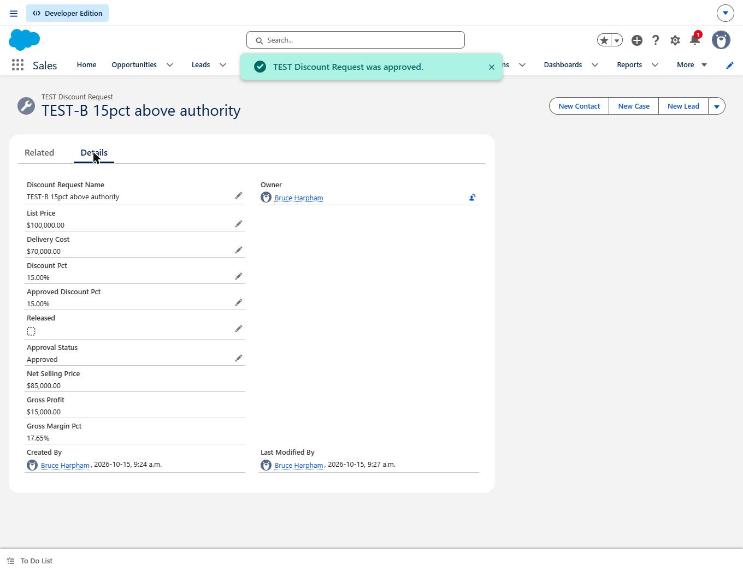
Figure 1. Earlier-phase evidence: a 15% discount and a captured approved discount of 15%. The record is Approved and has not yet been released. This screenshot predates the final three-term authorization formula.
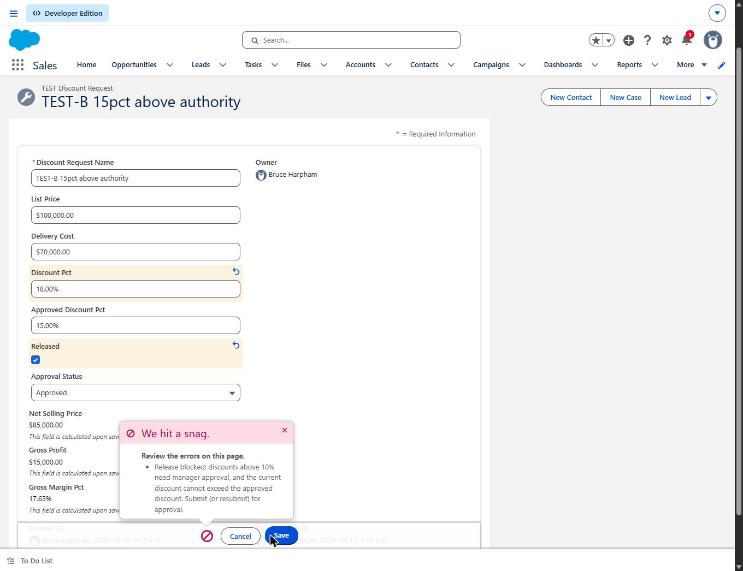
Figure 2. Earlier-phase evidence: attempting to save an 18% discount with Released checked is blocked against a 15% approved discount. The screenshot shows an unsaved edit; the displayed calculated financial fields still reflect the saved record. Its error message belongs to the earlier discount-only rule, not the final three-term rule.
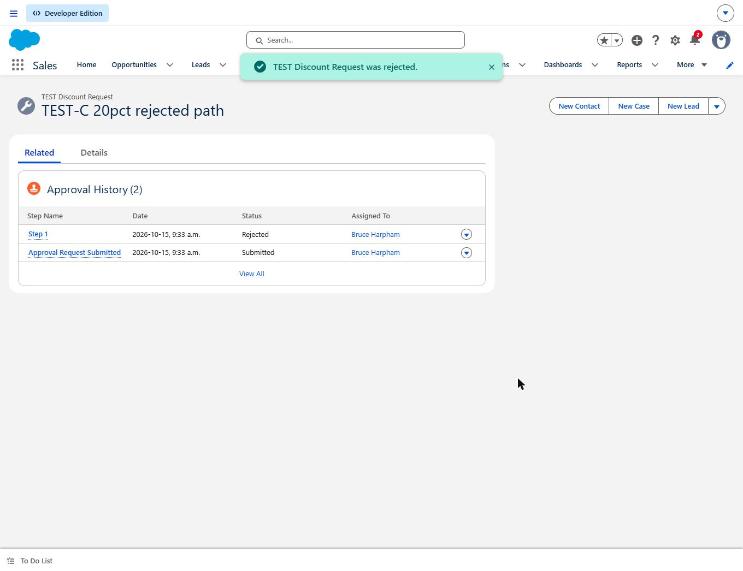
Figure 3. The approval history shows that a 20% discount request using test data was rejected.
The final phase used a non-admin Salesforce Platform seller and a different approver. Its evidence records a seller revising an approved 15% request to 18%, an INVALIDATED authorization state, blocked release, resubmission, fresh approval at 18% and subsequent release. Some final-phase steps have page-text captures rather than screenshots. The three images here support only the earlier-phase behaviors described in their captions. List-price changes, delivery-cost changes and discount decreases were not exercised in the supplied tests; their treatment follows from inspecting the formula.
Put discount controls into everyday use
The demo shows how approval checks can stop a deal from being released at a discount higher than the one approved. To apply that control in your business, focus on these implementation steps.
First, protect every snapshot field. The process-only validation rule covers Approval Status and Approved Discount, but the approved list-price and delivery-cost snapshots rely on field-level security for non-admins. Extend the protection and test all write paths before production use.
Second, review effective access across profiles and permission sets. The demo’s seller profile retained edit access to Approval Status even though the permission set presented it as read-only. The validation rule blocked manual edits in the tested path. Permission sets grant additional access; assigning one does not remove access granted elsewhere. Salesforce explains this additive model in its permission-set guidance.
Third, connect the approval check to the action that commits the quote, order or contract, including handoffs to external systems. Test API writes, integrations, existing automation, administrator behavior, blank snapshots, invalid input ranges, approval thresholds and amendment paths before putting the control into use.
Finally, choose approvers and reporting carefully. This demo used an administrator as approver; a non-admin approver was not tested. Show Authorization State beside the last approval decision, and avoid summing percentage columns in margin reports.
Salesforce also offers Flow Approval Processes, while CPQ and Revenue Cloud approval capabilities differ. They were not evaluated here. Salesforce’s Classic approval considerations provide context for reviewing the features in your own org.
Make discount control part of profit margin management
Start with one question: If a seller changes approved commercial terms, what stops the revised deal from being released?
Use the discount approval review checklist to trace the decision, approved terms, effective permissions and release action. The demo formula reference contains the supplied formulas and their limitations for technical review.
If the answer spans Salesforce and another quoting, finance or order system, talk with Logic Conduit about reviewing the handoff. You can also explore the Salesforce Integration Sprint. Bring a synthetic example, your approval threshold and the action that commits the deal; those provide a concrete starting point for the discussion.